Automate Expenses With a Receipt Scanning API
Think of a receipt scanning API as a smart digital translator for your finances. Instead of having someone manually squint at a crumpled receipt and type out the merchant name, date, and total, you just feed an image of that receipt (like a JPG or PDF) to the API. In a few seconds, it hands you back perfectly organized, structured data in a format like JSON. Manual entry is completely off the table.
How a Receipt Scanning API Works
At its core, a receipt scanning API is a specialized assistant that takes a messy, real-world task—reading and making sense of receipts—and turns it into a fast, automated digital process. This is the technology powering everything from modern expense tracking apps to automated accounting platforms and customer loyalty programs.
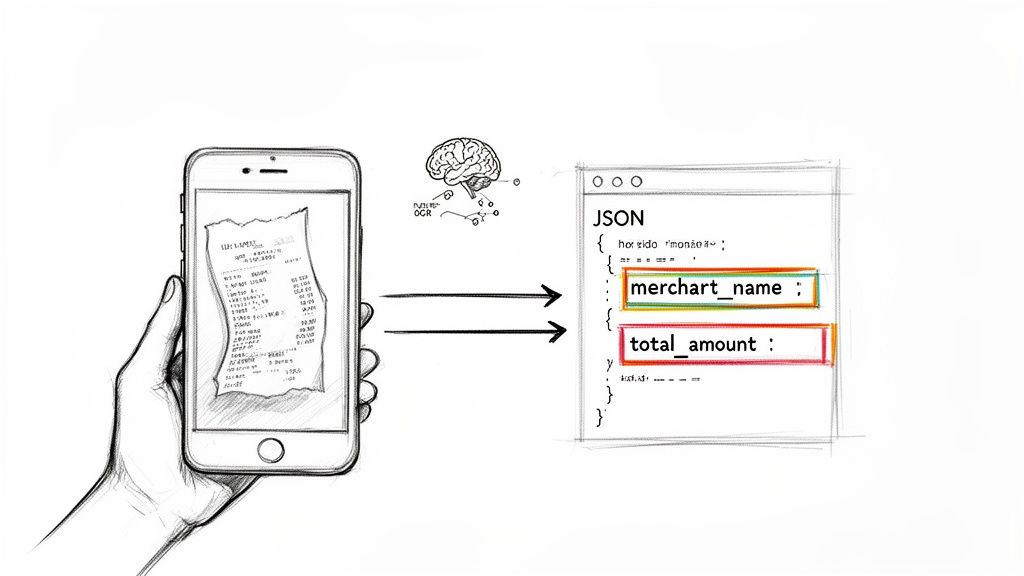
The magic behind it is a powerful combination of Optical Character Recognition (OCR) and artificial intelligence. Basic OCR is good at one thing: turning a picture of text into a simple text file. But it’s not very smart. It might correctly identify the words "Corner Cafe" and "$12.50," but it has no idea that one is a business and the other is the final bill.
The Core Technology Behind the Magic
This is where AI and machine learning step up. A modern receipt scanning API doesn't just read the text; it understands it. It uses AI models trained on millions of receipts to recognize the context and layout. The AI knows what a merchant name, a date, or a total amount typically looks like and where to find it.
Here’s a quick look at how it all comes together:
- Image Pre-processing: First, the API cleans up the image you send it. It might automatically crop out your desk in the background, straighten a crooked photo, or boost the contrast to make the text pop.
- Text Recognition (OCR): With a clean image, the OCR engine gets to work, converting every letter and number into digital text. We cover this part of the process in more detail in our guide on OCR for receipts.
- Data Extraction & Structuring: This is the AI's main job. It sifts through that raw text, intelligently identifying and pulling out the important stuff—merchant, date, total, tax, and even individual line items. It then neatly organizes everything into a structured format like JSON.
- Data Delivery: Finally, the API delivers this clean JSON data back to your application, ready to be plugged into a database, an expense report, or your accounting software.
The real power of a receipt scanning API is its ability to transform unstructured, chaotic data (a crumpled paper receipt) into structured, actionable information that a computer can immediately use.
The move toward this kind of automation is undeniable. The global market for Receipt Scanners is on track to hit around $600 million by 2033, growing at a steady clip of 12% per year. This isn't just an enterprise trend; businesses of all sizes are looking to ditch slow, error-prone manual work for something faster and more reliable.
To see just how big the difference is, let's compare the old way with the new way.
Manual Data Entry vs Receipt Scanning API
| Metric | Manual Data Entry | Receipt Scanning API |
|---|---|---|
| Process | Employee finds receipt, takes a photo, and manually types every field into a spreadsheet or form. | User snaps a photo, the app sends it to the API, and data is returned automatically. |
| Speed | 5-10 minutes per receipt. | 3-5 seconds per receipt. |
| Accuracy | 5-10% error rate (typos, transposed numbers, miscategorization). | <1% error rate with top-tier APIs. |
| Cost | High labor costs (e.g., ~$8 per receipt based on staff time). | Low transactional cost (e.g., $0.10 per receipt). |
| Scalability | Poor. Processing more receipts requires hiring more people. | Excellent. Can process thousands of receipts per minute without a drop in performance. |
Ultimately, this technology bridges the gap between the physical and digital financial worlds. It gives businesses the power to process expenses, manage their books, and analyze spending habits with a level of speed and accuracy that just wasn't possible before.
Essential Features That Drive Real Value
When you're looking for a receipt scanning API, it’s easy to get lost in the technical jargon. But choosing the right tool isn’t just about converting images to text—it's about finding a solution that actually makes your business run better. Plenty of APIs can do basic text recognition, but the great ones have a handful of non-negotiable features that save time, kill errors, and give you real financial insight.
These aren't just nice-to-haves. They're what separate a simple utility from a core part of your financial tech stack.
First and foremost is data accuracy. If an API constantly gets totals wrong or mixes up dates, it creates more manual cleanup than it saves. That completely defeats the purpose. The best solutions lean on sophisticated AI models trained on millions of receipts, pushing accuracy rates well over 99%. That level of precision means you can actually trust the numbers flowing into your accounting software, which is critical for reporting and audits.
Think of it this way: you wouldn't hire a bookkeeper who was only right 80% of the time. The mess from that other 20% would be a nightmare. A high-accuracy API is your most reliable digital bookkeeper—it just works, no questions asked.
Going Beyond the Grand Total
Extracting the total amount is table stakes. The real magic happens with line-item extraction. This is where the API breaks down a receipt into every single item purchased—every coffee, every pack of pens, every client lunch.
This granular data is a game-changer for a few reasons:
- Smarter Expense Categories: You can automatically sort spending with incredible precision. Instead of a vague "Office Supplies" bucket, you know exactly what was bought, which helps you manage budgets much more effectively.
- Instant Policy Checks: Automated systems can flag purchases that don't follow company policy, like an unauthorized item on a business trip, before the expense report even gets submitted.
- Deeper Spending Insights: Line-item data reveals trends you’d otherwise miss. You might discover your teams are consistently overspending on a specific software subscription or service, giving you a clear opportunity to renegotiate or switch providers.
High-quality line-item data shifts you from just recording expenses to actively managing them. It’s the difference between knowing how much was spent and understanding why it was spent.
Versatility and Global Readiness
Business is messy. It happens across different countries, languages, and file formats. A truly useful receipt scanning API has to be built for that reality.
Start with file type compatibility. Your API needs to handle more than just perfect PDF scans. It should flawlessly process the common formats people actually use, like:
- JPGs snapped with a smartphone
- High-resolution PNGs
- Multi-page PDFs for combined reports
Then there's multi-language and currency support. If you have international teams or employees who travel, an API that understands receipts from different countries and recognizes various currencies is a must. It eliminates the headache of manual conversions and keeps your data clean and consistent across the board.
Ultimately, you need a solution that brings all of this together. To see how these features work in a real-world API, check out the comprehensive features offered by ExtractBill. A powerful API isn't about one flashy feature; it's about a complete suite of tools that work together to make your life easier and deliver measurable results from day one.
Making Sense of the Extracted JSON Data
Once a receipt scanning API does its thing, what you get back isn’t just a messy pile of text. It's a clean, perfectly organized blueprint of the transaction, served up in a format called JSON (JavaScript Object Notation).
Think of JSON as the universal language for web applications. It’s lightweight, surprisingly easy for humans to read, and even easier for software to understand and process.
This structured output is the whole reason you use an API in the first place. Instead of dealing with a chaotic image, your application receives data that is predictable, categorized, and ready to go. Every tidbit of information, from the store's name to the tax amount, is neatly labeled.
This approach makes it incredibly simple to map the extracted data directly into your app's database, an expense report, or your accounting software. The API handles the messy translation work so your system doesn't have to.
Decoding a Sample JSON Response
To really see how this works, let's look at a typical receipt and the JSON data a quality receipt scanning API would spit out. Picture a standard receipt from your local coffee shop. The JSON output turns that slip of paper into a set of clear, actionable data points.
Here’s a quick breakdown of the most common fields you'll run into and what they actually mean:
"merchant_name": "The Daily Grind": The API is smart enough to figure out the name of the business where the purchase happened."transaction_date": "2024-10-26": It finds the date and, just as importantly, standardizes it—often into a universal format like YYYY-MM-DD for consistency."total_amount": 14.75: This is the final amount paid, pulled out as a number so you can easily use it for calculations."currency": "USD": The API recognizes the currency symbol or code (like $, €, or £) and gives you the standard three-letter code."tax_amount": 1.25: It isolates the tax value, which is absolutely critical for accurate bookkeeping and tax filing.
This is how a receipt scanning API creates value—by turning a simple image into accurate, detailed, and insightful data.
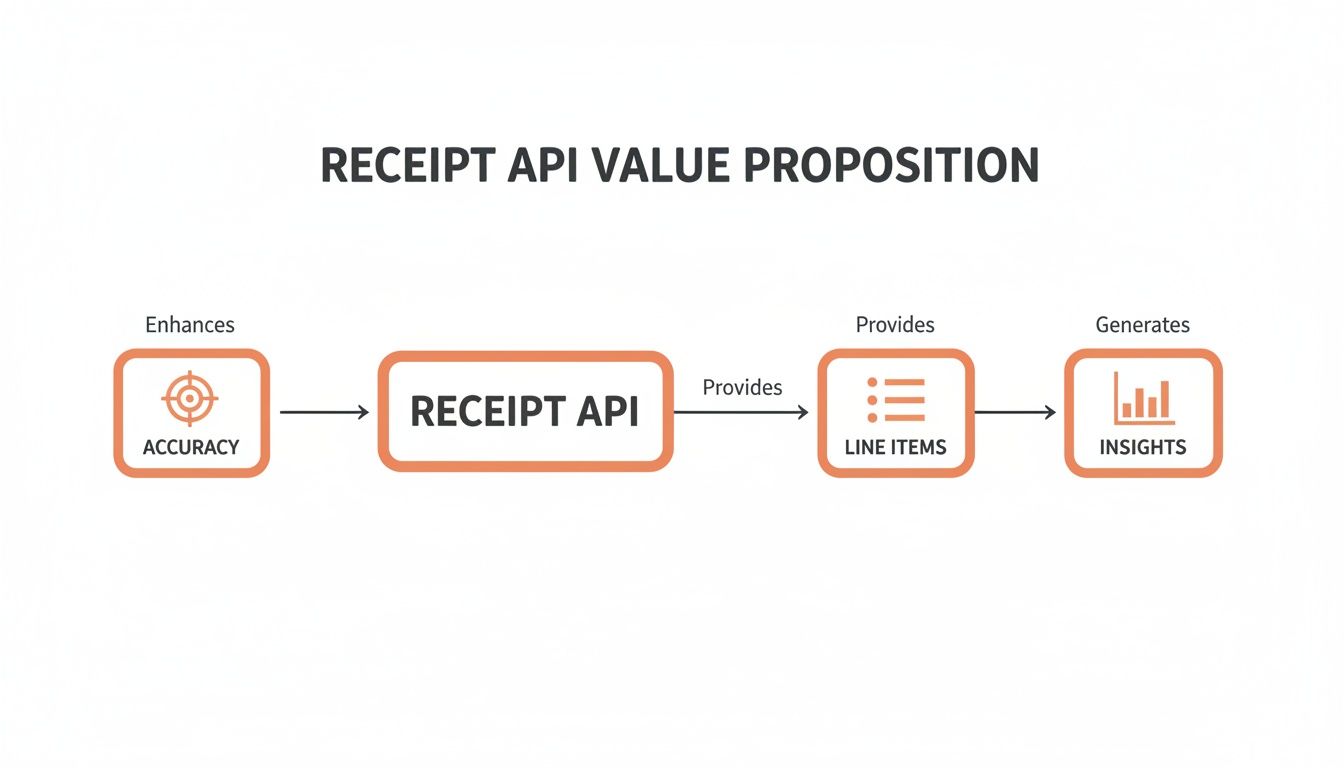
The real magic isn't just about reading text; it's about delivering trustworthy accuracy, getting down to the granular line-item detail, and unlocking the financial insights that come from it.
Diving Deeper into Line Items
The best APIs don't just stop at the summary. They give you a detailed breakdown of every single thing that was purchased. In the JSON, this is usually represented as a line_items array.
An array is just a list of items. In this case, the
line_itemsarray is a list where each item is an object holding the details of one product on the receipt.
Each object inside the line_items array will have its own set of details, giving you incredibly specific information. For our coffee shop receipt, it might look something like this:
"line_items": [ { "description": "Latte", "quantity": 2, "unit_price": 4.50, "total_price": 9.00 }, { "description": "Croissant", "quantity": 1, "unit_price": 4.50, "total_price": 4.50 } ]
This level of detail is what makes powerful automation possible, like automatically categorizing different types of expenses or flagging purchases that violate company policy. You can find a complete breakdown of every possible field by exploring an API's documentation, like the detailed ExtractBill JSON Schema.
This ability to turn raw receipt data into structured, analyzable information is fueling huge market growth. The Smart Receipt Analytics market, which is powered by this kind of API technology, is projected to swell to $20.5 billion by 2034, a massive jump from $2.7 billion in 2024. In 2024 alone, solutions that turn raw data into actual insights grabbed over 75.3% of the market as businesses everywhere prioritize getting more efficient.
At the end of the day, understanding the JSON output is the key to unlocking the full power of a receipt scanning API. It’s the bridge between a flimsy piece of paper and a fully automated financial workflow.
Integrating the API Into Your Application
This is where the magic happens. Theory is great, but bringing a receipt scanning API into your own software is what unlocks its real power. Think of it like plugging a supercharger into your app's engine—suddenly, you’ve got a whole new level of speed and automation at your fingertips.
Thankfully, the integration process is usually quite straightforward. Most modern APIs follow a standard RESTful API pattern, so your developers won't have to learn a new programming paradigm from scratch. You're essentially just sending an image file to a specific web address and getting structured JSON data back.
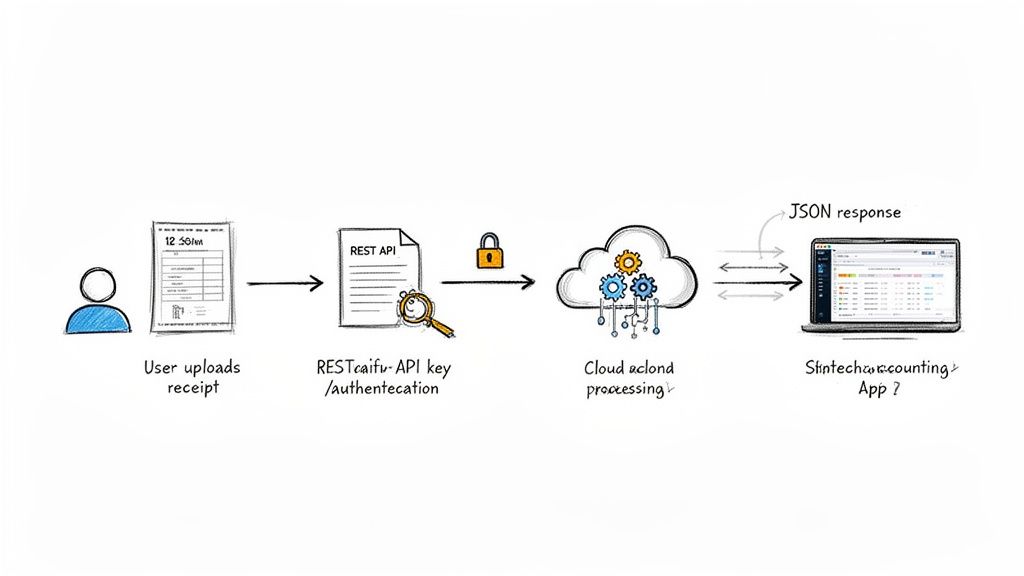
This diagram shows the entire journey, from the moment a user snaps a photo of a receipt to the clean, organized data landing right inside your application. It’s a seamless flow designed for efficiency. Let's walk through exactly how to make this happen.
The Standard Integration Workflow
The best part about a well-built receipt scanning API is that it’s predictable. There’s no need to reinvent the wheel. You just follow the recipe.
Here’s the typical play-by-play for processing a receipt:
- Authentication: First, your app has to introduce itself to the API. This is almost always done with a unique API key, which you include in your request header. It’s the digital equivalent of a secret handshake, proving you have permission to access the service.
- Making the API Request: With authentication sorted, you send a
POSTrequest to the API’s endpoint. The core of this request is the receipt file itself—usually a JPG, PNG, or PDF—sent along as the payload. - Handling the Response: In just a few seconds, the API sends its reply. A successful scan returns a
200 OKstatus code, and the body of the response contains the neatly structured JSON data you’ve been waiting for. - Error Handling: What if something goes wrong? A good API will tell you. If you send a blurry image or forget your API key, you’ll get an error code like
400(Bad Request) or401(Unauthorized). Building robust error handling is key to a smooth user experience.
This simple request-and-response cycle is the bedrock of the entire integration, making it incredibly easy to get up and running.
A Practical Code Example
It always helps to see it in action. Here’s a quick example using cURL, a basic command-line tool, to send a receipt image to an API. This snippet clearly shows how to package your API key and the file for processing.
curl -X POST "https://api.extractbill.com/v1/receipts"
-H "Authorization: Bearer YOUR_API_KEY"
-F "file=@/path/to/your/receipt.jpg"
Let's break that down:
-X POSTtells the server we're sending new data.-H "Authorization: Bearer YOUR_API_KEY"is where you slot in your secret API key to authenticate the request.-F "file=@/path/to/your/receipt.jpg"attaches the actual receipt image from your computer.
Once the API gets this, it gets to work, processing the image and firing back a JSON object with all the good stuff: merchant_name, total_amount, line_items, and more.
A well-designed API should feel intuitive. A developer should be able to go from reading the docs to making their first successful API call in a matter of minutes, not hours.
For anyone ready to get their hands dirty, solid documentation is non-negotiable. To see all the available endpoints, parameters, and response structures, you can dive into the official ExtractBill API reference. Resources like this are invaluable for planning your integration and quickly squashing any bugs that pop up.
Ultimately, plugging in a receipt scanning API is less of a massive technical hurdle and more of a straightforward step toward transforming a tedious manual process into a slick, automated workflow.
How to Choose the Right API Provider
Picking a receipt scanning API isn't just about code—it's about finding a partner. The right provider will feel like an extension of your team, reliably powering a critical part of your app. But the wrong one? That leads to buggy data, frustrated users, and endless headaches for your developers.
To avoid the pitfalls, you need a solid game plan. Let's move past the flashy marketing claims and dig into what really counts: raw performance, the developer experience, and a business model that makes sense for you.
Core Technical Capabilities
First things first: does the API actually work well? A beautiful API is useless if it can't deliver accurate data, fast. This is where the rubber meets the road.
Here’s what to zero in on:
- Accuracy and Reliability: What’s their accuracy rate? You should be looking for providers that can hit 99% accuracy or more. Anything less means you'll be stuck doing manual corrections, which defeats the whole purpose of automation. Ask them how their AI models handle the messy stuff—receipts that are wrinkled, poorly lit, or printed in weird fonts.
- Processing Speed: How fast does it turn an image into data? Today, users expect things to happen instantly. A good benchmark is 3-5 seconds per receipt. If it's slower than that, your user experience will suffer, especially if you're processing a high volume of documents.
- Scalability: Can it grow with you? A solid API should handle thousands of requests at the same time without breaking a sweat or forcing you into a queue. Make sure their infrastructure is built for scale, not just for a small demo.
At the end of the day, it's all about trust. You need to be able to trust the API's output enough to run your financial workflows without someone constantly looking over its shoulder.
The Developer Experience
An amazing API with terrible documentation is like a supercar with no keys—you can't do anything with it. The developer experience (DX) is just as important as the tech itself because it determines how quickly your team can get up and running.
When you’re evaluating DX, here's what matters most:
- Clear and Comprehensive Documentation: Is it easy to find what you need? Look for well-organized API references, simple "getting started" guides, and ready-to-use SDKs for languages your team uses. It should have clear examples for every endpoint and straightforward explanations for error codes.
- Responsive Support: What happens when you get stuck? See what their support is like. A provider that gives you quick access to real engineers who can solve real problems is worth its weight in gold.
- Sandbox Environment: Do they let you try before you buy? A free sandbox or trial is non-negotiable. It lets your team test the API with your own real-world receipts to confirm it actually solves your problem before you pull out a credit card.
The market for these APIs is packed. You'll see names like Klippa, Veryfi (known for its ability to handle line items in 38 languages), Mindee (which gives you confidence scores), and Tabscanner pop up often. Each has its strengths, whether it's fraud detection or speed.
Solutions like ExtractBill are built specifically for businesses that need to digitize invoices and receipts, offering clean, standardized fields that plug right into accounting software and ERPs. For a deeper dive, check out this comparison of the best receipt parsing APIs.
Pricing and Business Model
Finally, make sure the pricing model fits your business. Most providers fall into one of two camps:
- Pay-as-you-go: This is perfect for startups or apps with unpredictable usage. You only pay for what you actually use, which gives you a ton of flexibility without any big upfront costs.
- Subscription Plans: These plans give you a certain number of API calls each month for a flat fee. The cost per receipt is usually lower, making this a great fit for businesses with steady, high-volume needs.
Don't forget to look at the total cost. Are there hidden fees for support, data storage, or going over your monthly limit? You want a provider with transparent pricing and no long-term contracts so you can stay agile.
API Provider Evaluation Checklist
To help you compare your options side-by-side, use this checklist. It covers the crucial points we've discussed and will help you make a well-informed decision based on your specific needs.
| Evaluation Criterion | What to Look For | Why It Matters |
|---|---|---|
| Accuracy | Stated accuracy rate >99%. Test with your own crumpled, blurry, and difficult receipts. | Low accuracy creates manual work, defeating the purpose of automation and eroding user trust. |
| Speed | Average processing time of 3-5 seconds per document. | Slow processing leads to a poor user experience and can become a bottleneck in high-volume workflows. |
| Scalability | Ability to handle concurrent requests and scale with your user growth without slowdowns. | Your chosen API must support your peak demand and not hinder your ability to grow your business. |
| Documentation | Clear API reference, code examples in multiple languages, and easy-to-follow getting-started guides. | Good documentation dramatically reduces integration time and saves your developers from frustration. |
| Support | Access to responsive, knowledgeable technical support (ideally from engineers). | When issues arise, fast and competent support is critical to minimizing downtime and resolving problems. |
| Sandbox/Trial | A free and fully-featured trial or sandbox environment for testing. | You need to validate that the API meets your technical requirements before making a commitment. |
| Pricing Model | Transparent, predictable pricing that aligns with your business model (pay-as-you-go vs. subscription). | Hidden fees and misaligned pricing can lead to unexpected costs and make the solution unsustainable. |
| Security | Compliance with standards like GDPR, SOC 2, and ISO 27001. Clear data privacy policies. | You are entrusting the provider with sensitive financial data; robust security is non-negotiable. |
By systematically working through this checklist, you can cut through the noise and confidently select an API provider that will be a true partner in your success.
Got Questions? We’ve Got Answers.
Jumping into any new technology, especially one that handles your company's finances, brings up a lot of questions. It's smart to be thorough. A receipt scanning API is a game-changer, but you need to know the nuts and bolts to feel confident you're making the right call.
Let's tackle the most common questions we hear from businesses and developers.
How Accurate Is This Stuff, Really?
This is always question number one, and for good reason. The short answer? Modern receipt scanning APIs are incredibly accurate, with the best services hitting over 99% precision. This isn't just a number pulled out of thin air; it’s the result of sophisticated AI models trained on millions of real-world receipts—from crisp, clean printouts to crumpled-up gas station slips.
But accuracy isn't just a single number. It’s a moving target influenced by a few key things:
- Image Quality: A clear, well-lit photo taken flat-on will always beat a blurry, shadowy one. The top APIs have built-in magic to fix tilted images and boost contrast, but a good starting picture always helps.
- Receipt Condition: Faded thermal paper, weird fonts, or a barista’s handwritten note can throw a wrench in the works for basic OCR. This is where advanced AI shines, using context to figure things out even when the text is messy.
- The Brains Behind the API: The biggest difference between providers is the quality of their AI. A top-tier receipt scanning API doesn't just read text; it understands the document's structure. It knows which number is the subtotal and which is the final total, even on a funky layout.
The real goal here isn't just to pull text off a page. It's to deliver data so clean and reliable you can trust it for your financial records and audits without a human having to double-check everything. That's what unlocks true automation.
Can These APIs Do More Than Just Receipts?
Absolutely. Don't let the name fool you. While they're amazing at receipts, the core technology is all about broad document intelligence. The most capable APIs are versatile platforms built to process a whole range of financial documents. This is a huge win because it means you can centralize your automation instead of juggling multiple tools.
Think about it. Instead of one service for receipts and another for invoices, a powerful API can handle it all:
- Invoices: Pulling out invoice numbers, payment due dates, and banking details.
- Bills of Lading: Making sense of complex shipping and logistics documents.
- Purchase Orders: Automatically matching POs to incoming invoices.
- Bank Statements: Speeding up transaction reconciliation.
This elevates the tool from a simple expense tracker to a full-blown accounts payable automation engine. Using one solution for everything creates a single, streamlined workflow that saves your finance team a ton of time and headaches.
How Do I Know My Company's Financial Data Is Safe?
Handing over sensitive financial data to a third party is a big deal. Security should be at the very top of your checklist. Any reputable API provider gets this and builds their service on a foundation of bank-level security.
When you're vetting a provider, here are the non-negotiables to look for:
- End-to-End Encryption: Your data needs to be locked down tight, both when it's flying over the internet to the API (in transit) and when it's sitting on their servers (at rest). This is the absolute standard for protecting sensitive info.
- Data Privacy Compliance: The provider must be compliant with major data protection laws like GDPR and CCPA. This is your assurance that they handle data according to strict, legally-binding rules.
- Secure Infrastructure: Look for providers hosted on trusted platforms like AWS or Google Cloud, and ask about certifications like SOC 2 or ISO 27001. These independent audits confirm they have robust internal controls.
- Clear Data Policies: A trustworthy partner is transparent about how they handle your data. You should know exactly how long your files are stored and have the power to delete them for good.
Don't ever cut corners on security. Your financial data is a core asset, and your API partner needs to protect it as fiercely as you do.
What Do These Things Typically Cost?
Understanding the pricing is crucial for figuring out your return on investment. Most receipt scanning API providers use one of two models, each built for different scales and needs.
- Pay-Per-Use (Pay-As-You-Go): You pay a small fee for each document you process. Simple. This model is perfect for startups, small businesses, or anyone with unpredictable volume. It gives you total flexibility with zero upfront commitments or monthly fees.
- Subscription Tiers: Here, you pay a flat monthly or annual fee for a block of API calls (say, 10,000 extractions per month). The cost-per-document is usually lower, making it the smart choice for businesses with steady, high-volume needs.
When you're comparing options, look past the sticker price. Are there extra fees for key features like line-item extraction or premium support? The right model for you comes down to your expected volume and growth plans, so find a provider with clear, transparent pricing that can grow with you.
Ready to kill manual data entry for good and automate your entire financial workflow? With ExtractBill, you can process receipts, invoices, and bills with 99.9% accuracy in seconds. See for yourself how powerful it is.
Ready to automate your documents?
Start extracting invoice data in seconds with ExtractBill's AI-powered API.
Get Started for Free