A Guide to OCR for Receipts That Actually Works

Receipt OCR is really just a fancy term for technology that can automatically read and understand a picture of a receipt. It turns a simple photo into neat, organized data (like a JSON file). Think of it as software that does what your brain does instantly—spotting the store name, date, and total amount on a crumpled piece of paper.
Decoding the Digital Cash Register
Picture this: you're staring at a mountain of receipts. Some are faded, some are creased, and every single one has a different layout. This is the daily reality for countless businesses trying to keep their finances in order. Trying to enter all that data by hand isn't just mind-numbingly slow; it's practically guaranteed to lead to expensive mistakes and wasted hours.
This is exactly where OCR for receipts steps in. It’s like a specialized assistant who can read any receipt you throw at it, no matter the store or format, and instantly log all the important details into your system. It takes that chaotic pile of paper and turns it into clean, usable information.
The Core Process Explained
So, how does it actually work? Under the hood, the technology follows a pretty logical sequence to get from a blurry photo to structured data. It’s a smart assembly line designed to turn visual noise into organized clarity.
- Image Acquisition: It all starts when you snap a photo of a receipt or upload a PDF. This is the raw material.
- Preprocessing and Cleanup: First, the software cleans up the image. It’ll automatically straighten a crooked photo, sharpen fuzzy text, and get rid of shadows or coffee stains. It's a lot like restoring an old photograph before you can really see the details.
- Text Recognition: With a clean image, the core OCR engine gets to work, identifying every single character, word, and number on the document.
- Intelligent Data Extraction: This is where the magic happens. The system doesn’t just read the text; it understands it. Using AI, it figures out which text is the merchant's name, which numbers are the subtotal, tax, and final total, and which lines are the actual items purchased.
This visual breaks down how the system moves from a raw scan to usable data.
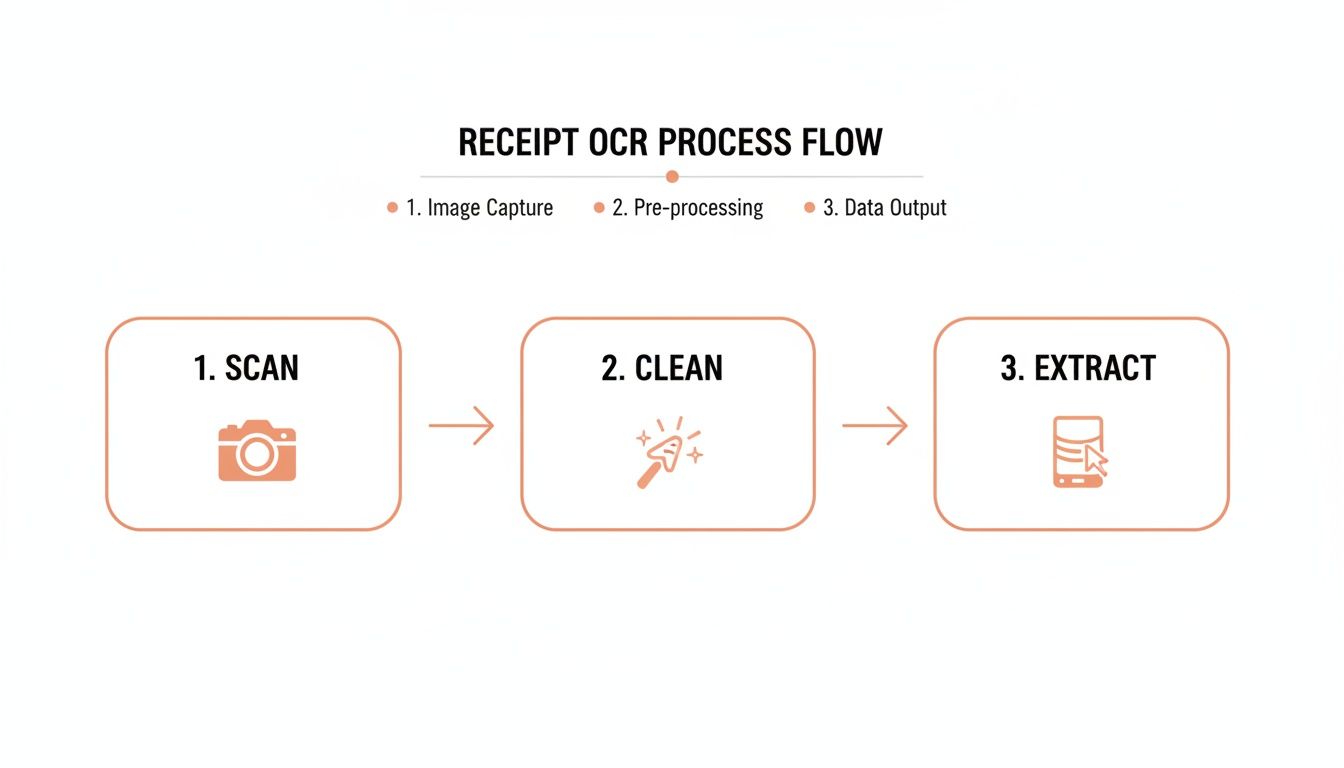
As the diagram shows, a raw image is refined and analyzed until you get clean, actionable information. This final step is often called data parsing—a critical phase where raw text is given structure. We cover this in more detail in our guide on what is parsing data.
The real power of receipt OCR isn't just reading text. It's about understanding the context—knowing that the number next to "Total" is the final amount. It's the difference between a simple transcript and an intelligent summary.
Ultimately, this process closes the gap between the physical receipts you hold in your hand and the digital records in your accounting software. By taking over the tedious task of data entry, it frees up your team to focus on things that actually matter—like analysis, strategy, and growth—instead of getting buried in paperwork.
The AI Technology Powering Receipt Scanners
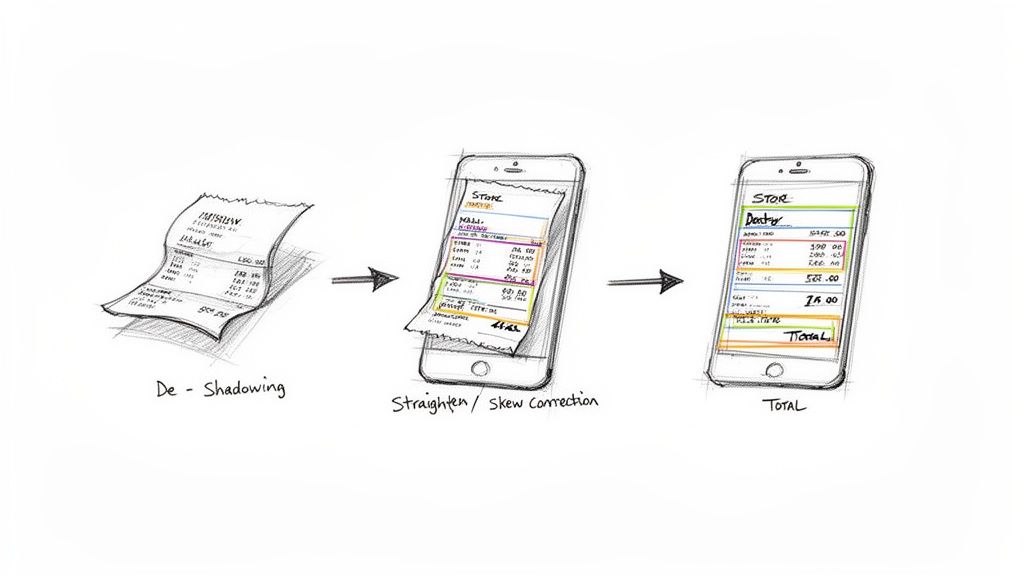
Watching a modern OCR for receipts tool digest a crumpled, faded document and spit out perfect data can feel like a magic trick. It's not just reading the letters; it's understanding what they mean. The secret isn't magic, though—it's a sophisticated stack of AI models designed to mimic how we process visual information and language.
At its heart, this technology relies on two powerful components working together. You can think of them as the system's "eyes" and its "brain." Each one has a specific job, but they're both essential for turning a messy photo into structured, useful data.
The Eyes of the System: Convolutional Neural Networks
The first hurdle in scanning a receipt is just making sense of the raw image. This is the job of Convolutional Neural Networks (CNNs). A CNN is the system’s set of eyes, meticulously breaking down the pixels of an image to spot patterns, shapes, and textures.
Think about looking at a busy photograph. Your brain instantly recognizes edges, objects, and people without you consciously thinking about it. A CNN does something similar for a receipt. It scans the image in layers, first identifying basic features like lines and curves, then building on that to recognize more complex things like individual characters, numbers, and eventually entire words.
This visual analysis is critical for a few reasons:
- Character Recognition: It learns the distinct shapes of letters and numbers, so it can tell an 'O' from a '0' or a '1' from an 'l'.
- Spatial Awareness: CNNs understand where text is on the page, helping to group a product name with its price.
- Noise Reduction: They're trained to filter out visual junk—creases, coffee stains, shadows—and focus only on the text that matters.
Without this level of visual processing, any OCR system would get tripped up by the imperfections of real-world receipts. CNNs deliver clean, identified text that the system's "brain" can then work with.
The Brain of the System: Transformers
Once the CNN has identified all the words, the system needs to understand their meaning and how they relate to each other. This is where Transformer models come in, acting as the AI’s brain. A Transformer doesn't just read words one by one; it analyzes the entire sequence to figure out the document’s structure and context.
When you read a receipt, you know that the number next to the words "Total Amount" is the final price. You get this from the context. A Transformer model does the exact same thing, using a mechanism called "attention" to weigh the importance of different words and figure out their relationships.
This contextual understanding is what separates modern AI-powered OCR from older, more rigid technology. Legacy systems were template-based. They were programmed to look for the "Total" in one specific spot on the page. If a store redesigned its receipt layout, the whole system would break.
AI-driven platforms like ExtractBill use Transformers to understand any receipt format, no matter the layout. The model isn't looking for a "total" field in a fixed location; it has learned the concept of what a total amount is, so it can find it wherever it appears. This flexibility is non-negotiable for handling the endless variety of receipts out in the wild.
In the end, it’s the combination of CNNs for visual recognition and Transformers for contextual understanding that makes today's receipt OCR so effective. This AI duo works in tandem to not only read the text on a document but to truly comprehend its financial meaning. The result is the accurate, structured data that businesses need to finally automate their workflows.
Solving the Toughest Receipt Data Challenges
Ever snapped a picture of a coffee receipt with a scanner app, only to have it mangle the total or misread the merchant name? You're not alone. The idea of receipt OCR sounds simple enough, but the real world is messy, and most basic tools fall apart when they meet the chaos of an actual, crumpled-up receipt from your wallet.
These failures aren't just bad luck. They happen because receipts are designed for human eyes, not rigid software that expects perfect formatting. They’re packed with visual quirks that easily trip up any system only taught to read clean, standardized text. This is exactly where modern, AI-powered solutions make all the difference.
Why Basic Scanners Stumble and Fail
Think of a simple OCR tool as someone who can recognize letters but can't actually read. It sees individual characters but has zero contextual understanding to piece them together into a meaningful document. This gap is what leads to all those common, frustrating errors.
For instance, one of the biggest challenges is simply associating an item description with its price on the same line. If the spacing is a little off, a basic tool might just grab the price from the line above or below, wrecking your entire expense report.
Here are some of the most common hurdles that cause them to fail:
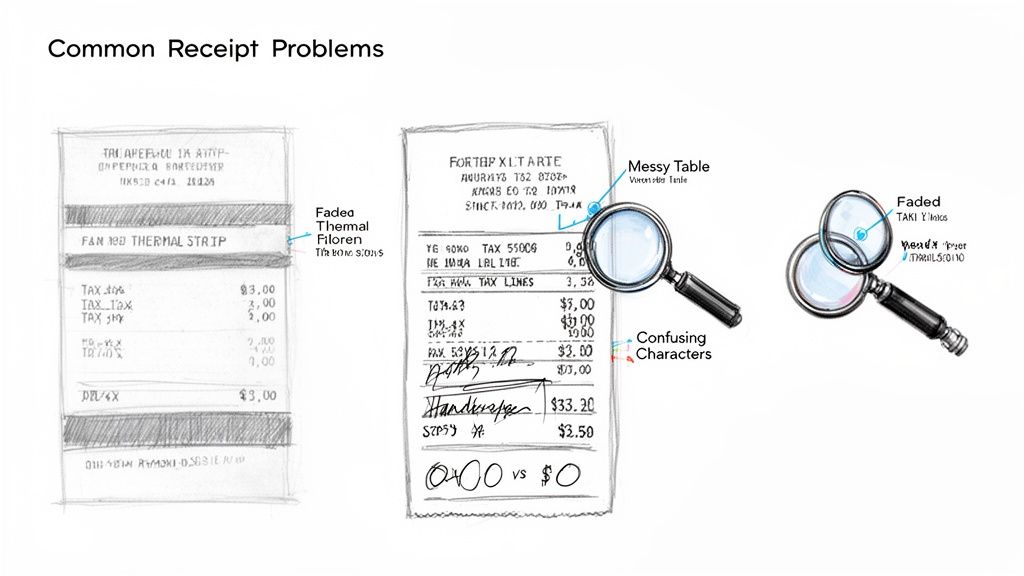
- Faded Thermal Paper: That low-contrast, gray-on-gray text from a thermal printer is a nightmare for most scanners, frequently leading to missed characters or entire lines being ignored.
- Complex Table Structures: Receipts with columns for multiple tax rates, item-specific discounts, or split payments create a structural mess for software expecting a simple layout.
- Handwritten Notes: That tip you scribbled on the total line? Or a note from your server? It’s completely invisible to traditional OCR, guaranteeing an incorrect total and a headache during reconciliation.
- Ambiguous Characters: Is that a capital 'O' or a zero? An 'l' or a '1'? Without any context, a basic system is just guessing, which is a terrible strategy for financial data.
The ultimate test for any receipt OCR system is its ability to handle ambiguity. An advanced platform doesn't just read the text; it understands that the number labeled "Total" is the most important figure, even if it's faded or slightly misaligned.
How Modern AI Overcomes These Obstacles
This is where modern, AI-powered OCR, like the technology behind ExtractBill, completely changes the game. Instead of relying on rigid templates, it uses deep learning models that have been trained on millions of real-world receipts. It learns to understand the concepts of a receipt—what a total looks like, where to find line items, how to spot the date—no matter the layout.
This isn't just a marketing claim; it's backed by real-world analysis. One detailed academic study on food-purchase receipts found that OCR correctly captured the exact total 75% of the time and showed a nearly perfect correlation (R² = 0.97) with manual data entry for item counts. This shows just how reliable OCR can be for the most important fields, even if it doesn't achieve 100% perfection on every single receipt. You can dig into the full findings from the comprehensive receipt OCR accuracy study here.
The end result is clean, structured data that’s ready to be used by your other systems. We have a great guide that explains more about how to convert PDF to JSON, which is a common next step for seamless integration.
To see the difference in action, let's compare how old and new technologies handle these common issues.
Traditional OCR vs. AI-Powered Receipt Extraction
Old-school OCR tools followed a rigid, rule-based approach that was easily broken. Modern AI, on the other hand, is built for the unpredictability of real documents. Here’s a side-by-side look at how they stack up.
| Challenge | Traditional OCR Limitation | AI-Powered Solution (e.g., ExtractBill) |
|---|---|---|
| Faded Text | Fails to recognize low-contrast characters, leading to missing data. | Uses image enhancement and models trained on poor-quality examples to accurately read faded text. |
| Line Items | Struggles to link item names to prices correctly on busy receipts. | Understands the spatial relationship between text, ensuring each item and its price are paired accurately. |
| Multiple Taxes | Often captures only the first tax line it finds or merges them incorrectly. | Identifies and extracts each tax type as a separate field, preserving financial accuracy. |
| New Layouts | Breaks completely if a store changes its receipt format. | Adapts to any layout by understanding the context of fields like "Subtotal," "Tax," and "Total," regardless of their position. |
Ultimately, solving these tough challenges is what separates a fun gimmick from a genuine business tool. While no system can promise 100% perfection every time, an AI-driven approach delivers the resilience and intelligence needed to handle the messy reality of receipts, turning a frustrating chore into a reliable, automated workflow.
Where Automated Receipts Actually Make an Impact
The tech behind receipt OCR is cool, but let's be honest—what really matters is how it helps your business. This isn't just about turning pictures into text. It’s about getting back countless hours, sidestepping expensive mistakes, and speeding up financial workflows from top to bottom.
Whether you're a small business or a sprawling enterprise, automating receipt processing delivers a clear, measurable return. The goal is to move your team away from mind-numbing admin work and toward tasks that actually grow the company.
Transforming How Key Teams Work
The applications for receipt OCR are incredibly practical, changing the daily grind for multiple departments. By killing that first, tedious step of manual data entry, you create a ripple effect of efficiency.
Here’s a look at who wins:
- Finance and Accounts Payable: AP teams can finally stop typing. Invoice details get pulled automatically, matched against purchase orders, and sent for approval in a fraction of the time. This means faster payment cycles and no more late fees.
- Sales and Field Teams: Your road warriors can ditch the wallet full of crumpled receipts. They just snap a photo on the go, and the OCR tech fills out their expense reports. This leads to quicker reimbursements and a much happier team.
- Small Business Owners: Tax season is no longer a nightmare. Instead of digging through a shoebox of faded paper, you have a clean, digital, and categorized record of every expense, ready to go.
- Market Research Firms: Imagine having insight into consumer buying habits, brand loyalty, and market trends without paying an army of data entry clerks. Anonymized receipt data makes this possible.
The move to digital document processing is happening fast. In the USA alone, the OCR market hit USD 3.299 billion in 2023, with the financial sector leading the charge. UK firms are seeing similar wins, cutting back-office work by 30-40%. You can learn more about the trends driving the US OCR market and its massive growth.
A Quick Story of Transformation
Picture a mid-sized consulting firm with 50 employees who are always on the road. Before they embraced automation, their finance team was buried in paperwork. Every month, a mountain of expense reports would land on their desks, complete with stapled, crumpled, and often unreadable receipts.
It was a total bottleneck. One administrator spent over 100 hours a month just typing numbers into their accounting software. Mistakes were inevitable—a misplaced decimal point or a misread total would throw everything off, leading to overpayments and compliance headaches. The month-end close was consistently delayed by a full week.
Then they switched to an automated receipt OCR solution. The change was almost immediate.
- Time Savings: Those 100+ hours of monthly data entry? Gone. The finance team could finally focus on strategic analysis and forecasting.
- Error Reduction: Data entry mistakes dropped by an estimated 99%, which meant the financial records were right the first time.
- Faster Reimbursements: Employees got their money back in days, not weeks. Morale shot through the roof.
- Accelerated Financial Close: The month-end close process became 50% faster, giving leadership a much quicker look at the company's performance.
This isn't a one-off success story; it's what happens when you remove manual friction. By automating financial workflows, businesses gain a serious edge in both efficiency and accuracy. If you want to dig deeper, check out our guide on accounts payable automation best practices for more advanced strategies.
How to Choose the Right OCR for Receipts Solution
Picking the right OCR for receipts solution isn't about finding some mythical "perfect" tool. It’s about finding the right fit for your actual, day-to-day business needs. The market is crowded, but if you know what to look for, you can cut through the noise and find a partner who delivers real results and a solid return on your investment.
Think of it like hiring a critical new member of your team. You wouldn't just glance at their resume; you'd give them a real-world task to see how they perform. The exact same logic applies here. Your evaluation has to be hands-on, focusing on performance, usability, and security.
Accuracy and Speed Under Pressure
The first and most important test for any receipt OCR is accuracy, but you have to look deeper than a simple percentage. The metric that truly matters is field-level accuracy. How well does the tool pull out the specific data you need—like the total, tax, and individual line items? A solution that nails the total 99% of the time is infinitely more valuable than one that just reads every character on the page correctly but can't make sense of it.
Just as important is how that accuracy holds up when things get messy. A vendor's shiny demo receipts are one thing. Your company's actual pile of crumpled, faded, and poorly lit phone pictures is a whole different beast.
The single most important step you can take is to test any potential solution with a batch of your own messiest, real-world receipts. This is the only way to get a true benchmark and see if it can handle the day-to-day chaos of your workflow.
Beyond just accuracy, keep an eye on these performance numbers:
- Processing Speed: How long does it take to process a single receipt? For a fast solution like ExtractBill, this should only be 2–5 seconds. Anything slower is a bottleneck waiting to happen.
- Scalability: Can the system handle a sudden rush of expense reports at the end of the month? A well-built API should process requests in parallel without making you wait in a queue.
The Developer and User Experience
A powerful API is completely useless if it’s a pain to integrate. The developer experience is a critical—and often ignored—part of the equation. Look for clear, well-written API documentation with code samples in a few different languages. This simple thing makes the initial setup faster and saves a ton of headaches when troubleshooting later.
And don't forget to check their support. Is there a real, responsive team you can talk to when you hit a wall? A good support system can save your developers hours of banging their heads against the keyboard.
Security and Compliance as a Top Priority
At the end of the day, you're handing over sensitive financial data to a third-party service. This means security and compliance are absolutely non-negotiable. Your provider has to prove they take protecting your information seriously and follow all the relevant regulations.
Here’s a quick checklist of the security essentials:
- Data Encryption: Make sure all your data is protected with strong encryption standards like AES-256, both when it's being sent and when it's stored.
- Compliance Certifications: Look for key certifications like GDPR (for EU data privacy) and SOC 2 (for operational security and controls).
- Secure Infrastructure: The service should run on a secure cloud foundation to guard against data breaches and unauthorized access.
By methodically checking potential solutions against these three pillars—performance, usability, and security—you can confidently pick a receipt OCR provider that doesn't just work, but becomes a reliable and secure partner for your business.
Best Practices for Getting Receipt OCR Right
Picking the right OCR for receipts tool is only half the battle. How you put it to work is what really determines if you’ll see that quick ROI and high accuracy you're aiming for. Think of it like this: you can buy the best seeds, but if you don’t prepare the soil, you won't get much of a harvest. A little prep work here goes a long, long way.
The real work starts before you scan a single receipt. The quality of that initial image is, without a doubt, the biggest factor driving OCR accuracy. Even the smartest AI will stumble if it's fed a blurry, dark, or crumpled mess. Setting good habits from the very beginning will save you from a world of headaches later on.
Optimizing Image Quality at the Source
There's a classic saying in data science: garbage in, garbage out. It’s practically the golden rule for receipt OCR. To give your system the clean data it needs to perform, you have to establish clear, simple guidelines for capturing receipt photos.
Here are a few tips that make a massive difference:
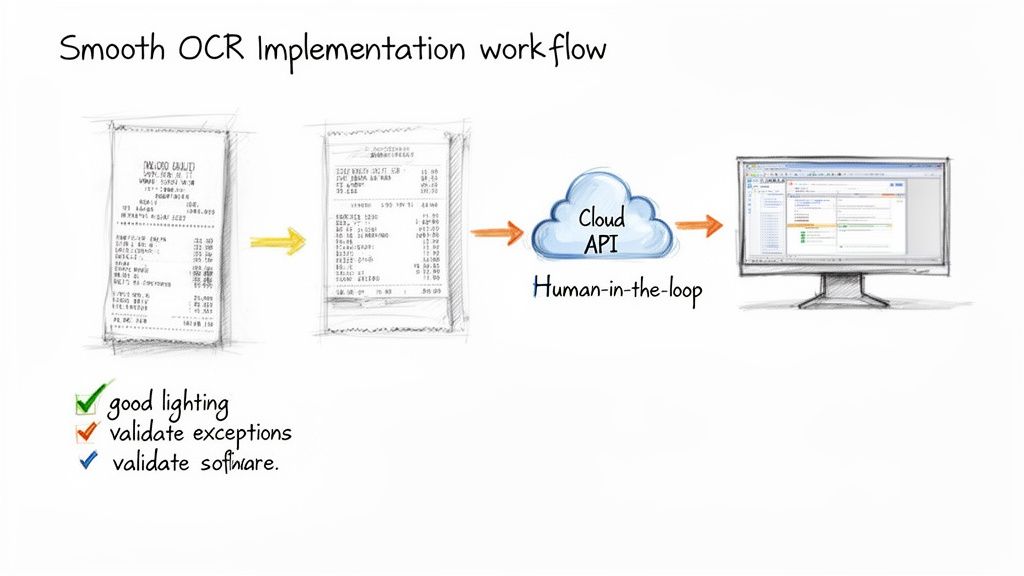
- Use Good Lighting: Make sure the receipt is evenly lit. You want to avoid harsh shadows or any glare that could wash out the text. Indirect, natural light is your best friend.
- Lay It Flat: Take a second to smooth out any major wrinkles or folds before snapping the picture. A flat receipt gives the OCR engine a clean, consistent surface to analyze.
- Avoid Extreme Angles: Try to capture the photo from directly above. Taking it from a sharp angle distorts the letters and numbers, making it much harder for the AI to read them correctly.
Getting these small steps right dramatically boosts the reliability of your entire process.
Automating Workflows with APIs and Webhooks
For any developer, the endgame is a "set it and forget it" automated workflow. This is where a solid API comes in. It’s the bridge that lets you plug the OCR service directly into your existing software, whether that's an expense management app, your company's accounting platform, or a custom internal tool.
Instead of having users manually upload files, you can use the API to send receipt images for processing programmatically. This creates a real-time data extraction pipeline that just works in the background. Taking it a step further, using webhooks is a pro move. Instead of constantly asking the API, "Are you done yet?", a webhook will ping your system the moment the data is ready. This creates a much more efficient, event-driven system. If you need a technical walkthrough, our guide on getting started with the API has you covered.
The most effective systems we see build a "human-in-the-loop" workflow. This means that while 99% of receipts fly through automatically, any results with low confidence get flagged for a quick manual check. This hybrid approach gives you the best of both worlds: incredible speed and near-perfect accuracy.
Finally, make sure you map the extracted fields to your own system correctly. Standardizing how data like "Total," "Tax," and "MerchantName" is fed into your ERP or accounting software is critical for preventing mismatches and keeping your financial records clean. By pairing clean images with smart automation, you’ll tap into the full power of receipt OCR from day one.
The Future of Financial Document Automation
Receipt OCR isn't just about pulling text from a picture anymore. The real magic happens when it becomes the engine for strategic automation.
We're seeing a powerful partnership between OCR, Generative AI, and large language models (LLMs). This trio doesn't just read receipts—it understands them. It can automatically categorize your expenses, flag weird-looking charges, and even start to uncover spending patterns you didn't know you had.
The result? Your finance team spends way less time hunched over spreadsheets trying to reconcile numbers and a lot more time actually analyzing what those numbers mean for the business.
The market is exploding because of this shift. Valued at USD 10.45 billion in 2023, the global OCR market is on a rocket ship, projected to hit USD 43.69 billion by 2032. That's a massive 17.23% compound annual growth rate, as more companies wise up to the power of automation. You can dig into the projections here.
What Generative AI and LLMs Bring to the Table
Think about it this way: Generative AI can look at a whole month's worth of receipts and instantly suggest the right budget categories for each one. No more manual sorting.
LLMs are the brains behind that operation, picking up on contextual clues. They see "Taxi" or "Lunch Meeting" and just know how to label it, something that old-school OCR could never do.
In the real world, this is slashing manual review time by up to 80% and catching suspicious transactions almost as they happen.
“Automated insights help my team spot suspicious charges before they become costly,” says one finance director we spoke with.
What this looks like in practice:
- Expense Categorization with little to no setup or training.
- Fraud Detection that uses anomaly scoring to find outliers.
- Trend Analysis to get a better handle on forecasting your monthly spend.
Why Everyone Is Investing in This Now
Companies are scrambling to modernize their back-office operations, and finance is at the top of the list. Receipts are no longer just scraps of paper stuffed in a drawer; they're valuable data points feeding into AI systems that help make smarter purchasing decisions.
The ROI is a no-brainer. Investments in modern OCR and AI pay for themselves by:
- Slashing data entry time by 60% or more.
- Cutting down human errors by a staggering 99%.
- Speeding up the financial close cycle by as much as 50%.
This is why receipt OCR is becoming a foundational piece of a much larger puzzle: a fully autonomous finance department. It lets your team shift from tedious manual work to high-value strategic planning, all powered by insights pulled from documents in seconds.
Key Takeaways For Finance Teams
So, what does this all mean for you and your team?
- Automated Categorization gets rid of the soul-crushing task of sorting receipts, especially when you have hundreds or thousands of them.
- Continuous Monitoring means you get instant alerts on weird expenses, so you can investigate right away, not a month later.
- Real-Time Reports help you make smarter budget decisions on the fly, not based on last quarter's stale data.
- Human-In-The-Loop workflows are still crucial. You have a safety net to ensure accuracy on weird edge cases, which keeps risk low.
Ultimately, it lets your team finally focus on strategy.
Ready to unlock autonomous finance and reclaim hours from manual work? Try ExtractBill today.
Ready to automate your documents?
Start extracting invoice data in seconds with ExtractBill's AI-powered API.
Get Started for Free