What Is Parsing Data A Guide to Unlocking Its Power
Data parsing is simply the process of taking raw, messy information—like what you’d find in a PDF invoice or a customer email—and turning it into a clean, organized format that software can actually use.
What Is Parsing Data in Simple Terms

Think of it like translating a handwritten recipe from your grandma into a modern cooking app. The original note has everything you need—ingredients, steps, cooking times—but it’s jumbled together in a way a computer can't possibly understand. To make it work in the app, you have to pull out each piece of information and put it into the right digital box: "Ingredient," "Quantity," and "Instruction."
That translation is exactly what data parsing does. It acts as a digital interpreter, taking chaotic information, breaking it down, and rebuilding it into a logical, predictable structure. Without parsing, the huge amount of data businesses run on—which some studies suggest is over 80% of all enterprise data—would stay locked up in formats that computer systems just can't handle.
The Bridge Between Chaos and Clarity
At its heart, data parsing builds a bridge between content that humans read and data that machines can process. It’s the essential first step that makes automation, deep analysis, and system integrations possible.
Just look at the information flowing into any business daily. You get invoices, purchase orders, bank statements, and customer support emails. Every single one contains crucial information, but it all arrives in a different, unstructured layout. A data parser works through these documents, spots the key details using predefined rules or AI, and extracts them.
Here’s a quick look at what this table shows:
| Data Point | Before Parsing (Unstructured Text) | After Parsing (Structured JSON) |
|---|---|---|
| Vendor | "Invoice from ACME Corp" | "vendor": "ACME Corp" |
| Date | "Due Date: 01/15/2024" | "due_date": "2024-01-15" |
| Total | "Total Amount......$250.00" | "total": 250.00 |
| Item | "1x Premium Widget" | {"item": "Premium Widget", "quantity": 1} |
This simple transformation is what unlocks the power of your data, making it ready for automated systems.
This process is what allows software to do incredible things:
- Automate Data Entry: Instead of someone manually keying invoice details into an accounting platform, a parser grabs the vendor name, total amount, and due date automatically.
- Enable Powerful Analytics: By structuring the data from thousands of customer feedback forms, you can instantly see common complaints or popular feature requests.
- Facilitate System Integration: Parsed data can be neatly packaged and sent via an API to other software, allowing different systems to talk to each other flawlessly.
A parser doesn’t just read text; it understands the context and relationships between data points. It knows that "$150.00" next to the word "Total" is the final bill, not just a random number floating on the page.
More Than Just Text Extraction
It’s easy to confuse data parsing with basic text extraction, like what old-school Optical Character Recognition (OCR) does. OCR is great at one thing: turning a picture of text into digital characters. It’s a vital first step, but it stops there, offering no context or organization.
Data parsing takes it much further. It applies logic to that raw text, figuring out which string of characters is an invoice number and which is a phone number. This intelligent layer of interpretation is what turns a simple document scan into actionable business intelligence, clearing the path for smarter workflows and better decisions.
The Two Worlds of Data: Unstructured vs. Structured
Every business is swimming in data, but not all data is created equal. To really get why data parsing is so critical, you first have to understand the two very different worlds your information lives in.
On one side, you have the neat, orderly world of structured data. Picture a perfectly organized spreadsheet or a database. Everything has its place in a predefined row and column. This data is clean, predictable, and an absolute dream for software to work with because it follows a rigid, consistent format.
Then there’s the other side—the wild, messy, and much, much larger world of unstructured data. This is where most of a company’s gold is actually buried. It’s the chaotic mix of PDF invoices, customer contracts, email attachments, scanned receipts, and support tickets that flood your business every day.
Bridging the Gap Between Formats
Here’s the fundamental problem: a human can glance at a PDF invoice and instantly know the total amount due. But a computer just sees a flat image with a jumble of text and lines. It has no idea that the number next to "Total Due" is the one that matters most.
This is the state of nearly 80% of all enterprise data—it's trapped in formats that are unreadable to the software systems that need it. Without a way to make sense of this information, it’s just digital noise, useless for automation, analytics, or your accounting software.
Data parsing is the essential bridge that connects these two worlds. It translates the chaotic language of unstructured documents into the clean, orderly format of structured databases that software can finally understand and use.
This translation process is what takes a mountain of static digital files and turns it into a dynamic, searchable, and incredibly valuable resource.
Real-World Examples of Each Data Type
Let's ground this in reality. You deal with both types of data every single day.
-
Structured Data Examples:
- An Excel file with columns like
Customer_Name,Order_ID, andPurchase_Date. - Your CRM database with clean fields for
Email,Phone_Number, andAddress. - An inventory list with columns for
SKU,Quantity, andPrice.
- An Excel file with columns like
-
Unstructured Data Examples:
- A supplier email with a PDF invoice attached.
- A photo of a business lunch receipt snapped with a phone.
- A signed client contract saved as a Word document.
- A customer survey with open-ended feedback comments.
Modern parsing technology is what lets your accounting software grab that PDF invoice, instantly identify the vendor, amount, and due date, and automatically create a bill to be paid. It’s the engine that transforms a useless document into actionable information, unlocking the massive potential hidden away in your files.
How Data Parsing Actually Works
To really get what’s happening when software “parses” data, we need to peek under the hood. It’s not one single magic trick. Think of it more like a specialized toolkit where each tool is designed for a specific kind of job. Modern AI often blends these methods, but understanding them one by one shows you exactly how a machine can turn a chaotic document into structured gold.
These techniques are the real engine behind business automation, especially as the world’s data pile-up continues. In 2024 alone, we created and consumed 149 zettabytes of data. That number is set to explode past 394 zettabytes by 2028, which makes efficient parsing less of a "nice-to-have" and more of a "need-to-survive." You can see the full data growth forecast on Statista.com.
Let's break down the four foundational methods.
Finding Patterns with Regular Expressions
Imagine you're scanning a huge document for every single phone number. You wouldn't read it word-for-word. You'd just look for a familiar pattern, like (xxx) xxx-xxxx.
That’s exactly what Regular Expressions (or Regex) do. A regex is just a special string of characters that defines a search pattern. It’s an incredibly precise way to pluck specific bits of information out of a sea of text. Developers use it all the time to find and validate things like:
- Email addresses
- Invoice numbers
- Dates in all their weird formats (like MM/DD/YYYY vs. YYYY-MM-DD)
- Postal codes
The catch? Regex is rigid. If an invoice number doesn't perfectly match the pattern you defined, the parser misses it completely. This makes it a poor choice for documents where the layout is always changing.
Deconstructing Web Pages with DOM Parsing
When you open a website, your browser doesn't just see a wall of text. It sees an HTML document, which is a highly structured file with a clear hierarchy—almost like a family tree. This structure is called the Document Object Model (DOM).
DOM parsing is all about navigating this tree to pull out information. You can tell a parser to go to a specific branch—say, the <div> holding the product description—and grab every item from the list inside it. It’s an incredibly reliable method for web scraping because the HTML gives the parser a predictable map to follow.
At its core, DOM parsing treats a web page like a map. It follows a set path to find exactly what it’s looking for, whether it’s a product price, a news headline, or user comments.
Reading Images with OCR and NLP
Okay, but what if your data isn't clean digital text? What if it’s a photo of a receipt or a scanned PDF invoice? This is where a powerful duo comes into play: Optical Character Recognition (OCR) and Natural Language Processing (NLP).
- Optical Character Recognition (OCR): First, the OCR technology scans the image and translates the shapes of letters and numbers into machine-readable text. It’s the digital equivalent of sight.
- Natural Language Processing (NLP): Once you have the raw text, NLP acts like the "brain." It analyzes that text to understand context and the relationships between words. NLP is how a system figures out that the words "Total Due" next to "$150.00" actually represent the final amount to be paid.
This combination allows a machine not just to read text from an image but to understand its meaning. If you're building automated workflows, our API documentation for developers shows how this structured output looks in practice.
Extracting Complex Table Data
Tables are notoriously difficult to parse correctly. A simple grid is one thing, but invoices from the real world are messy. They have merged cells, rows nested inside other rows, and columns with no clear borders. Simple parsing methods just fall apart here.
Advanced Table Extraction uses sophisticated algorithms—often AI models trained on millions of examples—to make sense of the chaos. These systems can identify row and column boundaries even when they aren't visible, correctly link line items to their prices and quantities, and export the whole grid into a clean, structured format. This is absolutely critical for accurately capturing the nitty-gritty details from financial documents.
Parsing an Invoice: From a Messy PDF to Usable Data
Theory is one thing, but seeing data parsing in action is where the magic happens. Let's walk through the real-world journey of a typical invoice, starting as a messy PDF file and ending as a clean, structured JSON object that any software can instantly understand.
The whole thing kicks off the moment a document gets uploaded. It could be a crisp, clean PDF from a vendor or even a slightly blurry photo of a paper invoice snapped with a phone. The starting format doesn't matter—the goal is always the same: to liberate the valuable data trapped inside.
This visual breaks down how a modern parsing system makes sense of it all, from finding patterns to analyzing images.
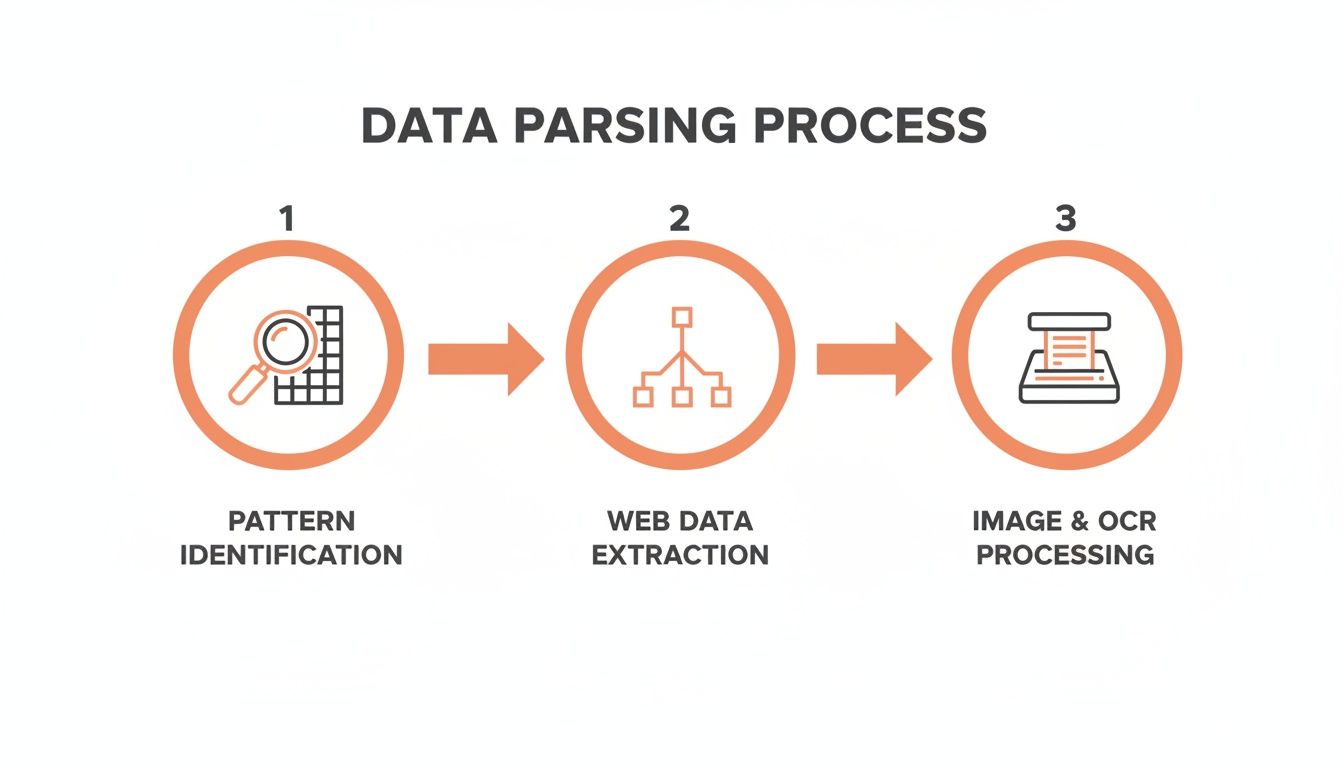
As you can see, different techniques like pattern matching for text, DOM analysis for websites, and OCR for images all work together to cover every possible data source.
The Step-by-Step Transformation
Once a document is in the system, the real work begins. It’s a multi-stage process where each step builds on the last, turning chaotic information into a perfectly organized output.
Here’s a breakdown of how an intelligent platform like ExtractBill gets it done:
- Pre-processing the Image: First, the system cleans up the document. It might automatically straighten a skewed image, boost the contrast to make text sharper, or remove any background "noise." This first step is absolutely crucial for getting the highest accuracy later on.
- Optical Character Recognition (OCR): Next, an advanced OCR engine reads every single character on the page. It's essentially translating the picture of the document into raw, machine-readable text. But this is far more than just simple reading; it’s about recognizing every letter, number, and symbol with pinpoint precision.
- Field Identification and Extraction: This is where the AI really shines. The system analyzes the raw text, drawing on its training from millions of documents to find and isolate key bits of information. It instinctively knows that the string of numbers next to "Invoice #" is the invoice number and that the largest dollar amount at the bottom is almost certainly the grand total.
- Structuring the Data: Finally, the system takes all that extracted information and organizes it into a standardized, structured format. The go-to format for modern systems is JSON (JavaScript Object Notation) because it's lightweight, easy for humans to read, and dead simple for any application to work with.
The entire process is incredibly fast. Platforms like ExtractBill can convert a complex document in just 2–5 seconds, creating a seamless flow of information from a static file right into your active business systems.
From PDF Mess to JSON Success
The final result is a clean JSON object where every piece of data has a clear label ("invoice_number") and a specific value ("INV-7890"). It’s the "after" photo that makes the value of parsing so obvious.
The transformation is complete. What was once a locked, unsearchable PDF is now a set of distinct, actionable data points ready for automation. The vendor name can automatically populate your accounting software, the total can trigger a payment workflow, and the line items can update your inventory—all without anyone lifting a finger.
This structured output is the key that unlocks true automation. For anyone looking to implement this, our guide on how to convert PDF to JSON dives deeper into the technical side. This is how modern businesses leave manual data entry behind for good.
Why Accurate Data Parsing Can Be So Darn Hard
If data parsing is so powerful, why isn't it a simple, push-button process? The honest answer is that the business documents we all rely on—invoices, receipts, purchase orders—are a chaotic mess. This real-world messiness throws a huge wrench in the works for any system trying to pull out information accurately.
The single biggest headache is the total lack of standardization. Think about it: no two of your vendors format their invoices the same way. One company puts the grand total in the bottom-right corner, another sticks it in a table halfway down the page. This wild inconsistency means a simple, rule-based parser that’s told "look for the total here" will fail almost every time. It’s like trying to use a single key to open a thousand different locks. It's just not going to work.
The Unpredictable Nature of Documents
Beyond just where things are on the page, the quality of the documents themselves is a huge problem. We're not always dealing with clean, perfect digital PDFs. More often, we're working with scanned copies, grainy photos snapped on a phone, or even ancient faxes that have been digitized.
This introduces a whole new layer of issues that can completely derail the parsing process:
- Poor Scan Quality: Low-resolution images, weird shadows, or blurry text can stump even the most advanced OCR trying to figure out what the characters are. Is that an '8' or a 'B'?
- Handwritten Notes: Something as simple as a signature or a scribbled "PAID" in the margin can confuse a parser that’s only expecting clean, printed text.
- Complex Table Structures: Invoices are notorious for tables with merged cells, nested rows, or missing borders. This makes it incredibly difficult to correctly link a line item to its quantity and price.
The core difficulty of parsing boils down to the gap between human intuition and machine logic. A person can glance at a new invoice layout and instantly make sense of it. A traditional machine, on the other hand, needs to be explicitly told where to find every single piece of data, every single time.
How Modern AI Finally Solves These Headaches
This is where modern, AI-powered platforms completely change the game. Instead of depending on rigid, brittle templates, these systems are trained on millions of wildly different documents. This massive training library teaches the AI to spot patterns and understand context, a lot like how a person learns.
An AI model learns what an "invoice number" or a "total amount" looks and feels like, no matter where it shows up on the page. It can intelligently adapt to brand-new formats it's never encountered before, maintaining high accuracy even when the documents are messy. This adaptability is the key for any business trying to digitize its operations. In fact, precise parsing is the foundation for the data management and storage market, which is on track to become a $1.75 trillion industry by 2030, according to projections on data market size at Edgedelta.com.
This AI-first approach is especially powerful for documents like receipts, where formats are all over the map. For a deep dive into this specific use case, check out our guide on using a receipt OCR API for automated expense reports. By ditching fixed rules and embracing contextual understanding, modern parsing technology finally brings the reliability businesses need to achieve true automation.
How Automated Parsing Transforms Business Operations

It’s one thing to understand the mechanics of parsing data, but it’s something else entirely to see its impact on the bottom line. Automated parsing isn't just a tech upgrade; it’s a complete operational shift. It takes sluggish, error-prone manual tasks and turns them into fast, accurate, and efficient automated workflows.
The most immediate benefit is the staggering amount of time you get back. Think about the classic accounts payable process: someone receives an invoice, reads it, manually types the vendor name, date, and every single line item into the accounting software, then files it away. This tedious cycle, repeated across hundreds or thousands of invoices, eats up thousands of employee hours every year.
Automated parsing blows that bottleneck wide open. By pulling out and structuring data in an instant, it frees your team from the drudgery of data entry. They can finally focus on higher-value work like financial analysis, managing vendor relationships, or strategic planning.
Boosting Operational Speed and Accuracy
Beyond just saving time, automated parsing brings incredible speed and precision to your core operations. We all know manual data entry is a minefield for human error—a misplaced decimal or a typo in an invoice number can cause incorrect payments, compliance headaches, and hours of frustrating detective work.
Intelligent parsing systems hit an accuracy rate that humans just can't match, often clearing 99%. That reliability sends positive ripples throughout the entire organization.
- Faster Payment Cycles: When invoice data is processed in seconds, payment cycles shrink from weeks to days. This helps you snag early payment discounts and keep your suppliers happy.
- Reduced Error Costs: By stamping out data entry mistakes, you avoid the painful costs of overpayments, duplicate payments, and the labor needed to fix them.
- Real-Time Data Access: Information from incoming documents is available almost immediately. This gives decision-makers an up-to-the-minute view of financial liabilities and operational health.
Automated parsing delivers a clear return on investment by converting operational expenses into opportunities. It transforms the costly, time-consuming task of data entry into a strategic asset that fuels speed, accuracy, and growth.
Seamless Integration with Your Existing Tools
The real magic happens when automated parsing plugs right into the software you already rely on. Modern parsing solutions are built to connect, using tools like APIs and webhooks to create a smooth, uninterrupted flow of information between your systems.
Think of an API (Application Programming Interface) as a secure messenger. It lets your existing accounting platform or ERP system send a document to the parsing service and get clean, structured data back in seconds.
Webhooks are like automated alerts. As soon as the parser finishes with a document, a webhook can instantly ping your other software to kick off the next step—like creating a bill for approval or updating your inventory.
This kind of integration is the bedrock of true, end-to-end automation. It lets a business build a completely hands-off process where an emailed invoice is automatically parsed, entered into the accounting system, and queued for payment without anyone lifting a finger. To see this in action, check out our guide on accounts payable automation best practices.
This connected ecosystem is the engine driving the explosive growth of the data analytics market. Valued at USD 64.75 billion in 2025, the market is projected to surge to USD 785.62 billion by 2035, all fueled by the need for clean, structured data. By adopting automated parsing, companies not only sharpen today's operations but also build the solid data foundation needed for tomorrow's analytical demands.
Frequently Asked Questions About Data Parsing
Once you start exploring data parsing, a few questions always seem to pop up. Teams want to know how it’s different from other tech they’ve heard of, how reliable it really is, and whether it’ll play nice with the software they already use.
Let's clear up some of the most common ones.
What Is the Difference Between Data Parsing and Web Scraping
People often use these terms interchangeably, but they’re not the same thing. Think of it like cooking: web scraping is going to the market and grabbing all the raw ingredients, while parsing is the chef’s work of cleaning, chopping, and preparing them for a recipe.
- Web Scraping: This is the act of collecting raw, messy data from a source, like pulling down the entire HTML code of a webpage. It gets the data, but it doesn't understand it.
- Data Parsing: This is the intelligent step that comes after. It takes that raw data—whether from a webpage, a PDF, or a photo—and organizes it into a clean, predictable format like JSON.
In short, scraping is about collection; parsing is about creating structure and meaning.
How Accurate Is AI-Powered Data Parsing for Documents
It’s a fair question, especially if you’ve been burned by older tech. While accuracy depends on the provider, the best AI-powered tools now consistently hit 99% accuracy or higher. This is a world away from old-school, template-based systems that would fail the moment a supplier changed their invoice layout.
The magic is in the context. Modern AI doesn't just "read" characters like basic OCR; it understands what it's reading. It knows a "Total" is different from a "Quantity," can correctly identify line items even in a complicated table, and can figure out new document formats it's never seen before. This contextual intelligence is what allows it to be so incredibly precise.
Can I Integrate Data Parsing Into My Existing Software
Absolutely. In fact, modern parsing services are built from the ground up for integration. The most common way is through a RESTful API, which lets your own software send documents and get back structured data automatically.
An API is like a secure translator between your software and the parsing engine. It allows your accounting platform, ERP, or expense app to talk directly to the parser, creating a seamless, hands-off workflow.
Beyond APIs, many services also offer webhooks. Think of a webhook as a push notification for your software—it instantly sends a message to your system the second a document is finished processing. This is perfect for building real-time, event-driven automations.
Does Data Parsing Work With Scanned Documents and Images
Yes, and this is where the technology truly shines. The process kicks off with advanced Optical Character Recognition (OCR), a technology that converts the pixels in an image or scanned document into machine-readable text.
Once the text is digitized, the AI parsing engine gets to work. It analyzes the text to find, extract, and structure all the key information, just like it would with a digital-native document. The best systems are trained to handle low-quality scans, skewed photos, and even some types of handwriting, making them powerful tools for turning piles of paper into useful data.
Ready to stop wasting time on manual data entry? ExtractBill uses advanced AI to parse your invoices, receipts, and bills with 99.9% accuracy, delivering structured JSON in just a few seconds. Get started for free at ExtractBill.
Ready to automate your documents?
Start extracting invoice data in seconds with ExtractBill's AI-powered API.
Get Started for Free