A Complete Guide to Converting Image to JSON for Invoices and Receipts

Converting an image to JSON isn't just a technical step; it's about turning a static picture of a document—like an invoice or receipt—into structured, usable data. Using a mix of Optical Character Recognition (OCR) and AI, this process extracts all the key information and organizes it into a clean, machine-readable JSON format.
The result? Data that can be instantly fed into your accounting software, ERP, or database, paving the way for full automation of data entry.
Why Convert Images to JSON
Picture this: someone on your finance team is buried under a mountain of invoices. Their entire day is a blur of manually typing vendor names, line items, and totals into a spreadsheet or accounting system. It’s slow, tedious work.
Worse yet, it's a minefield of potential errors. A single misplaced decimal or a mistyped invoice number can throw off your books and create a massive headache to track down later. This manual data entry bottleneck is a real and costly problem for almost every business, draining resources and slowing down critical financial cycles.
The Power of Structured Data
This is where converting an image to JSON becomes a game-changer. JSON (JavaScript Object Notation) is essentially the universal language for modern software. When you transform the jumbled, unstructured text from an image into a neatly organized JSON object, you unlock its real value.
- Machine-Readability: Your software can instantly understand and process the data without any human help.
- Seamless Integration: Structured JSON plugs directly into virtually any system—ERPs, accounting platforms, or custom-built databases.
- Automation at Scale: It becomes the fuel for automating entire workflows, from three-way matching to bill payments.
The impact here is huge. Modern AI-powered tools can hit over 98% accuracy, fundamentally changing how businesses handle financial documents. With U.S. businesses processing a staggering 50 billion invoices each year, the costs of doing things manually add up fast. The average cost to process a single document is around $12, leading to an estimated $600 billion lost annually to labor and errors.
Switching to an automated image-to-JSON workflow can slash these costs by 70-80%, with processing times dropping to just 2-5 seconds per file. You can learn more about how this technology works in our guide on how to extract data from invoices.
To really see the difference, let’s compare the old way with the new.
Manual Data Entry vs Automated Image to JSON Conversion
| Metric | Manual Data Entry | Automated Image to JSON |
|---|---|---|
| Processing Time | 5-15 minutes per document | 2-5 seconds per document |
| Cost Per Document | ~$12 (labor, overhead) | ~$0.10 - $0.50 (API/software cost) |
| Accuracy Rate | 90-95% (prone to human error) | 98%+ (AI-driven consistency) |
| Scalability | Low (linear; hire more people) | High (process thousands in minutes) |
| Integration | Manual export/import | Direct API integration (real-time) |
| Employee Focus | Tedious, repetitive tasks | High-value, strategic work |
The numbers speak for themselves. The move to automation isn’t just about saving a few minutes here and there; it’s a fundamental shift in operational efficiency.
By transforming a static image into dynamic JSON, you're not just digitizing text; you're creating an actionable data asset that can power intelligent, automated financial operations, giving your team back valuable time to focus on strategic work.
Understanding Your Options for Image to JSON Conversion
So, you've decided to stop drowning in paperwork and automate your document processing. Smart move. When it comes to turning an image of an invoice or receipt into clean, structured JSON, you've got a few different roads you can take. Each one has its own trade-offs in cost, complexity, and how accurate the final data will be.
Think of it like getting a car. You could build one from scratch in your garage, buy a high-performance engine and build the car around it, or just lease a brand-new vehicle that’s ready to go the second you get the keys. Your choice really boils down to your team's technical skills, your budget, and just how much control you need over the entire process.
Let's walk through the three main strategies I've seen teams use.
The DIY Method: Local OCR Libraries
First up is the full do-it-yourself, roll-up-your-sleeves approach. This is where you grab an open-source Optical Character Recognition (OCR) library like Tesseract and build your entire data extraction pipeline from the ground up. You’ll be writing code to install the library, clean up your images (a crucial step called preprocessing), and then running the OCR engine to spit out a wall of raw text.
The big appeal here is maximum control. You own every single step, and the software itself is free, which looks great on paper. But here’s the catch: it’s by far the most complex path. Tesseract is a fantastic general-purpose engine, but it only knows how to read. It has zero built-in understanding of what an "invoice number" or a "line item" actually is. That means you're on the hook for writing a mountain of fragile parsing logic—often relying on complicated regular expressions—to make sense of the text. It's a constant battle to maintain as soon as you encounter a new invoice layout.
The bottom line: The DIY approach gives you total control and costs nothing in software licenses, but it demands a massive investment in development time, endless maintenance, and usually struggles with accuracy on complex documents.
The Middle Ground: General-Purpose Cloud AI APIs
The second option is a popular middle path: using a powerful cloud AI service from one of the big tech players, like Google Vision AI or AWS Textract. These platforms are a huge leap forward from a local library like Tesseract. They’re packed with advanced machine learning models that don't just extract text but can also identify basic document structures like forms, key-value pairs, and tables.
You just send an image to their API, and you get back a semi-structured JSON response. This saves you the headache of building and maintaining the core OCR and AI components yourself. But your work isn't done. The JSON you get back from these generalist APIs is a generic map of the document's content, not a clean, ready-to-use schema for your application. You’ll still need to build a post-processing layer to translate their output into what you actually need, handling things like standardizing field names ("Vendor" vs. "Supplier") and validating the data.
This flowchart gives a good visual breakdown of the decision-making process.
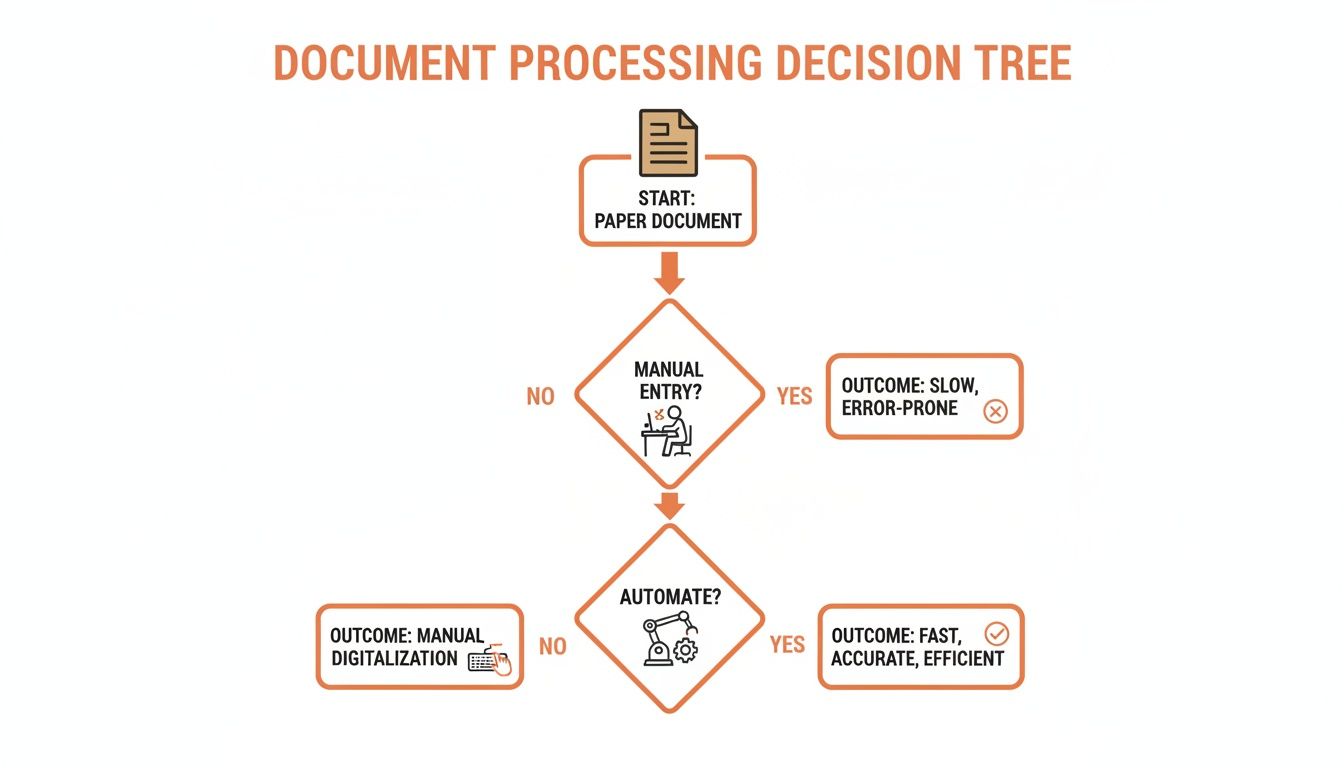
As you can see, while automation is clearly the most efficient path, the specific tool you choose really depends on the complexity of your documents and your team's resources.
The Fast Lane: Specialized AI Extraction Services
Finally, we have what is almost always the most efficient option: using a specialized, purpose-built service like ExtractBill. These platforms are engineered for one job and one job only—extracting data from financial documents. Their AI models have been trained on millions of real-world invoices and receipts, so they don’t just see text; they understand its context.
When you send an image to a specialized service, you get back a perfectly structured, clean JSON object that’s ready for immediate use in your systems. No fuss, no post-processing.
- Standardized Fields: It instantly recognizes that "Invoice #," "Inv. No.," and "Invoice Number" are all the same concept and maps them to a single, consistent field in the JSON.
- Line Item Parsing: It intelligently pulls out every line item from complex tables, correctly separating the description, quantity, unit price, and total for each row.
- Sky-High Accuracy: Because the AI is hyper-focused on this one task, it achieves accuracy rates of 99.9% or higher, even when faced with messy or unfamiliar document layouts.
This approach strips away nearly all the development and maintenance headaches. It's the "fully serviced vehicle" I mentioned earlier—you just turn the key and get the results you need, right away. You can see exactly what this clean, structured output looks like by checking out the ExtractBill JSON schema documentation.
The DIY Approach: Building Your Own OCR Pipeline
For the developers out there who love getting their hands dirty and want full control, building a custom image to json pipeline from scratch can be a really rewarding project. This path means you're piecing together open-source tools to build a workflow that cleans up an image, pulls out the text, and then wrangles that text into a structured format. It’s the most hands-on method, giving you deep insights into how it all works, but it definitely comes with its own set of headaches.
The journey almost always starts with a Python environment. It's the go-to for this kind of work because of its killer ecosystem of libraries for image processing and data manipulation. You'll be leaning heavily on two main workhorses: OpenCV for getting your images into shape and Tesseract for the actual Optical Character Recognition (OCR).
Preprocessing: The Key to Accuracy
Before you even think about extracting text, you’ve got to clean up the image. Raw photos of invoices or receipts are rarely perfect—they're often skewed, poorly lit, or full of digital "noise." If you feed a messy image straight into an OCR engine, you're just asking for a garbled, unusable wall of text.
This is where preprocessing with a library like OpenCV isn't just nice to have; it's non-negotiable. A few key steps here can make a world of difference for your OCR results:
- Binarization: This fancy term just means converting a grayscale image into a pure black-and-white one. By setting a clear threshold, you make the text pop against the background, which is way easier for an OCR engine to read.
- Noise Reduction: Techniques like a Gaussian blur can smooth out an image, getting rid of random pixel variations (noise) that the OCR might mistake for parts of a character.
- Deskewing: Documents are often scanned or photographed at a slight angle, making the text tilted. Deskewing algorithms find that tilt and rotate the image back to being perfectly horizontal. This is a crucial step for reading text line by line.
Honestly, skipping these prep steps can tank your OCR accuracy by 20-30% or more. The text you get back would be almost useless for any kind of automated parsing.
From Image to Raw Text with Tesseract
Okay, so your image is clean and prepped. Now it's time for the main event: the OCR. Tesseract is the undisputed champ of open-source OCR engines. It started at HP and is now maintained by Google. It’s fantastic at recognizing characters in a clean image, but it's really important to know what it can't do.
Tesseract’s job is just to read characters and words. It has zero understanding of a document's structure. It doesn’t know what an invoice number is, where a table of line items starts, or how to tell a subtotal from a tax amount. It just spits out one long, unstructured string of every bit of text it found.
This flowchart shows the typical steps you'd build into a DIY pipeline.
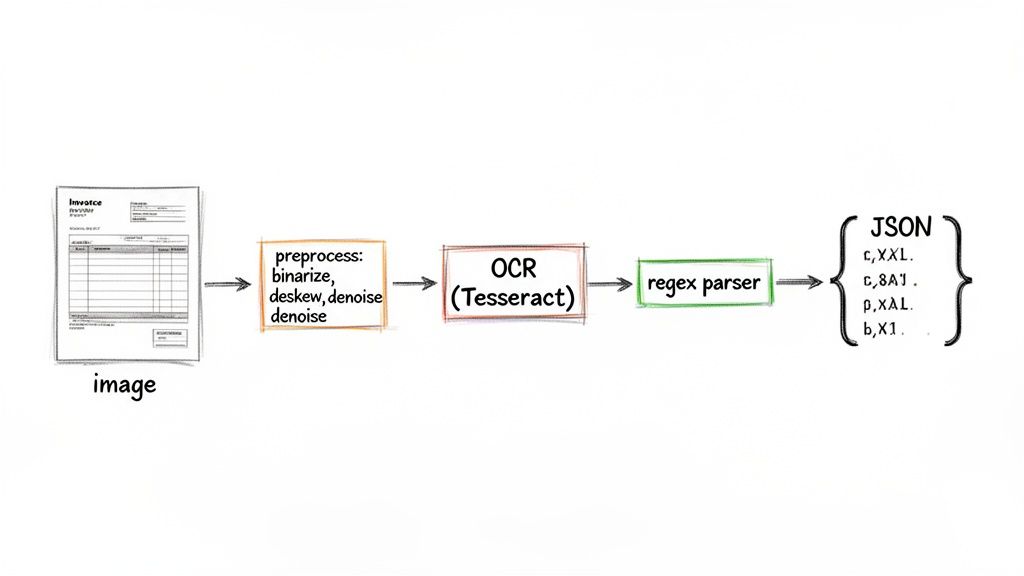
As you can see, OCR is just one piece of the puzzle. The real beast is the custom parsing logic you have to write to turn that raw text into something meaningful. This is where most DIY projects get stuck.
The Parsing Puzzle: Turning Text into JSON
So now you have a prepped image and a big block of raw text. The final and, by far, the most difficult step is parsing this unstructured mess into a clean JSON object. This is where you'll sink the majority of your development time, writing custom logic—usually a ton of regular expressions (regex)—to hunt down and extract specific bits of information.
For instance, you might write one regex pattern to find anything that looks like a date, another to find a dollar amount that comes after the word "Total," and a third to guess at the vendor's name.
The big challenge with the DIY approach isn't the OCR. It's building and—more importantly—maintaining a fragile parsing system. A tiny layout change on a vendor's invoice can shatter your regex patterns, sending you back to the drawing board.
This manual parsing is also where the DIY method completely falls apart with complex documents. Trying to extract individual line items from a table is a classic nightmare, since you have to write logic that can somehow figure out rows and columns from a flat string of text.
While you might get this working for one specific document format, it becomes a maintenance nightmare when you need to process invoices from dozens or hundreds of different vendors, each with its own layout. If you're dealing with varied document types, you might find some useful strategies by looking into how to convert a PDF to JSON, since PDFs sometimes contain more structural hints than a flat image.
Globally, a staggering 80% of businesses are still bogged down by manual data entry. But AI-powered tools are slashing that effort by 85% by handling complex tables and line items at scale. In places like the U.S. and EU, where AP teams manage 1.2 trillion transactions every year, a tool that can turn an image into JSON in 2-5 seconds can cut error rates from 4% down to less than 0.1%.
At the end of the day, the DIY route is a fantastic learning experience, but it often proves too brittle and high-maintenance for a real-world production system that needs to handle a variety of documents reliably.
Using Cloud AI Services for Smarter Extraction
If building a custom OCR pipeline from the ground up feels like a heavy lift, there's a powerful middle ground. Instead of assembling your own engine, you can tap into the massive infrastructure and advanced models from big cloud providers like Google Cloud Vision or AWS Textract. This approach gets you beyond basic text recognition and into the realm of intelligent document understanding.
These services aren't just simple OCR tools; they are sophisticated machine learning platforms. They’ve been trained on enormous datasets, which means they do more than just read characters. They can actually identify the inherent structure within a document, recognizing key-value pairs (like "Invoice Number" and its value) and even parsing the complex layout of tables.
This means when you convert an image to JSON with a cloud AI service, you get a much more organized starting point than the raw, messy text from a local library.
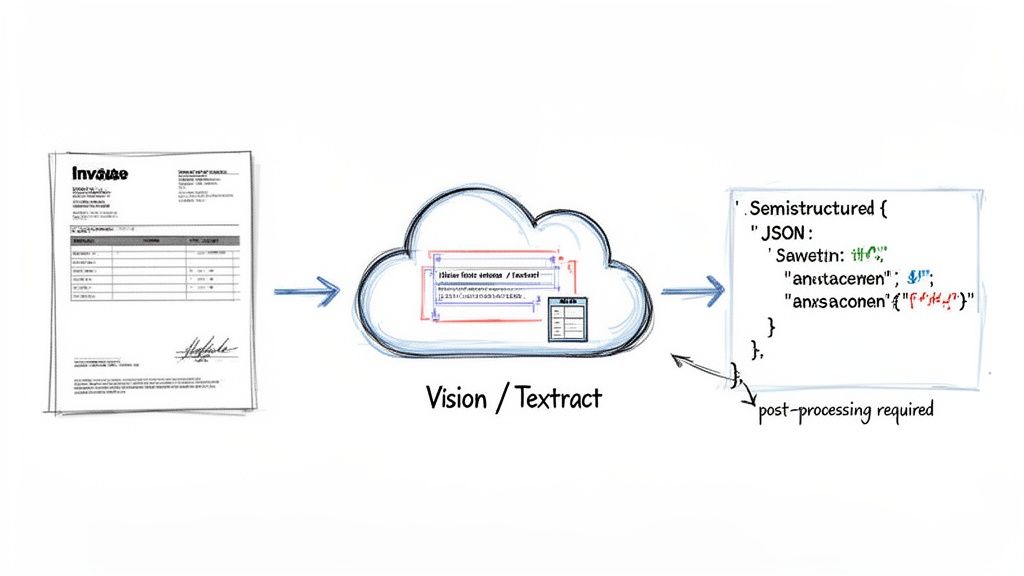
Making the API Call
Getting started is usually pretty straightforward. You'll need an account with your chosen provider (AWS, Google Cloud, etc.), your API keys, and their client library to send your image file. The process typically involves authenticating your application, loading the image, and then hitting a document analysis endpoint with a single API call.
For instance, with AWS Textract, you might use the AnalyzeDocument function. This is far more powerful than the basic DetectDocumentText call because it’s built specifically to pull out forms and tables. You just send the image bytes, and in a few seconds, a detailed JSON response lands back in your lap.
Decoding the Semi-Structured Response
Now, this is where the real work begins for a developer. The JSON you get back from a general-purpose cloud AI service is incredibly detailed, but it's also very generic. Think of it as a comprehensive map of every piece of text, its exact location (bounding box coordinates), confidence score, and relationship to other elements on the page.
But here’s the catch: it’s not a clean, application-ready invoice object. You’ll get a massive payload that tells you a block of text labeled "Vendor Name" was found next to "ABC Corp." It's entirely up to you to write the code that translates this into a simple "vendor_name": "ABC Corp" field in your final schema. This post-processing step is the main hurdle with this approach.
The JSON from a general AI service gives you the building blocks—the text, its location, and some structural hints. But you are still responsible for assembling those blocks into a finished, usable structure that your application can understand.
You'll have to build a custom mapping layer in your code. This logic needs to loop through the API response, pick out the key-value pairs you care about, find and reconstruct tables piece by piece, and standardize all the field names into your desired format.
The Post-Processing Hurdle
Let's walk through a real-world example. Say you need to pull the line items from an invoice table. AWS Textract might give you a series of "CELL" blocks, each tagged with row and column indices. Your Python script would have to:
- Iterate through every single block in the API response.
- Filter for all blocks with a
BlockTypeof "CELL". - Group all these cells together based on their
RowIndex. - For each row, map the cell in
ColumnIndex1 to adescriptionfield, column 2 toquantity, and so on. - Finally, assemble all of this into a
line_itemsarray in your JSON object.
This requires a good bit of custom code. You also have to handle all the variations you'll inevitably encounter in the wild—invoices where "Total" is labeled "Amount Due," or where date formats change completely. This logic can become complex and, much like the DIY approach, will need ongoing maintenance as you run into new document layouts.
Pros and Cons of Cloud AI Services
This method strikes a compelling balance between power and convenience, but it's crucial to weigh the trade-offs before diving in.
Advantages:
- Scalability and Reliability: You’re backed by the world-class infrastructure of a major tech company. No servers to manage.
- Advanced Models: You get access to powerful, constantly improving ML models without needing to hire an AI team.
- Reduced OCR Headaches: You can forget about the low-level headaches of image preprocessing and raw text extraction.
Disadvantages:
- Significant Post-Processing: The development effort required to turn the generic API response into clean, usable JSON is substantial.
- Cost at Scale: While it might seem cheap for a few documents, processing thousands of pages a month can get expensive quickly.
- Lack of Specialization: These models are generalists. They aren't fine-tuned for the specific nuances of financial documents like invoices or receipts, which can limit accuracy on tricky layouts compared to a purpose-built tool.
The Ultimate Solution: A Specialized AI Like ExtractBill
While local OCR libraries give you total control and big cloud APIs offer raw power, they both leave you with a mountain of development and maintenance work. If your goal is to convert an image to JSON quickly, accurately, and without the headaches, the best path forward is a specialized, purpose-built AI service.
This is where a solution like ExtractBill completely changes the game.
Unlike generalist tools that try to read everything, specialized services are fine-tuned on millions of financial documents. This gives them a deep, contextual understanding of what they're seeing. They don't just find the text "Invoice # 123"; they recognize that "Invoice #" is the key and "123" is its value, then intelligently map it to a standardized "invoice_id" field. Every single time.
It's this built-in intelligence that delivers a staggering 99.9% accuracy rate right out of the box.
Why Specialization Matters
A specialized AI knows the anatomy of an invoice. It instinctively knows where to look for the vendor’s name, how to tell a subtotal from a tax amount, and—most crucially—how to parse complex tables of line items correctly.
This completely eliminates the need for the fragile, custom parsing logic that constantly breaks in DIY and generalist API setups.
The result? Clean, structured, and predictable JSON output that’s ready for immediate use in your accounting software, ERP, or database. You get to skip the entire post-processing nightmare and start working with the data right away.
This level of precision is exactly what's driving the massive growth in the digital image processing market. The industry, valued at $93.27 billion in 2024, is projected to explode to $435.68 billion by 2035. According to Market Research Future, this surge is fueled by AI that can recognize complex document elements with high accuracy—the core strength of services like ExtractBill.
Integrating ExtractBill: A Practical Walkthrough
Getting started with ExtractBill is designed to be fast and developer-friendly. The whole process centers on a simple REST API call. You send an image file and, within seconds, you get back perfectly structured JSON. No complicated setup, no model training—just immediate results.
Here’s a look at how ExtractBill takes a messy, real-world document and turns it into clean, actionable data for your systems.
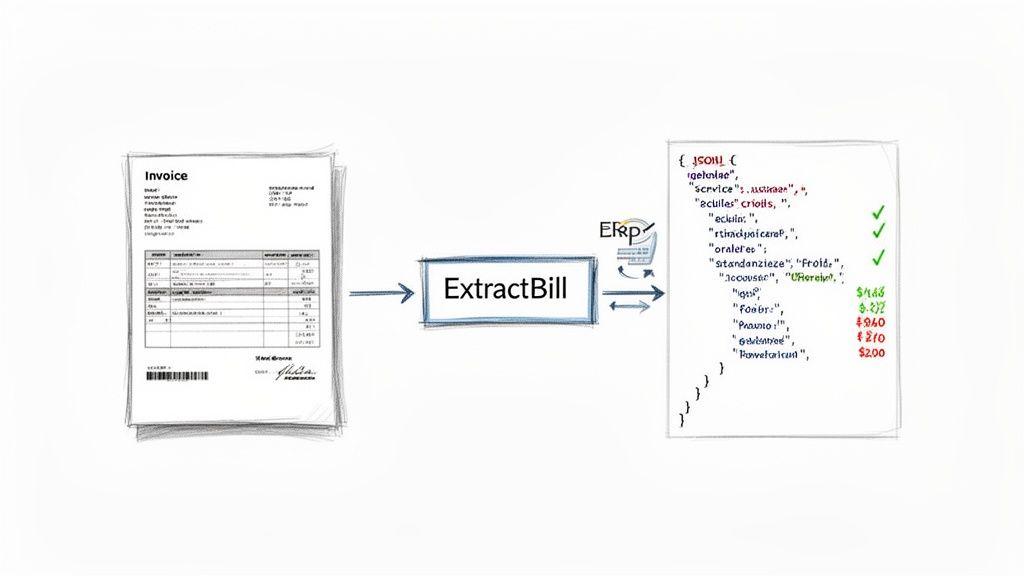
This is the end-to-end flow we're aiming for. Let's see how to make it happen with just a little bit of code.
Here’s a quick Python example showing how to upload an invoice and retrieve the JSON data.
import requests import json
Your ExtractBill API key
api_key = "YOUR_API_KEY"
Path to your invoice image file
file_path = "path/to/your/invoice.png"
url = "https://api.extractbill.com/v1/process"
with open(file_path, "rb") as f: files = {"file": (f.name, f, "image/png")} headers = {"x-api-key": api_key}
response = requests.post(url, files=files, headers=headers)

if response.status_code == 200:
    # Get the structured JSON data
    data = response.json()
    print(json.dumps(data, indent=2))
else:
    print(f"Error: {response.status_code}")
    print(response.text)
This simple script handles authentication, file upload, and prints the clean JSON response. The output structure is consistent every time, which makes integration a breeze.
Key Takeaway: With a specialized service, the code you write focuses on using the data, not on the complex and error-prone process of extracting it. This dramatically shortens development cycles.
Advanced Features for Scalable Workflows
Beyond a simple API call, a mature platform like ExtractBill comes with features designed for professional, high-volume workflows.
- Webhooks for Real-Time Processing: Instead of constantly polling the API to check if a document is ready, you can set up a webhook. ExtractBill will send a POST request to your URL the moment an extraction is complete, pushing the clean JSON data directly to your application. This is a must-have for building efficient, event-driven automations.
- Robust Error Handling: The API gives you clear error codes and messages, helping you build a more resilient integration. You'll know instantly if a file is corrupted or an API key is invalid, allowing your application to handle exceptions gracefully.
- Security and Performance: All data is transferred over encrypted connections. On the performance side, the system is built to handle thousands of documents in parallel, so you never get stuck in a queue. Each file is processed in just 2-5 seconds.
The platform’s transparent pricing—a flat $0.11 per document with no subscriptions—makes it accessible for any project, big or small. You can learn more about all the features ExtractBill offers on our site.
By offloading the heavy lifting of image-to-JSON conversion, you free up your team to focus on building value for your business, not maintaining a fragile data extraction pipeline.
Comparison of Image to JSON Conversion Methods
To put it all into perspective, here's a quick comparison of the three main approaches we've discussed. This should help you decide which path makes the most sense for your project's needs and resources.
| Feature | DIY (Tesseract + Custom Code) | Cloud AI API (e.g., Google Vision) | Specialized Service (ExtractBill) |
|---|---|---|---|
| Accuracy | Low to medium; highly dependent on image quality and tuning | Medium to high; good general text recognition | 99.9% out-of-the-box for financial documents |
| Development Effort | Very high; requires preprocessing, parsing logic, maintenance | High; requires post-processing and logic to structure data | Very low; a single API call returns structured data |
| Maintenance | High; must constantly update parsers for new document layouts | Low for the API itself, but high for your parsing code | None; the service is continuously updated for you |
| Cost | "Free" library, but very high in developer hours and infra | Pay-per-use, can be costly for post-processing compute | Simple, predictable pay-per-document pricing ($0.11/doc) |
| Key Use Case | Hobby projects, academic research, non-critical tasks | Extracting raw text from a wide variety of image types | High-volume, high-accuracy invoice and receipt processing |
| Speed to Market | Months | Weeks to months | Hours to days |
Ultimately, the choice comes down to a classic build-vs-buy decision. While DIY offers maximum control, and general APIs provide flexibility, a specialized service like ExtractBill delivers the fastest, most accurate, and most scalable solution for anyone serious about automating document data extraction.
Still Have Questions? We've Got Answers
Jumping into document automation, especially turning an image to JSON, naturally brings up a few questions. Whether you're a developer deep in the code or a business owner trying to figure out the best path forward, a few key details can make all the difference. Here are the most common questions we hear.
What’s the Best Image Format for Getting Accurate JSON?
For the best results, always start with high-resolution images. We recommend aiming for at least 300 DPI (dots per inch). You can’t go wrong with standard formats like PNG or a high-quality JPG. Simply put, the clearer the input, the more reliable the output.
Make sure the document is flat, well-lit, and doesn't have any weird shadows or skewed angles. While advanced services like ExtractBill are built to fix many of these imperfections automatically, giving the AI model a clean source image is the best way to minimize errors and get JSON you can trust.
How Do You Handle Complex Tables with Multiple Columns?
This is where you really see the difference between basic tools and advanced platforms. Most simple OCR libraries look at a table and just see a jumble of text, spitting out data that’s a nightmare to parse programmatically.
On the other hand, specialized AI services are trained specifically to recognize tabular structures. They don’t just see text; they see rows, columns, and cells. The service then intelligently parses the line items into a structured array inside the final JSON object. This means every item keeps its distinct fields—like 'description', 'quantity', 'unit_price', and 'total'—perfectly preserving the table's original layout.
Is It Safe to Upload Sensitive Invoices and Receipts?
Security is everything when you're dealing with financial data. When you're picking any image to JSON service, the first thing you should check for is end-to-end encryption, like TLS/SSL, for every single data transfer.
Reputable platforms are built from the ground up with security in mind. They often process documents in memory without storing them long-term, unless you specifically tell them to. Always take a minute to review a provider’s privacy policy and security docs. If you go the DIY route, just remember that all the responsibility for securing your infrastructure and data falls on you.
Can You Convert Handwritten Receipts to JSON?
Honestly, converting handwritten text is a whole different ballgame compared to printed characters. It’s significantly harder. While some advanced AI models are getting surprisingly good at handwriting recognition, the accuracy can still be a bit hit-or-miss depending on how clear the writing is.
In general, specialized services will give you a much higher success rate than off-the-shelf OCR libraries. The best thing to do is test a few of your own real-world documents. A platform like ExtractBill is fine-tuned for printed documents, but its AI is powerful enough that it can often process clear, block-style handwriting with great results.
Ready to stop wrestling with document data and start automating? ExtractBill converts your invoices and receipts into clean, structured JSON in seconds. Get started with three free documents today and see just how easy it can be.
Ready to automate your documents?
Start extracting invoice data in seconds with ExtractBill's AI-powered API.
Get Started for Free