How Receipt Scanner Software Unlocks Business Automation
Receipt scanner software is the tech that finally kills off the shoebox full of crumpled receipts. It’s a tool that takes a picture or a scan of a receipt and uses AI to automatically pull out all the important financial data—who you paid, when you paid them, and how much.
It completely replaces the soul-crushing, error-filled chore of typing everything into a spreadsheet by hand. For businesses, this isn't just a time-saver; it's a massive leap in financial accuracy.
Putting an End to Manual Data Entry
Imagine turning that chaotic pile of paper into a perfectly organized, searchable digital archive in minutes. That’s the real magic of modern receipt scanner software. This isn’t just some simple utility; it’s a strategic fix for the age-old headache of processing financial documents one by one.
For small business owners juggling a million tasks, finance teams buried in paperwork, or developers building automated workflows, this software acts like a tireless digital assistant. The days of squinting at faded ink, punching line items into spreadsheets, and chasing down missing expense reports are finally over. Now, a quick photo or file upload is all it takes to capture crucial information with incredible precision.
The Foundation of Financial Automation
Think of this software as the first, most important domino to fall in your financial workflow. By automating the very first step—getting the data off the paper—it sets off a chain reaction of efficiency. Businesses can make smarter, faster decisions when their financial data is accurate and available right now, not next month.
The switch from manual to automated processing is about more than just convenience. It’s about turning a time-sucking administrative burden into a streamlined, value-adding part of your business. You're literally buying back employee hours that can be spent on growing the company.
What You Will Learn in This Guide
In this guide, we’re going to pull back the curtain on how receipt scanner software actually works, from the AI under the hood to its practical, real-world uses. We’ll look at how it solves common business problems and give you a clear roadmap for picking the right solution. By the end, you'll know exactly how to use this tech to automate key processes and say goodbye to manual data entry for good.
The benefits are immediate and obvious:
- Eliminate Human Error: Automated extraction gets rid of the typos and misreads that always creep into manual entry.
- Save Valuable Time: Teams can slash the time spent on data entry by over 80%, freeing them up for work that actually matters.
- Improve Financial Visibility: Get a real-time snapshot of expenses and spending without having to wait for a painful month-end reconciliation.
We’ll cover the must-have features, explore powerful ways to integrate it into your existing systems, and explain how a data extraction API can unlock even deeper automation for your unique workflows.
How AI and OCR Work Together to Read Receipts
Every receipt scanner relies on a killer partnership between two technologies: Optical Character Recognition (OCR) and Artificial Intelligence (AI). Getting how these two work together is the key to understanding why modern tools are so much better than the basic scanners of the past.
Think of OCR as the system’s “eyes.” Its only job is to look at a picture of a receipt—whether it’s a perfect PDF or a crumpled photo from your phone—and turn the squiggles and lines into digital text. It can see the letters "C-o-f-f-e-e" and the numbers "$4.50," but that's where its job ends. On its own, OCR has zero clue what any of that means.
That’s where AI steps in. If OCR gives us the raw words, AI acts as the “brain” that provides context and understanding. It doesn't just see the characters for "Coffee Shop"; it knows that string of text is the merchant’s name. It sees "$4.50" next to the word "Total" and instantly understands that's the final amount paid.
From Raw Text to Structured Data
This AI-powered interpretation is what truly separates a basic text scraper from advanced receipt scanning software. The AI has been trained on millions of receipts, so it’s learned all the common—and not-so-common—layouts. It knows how to spot a subtotal versus a tax amount, pull out individual line items, and find the transaction date, no matter where it's hiding on the page.
Let's try a different analogy. Imagine you hand a grocery list to two different people.
- OCR is like someone who can read the words. They can tell you the list says "Milk," "Eggs," and "Bread."
- AI is like an experienced chef. They not only read the list but understand you're likely making breakfast, know to grab 2% milk and a dozen large eggs, and might even suggest you pick up some bacon while you're at it.
This process is all about turning messy paper into clean, useful data, which is exactly what this visual shows.
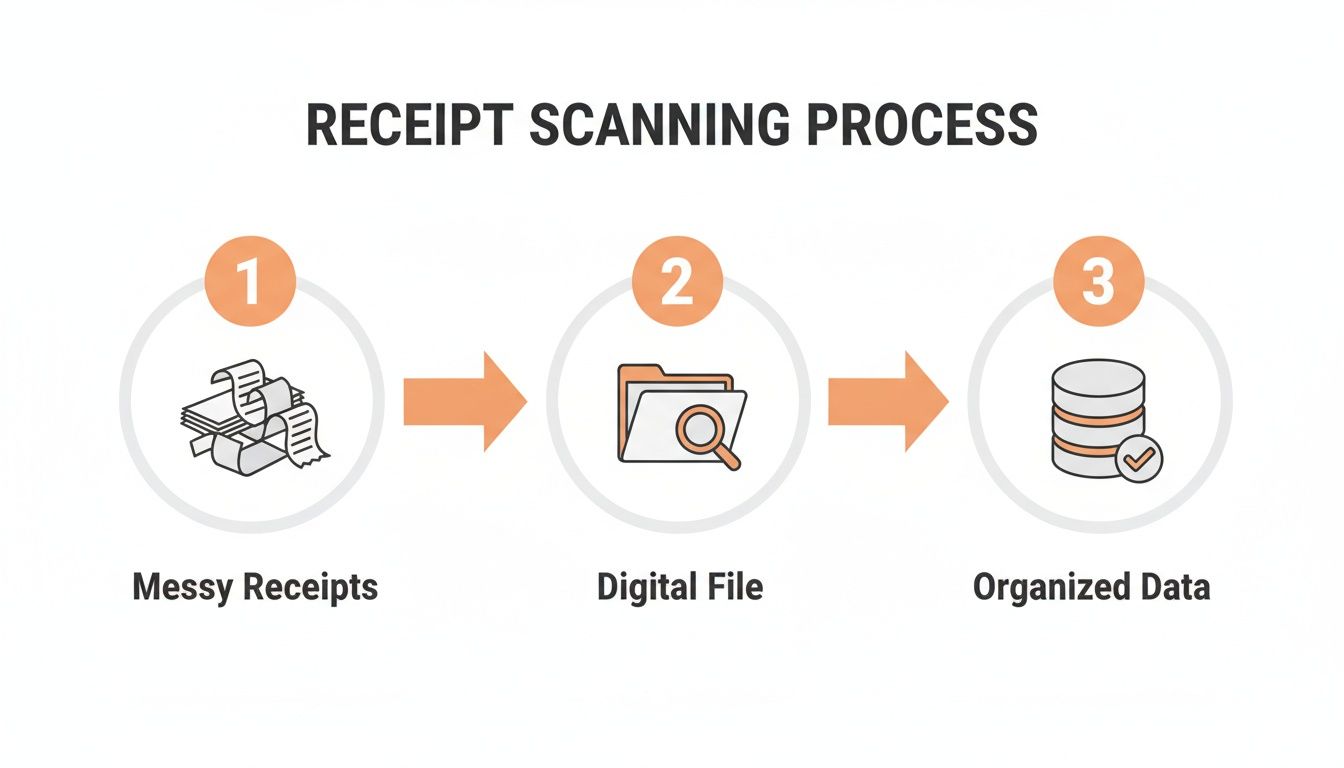
It’s a simple workflow on the surface, but it’s this transformation from physical clutter to digital clarity that delivers all the value.
The Technical Workflow Explained
So, what actually happens behind the scenes when you use a modern service? It's a surprisingly quick operation that boils down to three main steps, usually taking just a few seconds from start to finish.
- Document Upload: First, you send in your receipt. This could be a PDF, a JPG, or a PNG file. Good services let you do this through a simple drag-and-drop on their site or programmatically via an API.
- AI-Powered Processing: The second your file hits the server, the AI engine fires up. It uses OCR to digitize the text, then its intelligence models get to work identifying, categorizing, and pulling out every key data point—the vendor, date, line items, taxes, totals, and more.
- Structured JSON Output: Finally, instead of spitting back a messy text file, the software organizes everything it found into a clean, structured format like JSON. This format is the universal language of software, making it instantly ready to be plugged into your accounting system, ERP, or any other application.
This huge leap in technology is why AI-driven receipt scanning has sent accuracy rates through the roof. In the travel and expense world, for example, AI boosted accuracy from 85% to 93% in just a few years. That single improvement cut the need for manual corrections by a whopping 49%. And with 76% of employees now submitting expenses from their phones, that level of automation is no longer a luxury—it’s a necessity.
This tag-team of OCR and AI turns a simple picture into a genuine business asset. You're not just getting a digital copy of a receipt; you're getting a perfectly organized dataset ready to power your bookkeeping, expense reports, and financial analytics, all without a human lifting a finger. If you want to get into the nitty-gritty of how it all works, you can dig deeper in our guide on OCR for receipts.
What to Look for in a Scanner Solution
Picking the right receipt scanner software is about more than just grabbing the first option you see. With a flood of tools on the market, you need a checklist to tell the difference between a basic gadget and a genuine automation partner that actually impacts your efficiency and bottom line.
Think of it this way: the best software doesn't just scan; it understands. It turns a simple photo into structured, reliable data your business can use immediately. Let's break down the non-negotiable features you should be looking for.
Uncompromising Data Extraction Accuracy
Accuracy is everything. If a tool consistently messes up vendor names or totals, it creates more work, not less. Your team ends up in a frustrating loop of manually checking and fixing data, which completely defeats the point of automating in the first place.
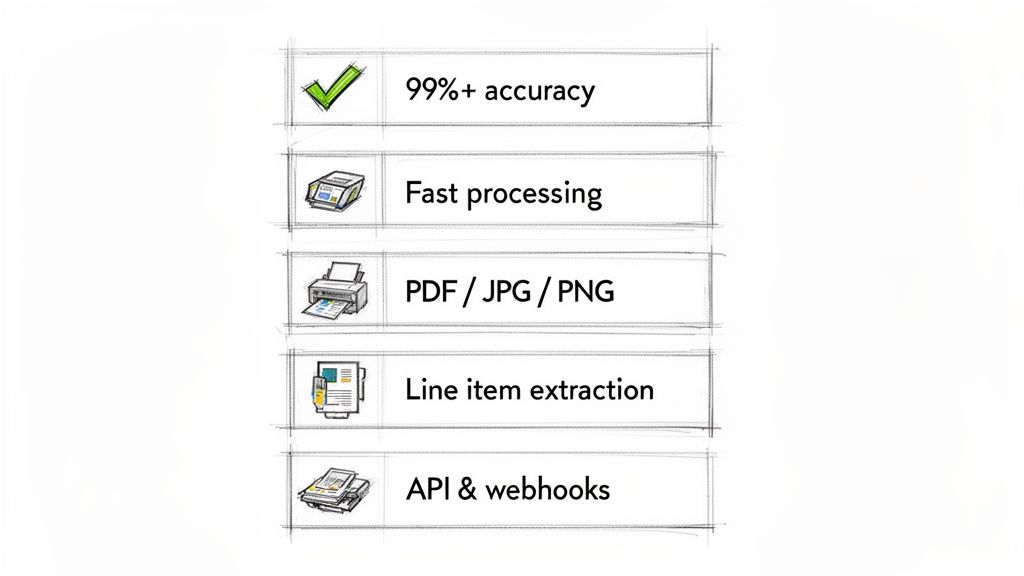
Look for providers that openly advertise 99% accuracy or higher. That isn't just a marketing gimmick; it’s a direct measure of how good their AI is. High accuracy means you can trust the data flowing into your accounting system, leading to fewer errors, faster month-end closes, and reports you can actually rely on.
Lightning-Fast Processing Speed
In business, time is a resource you never get back. A scanner that takes several minutes to process one receipt creates a serious bottleneck, especially when you're dealing with hundreds or thousands of them. Modern, AI-powered tools should give you results in seconds.
A top-tier service should process a standard receipt in just 2 to 5 seconds. This kind of speed makes real-time workflows possible—like instant expense approvals or immediate updates to your accounts payable ledger. It turns a clunky batch process into a smooth, continuous flow.
Versatile Support for Multiple File Types
Receipts and invoices come from everywhere and in every format. A flexible scanner has to handle them all without a fuss. This ensures you have one consistent workflow, no matter where the document came from.
Your checklist for file support should absolutely include:
- PDFs: The go-to for official invoices and digital statements.
- JPGs and PNGs: Critical for handling photos of paper receipts snapped on a smartphone.
- Other common image files: Bonus points for supporting formats like TIFF or HEIC.
This versatility saves you from annoying upload errors and empowers your team to capture data from any source, whether it’s a scan from the office printer or a quick photo from the field.
Detailed Line Item Extraction
Getting the vendor, date, and total amount is table stakes. The best software goes much, much deeper. Line item extraction is the game-changing feature that separates the truly useful tools from the basic ones. It means the software identifies and digitizes every single product or service listed on the receipt.
This level of detail is gold for financial analysis. It lets you track spending by specific categories, manage inventory with precision, and get a crystal-clear view of where your money is actually going. Without it, you’re flying half-blind. You can explore the full range of data extraction capabilities that platforms like ours offer.
Robust Developer Tools for Automation
If you plan to integrate receipt scanning into your own apps or workflows, then developer tools are non-negotiable. A well-documented RESTful API and support for webhooks are the keys to unlocking true, hands-off automation.
An API lets your developers send documents and get structured JSON data back programmatically, allowing you to build custom workflows that fit your exact needs. Webhooks finish the job by sending real-time alerts when a document is processed, which can automatically trigger the next step in your process, like creating a new entry in your ERP system. These tools turn the software from a simple app into a core, seamless part of your entire tech stack.
The demand for this kind of efficiency is exploding. The global receipt scanners market is on track to grow from USD 6.88 billion in 2025 to USD 11.15 billion by 2033. It’s all driven by the need for smarter, faster, and more integrated digital workflows.
How Different Industries Put This Tech to Work
The real magic of receipt scanning isn't just the tech itself—it's what it unlocks in the real world. Across completely different fields, this tool is fundamentally changing how businesses manage their money, freeing up people from the soul-crushing grind of paperwork.
It's not some rigid, one-size-fits-all solution. Think of it more like a flexible engine for automation that can be tuned for anyone from a solo consultant to a massive accounting firm. The end goal is always the same: turn a messy pile of paper into clean, usable data.
Let's look at a few examples of how this plays out day-to-day.
For the Freelance Consultant on the Go
Picture a management consultant who practically lives out of a suitcase, flying to client meetings three weeks a month. Her wallet is a graveyard for receipts—flights, hotels, client dinners, Ubers. Before, she’d block out the last weekend of the month for the dreaded "expense report ritual": sorting, taping, and typing every single line item into a spreadsheet. It was slow, painful, and a recipe for typos.
Now, she just uses a mobile receipt scanner app. The second a cashier hands her a receipt, she snaps a picture.
- The software instantly pulls the vendor, date, and total amount.
- It's smart enough to categorize the expense as "Travel" or "Meals."
- Everything zips straight over to her cloud accounting software.
What used to be an 8-hour administrative headache is now done in literally seconds. She gets that time back to focus on billable work and never again has to worry about missing a deductible expense.
For the Busy Accounting Firm
Now, let's shift gears to a mid-sized accounting firm juggling the books for dozens of small businesses. Every month, they get hit with a tidal wave of documents—emailed PDFs, scanned images, and even shoeboxes full of physical receipts. The firm’s junior accountants used to burn the entire first week of the month just on mind-numbing data entry.
By bringing in a powerful receipt scanner with batch processing, they completely flipped their workflow on its head. They can now dump an entire client's folder of documents into the system at once, and the AI engine chews through all of them simultaneously.
This leap from one-by-one data entry to automated batch processing isn't just an improvement; it's a total game-changer for productivity. It lets firms take on more clients without hiring more data-entry staff, which directly boosts their bottom line.
With structured data ready almost instantly, the accountants can close the books faster, give clients quicker financial reports, and spend their time on high-value advisory services instead of being glorified typists.
For the Developer at a Growing SaaS Company
Finally, think about a developer working at a SaaS company that builds project management software. They want to add an expense-tracking feature so users can attach receipts directly to projects. Building their own OCR and AI from scratch would be a massive, expensive detour. So instead, they just integrate a receipt scanning API.
This one move gives their platform a whole new set of powerful features:
- A Smooth User Experience: Users can upload a receipt right inside the app, and all the key data fields populate on their own. No more manual entry.
- Automated Workflows: The API’s clean JSON output can kick off other processes, like pinging a manager for approval through a webhook notification.
- Insanely Fast Time-to-Market: They can launch a killer new feature in a few weeks, not the many months it would take to build it themselves, giving them a huge leg up on the competition.
This shift away from paper is only getting faster. The digital receipts market was valued at USD 1.732 billion in 2024 and is expected to explode to USD 9.145 billion by 2035 as more companies chase automation. You can dig into the numbers in the full digital receipts market growth report from marketresearchfuture.com. By using an API, our SaaS company is perfectly positioned to ride that wave.
Automating Financial Processes with APIs and Webhooks
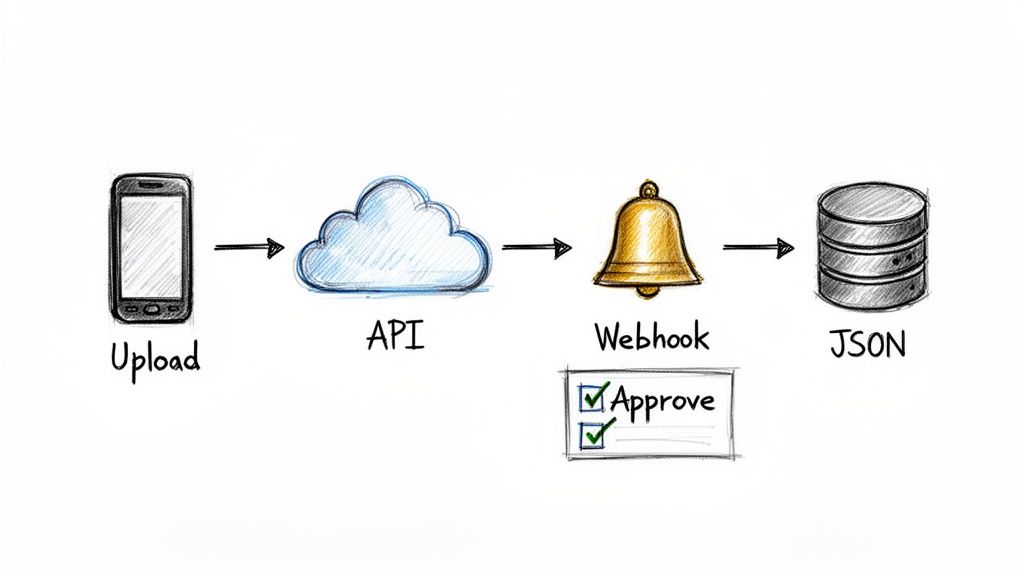
For developers and businesses trying to build genuinely hands-off financial systems, the real magic of modern receipt scanner software isn't just in its user interface. It's in the tools that let you weave this power directly into your own applications: APIs and webhooks.
Think of an API (Application Programming Interface) as a secure messenger that lets different software systems talk to each other. A good RESTful API turns receipt scanning from a manual chore into a programmable service. Instead of uploading files one by one, your own application can automatically send documents for processing and get clean, structured JSON data back.
This completely changes the game for custom automation. You could build a feature right into your company’s internal portal for employees to submit expenses, and the API would handle all the data extraction heavy lifting behind the scenes.
The Power of the API in Action
Let’s say you have an accounts payable system that needs to process hundreds of vendor invoices every single day. With an API, that whole workflow becomes slick, efficient, and almost entirely automatic.
- Programmatic Submission: Your system sees an incoming invoice PDF and automatically forwards it to the receipt scanner software’s API endpoint.
- Instant Data Extraction: In seconds, the AI engine gets to work, pulling out every critical field—vendor name, invoice number, line items, totals, you name it.
- Structured JSON Response: The API sends this data back in a perfectly organized JSON format, ready for your system to read and use.
- Automated Entry: Your accounting software takes that clean data and creates a new bill payable. No human ever had to touch it.
This approach is built for volume. An API can chew through thousands of documents at once without breaking a sweat, something a manual process could never hope to match. It’s the engine that drives true enterprise-level financial automation.
Webhooks: The Real-Time Automation Trigger
So, if the API is the messenger that carries requests and delivers data, a webhook is the instant alert that tells your system when something important has happened. It's a real-time ping sent from the scanner service to your application the very moment a task is finished.
It’s like getting a package delivery notification on your phone. You don't have to keep refreshing the tracking page (polling the API); the system tells you the instant the package arrives (the webhook fires). It’s a much smarter way to work.
By using webhooks, you can build event-driven workflows that react instantly. The moment a receipt is successfully processed, a webhook can trigger the next action in your chain, creating a truly automated, end-to-end process.
For example, the moment the scanner software finishes pulling data from an employee’s expense receipt, a webhook could kick off a whole chain of events:
- Instantly create an approval request in your expense management tool.
- Ping the employee’s manager in Slack or via email.
- Update a corresponding record in your company’s ERP system.
This combination—a powerful API for data exchange and responsive webhooks for real-time triggers—is the bedrock of modern financial automation. You can learn more about getting this set up in our guide on using webhooks for instant alerts. It’s how developers move beyond simple data extraction to build sophisticated, scalable systems that save countless hours and eliminate the risk of human error.
Alright, let's get into what really matters: picking the right partner to handle your receipt processing. This is where the rubber meets the road. You can understand all the tech in the world, but if you choose the wrong service, you’re back to square one.
Choosing a partner ties everything we’ve talked about together—accuracy, speed, integration, and the ability to grow. You’re not just buying a tool; you're investing in the backbone of your financial workflow. Get this right, and you’ll solve today’s headaches while setting yourself up for future growth.
The Modern Provider Checklist
A top-tier receipt scanning partner needs to deliver on a few non-negotiable promises. These aren't just fluffy features on a pricing page; they are the absolute essentials for getting a real return on your investment. Be wary of any provider who isn't upfront about where they stand on these.
Here’s what you should be grilling them on:
- Near-Perfect Accuracy: Look for a guarantee of 99% or higher. Anything less means your team is still doing manual corrections, which completely defeats the point of automating in the first place.
- Blazing-Fast Speed: You need data in real-time. A quality service processes a receipt in 2–5 seconds, not minutes. Slow processing creates bottlenecks, and that's exactly what you're trying to eliminate.
- Developer-First Tools: If you’re serious about automation, a solid, well-documented API with webhook support is a must-have. This is what allows your developers to build the seamless, custom workflows that give you a competitive advantage.
- Scalable Infrastructure: The system shouldn't buckle under pressure. Whether you're sending one receipt or a thousand, the speed and performance should stay consistent. True scalability means no queues, no delays, no excuses.
Think of it like hiring a key team member. You need someone who is reliable, incredibly efficient, and doesn't crack under pressure. A service that nails accuracy and speed is one you can trust with a critical part of your business.
The Advantage of Usage-Based Pricing
For startups and growing businesses, predictable costs are king. This is where simple, usage-based pricing blows complex, long-term contracts out of the water. With a pay-as-you-go model, you only pay for what you actually process. It’s that simple.
This approach completely removes the risk of getting locked into a pricey subscription that you don't fully use. It gives you the freedom to scale up during your busy season or dial it back during quieter months without getting hit with financial penalties. The provider’s success is directly tied to yours—the way a real partnership should be.
Empowering Your Entire Organization
At the end of the day, the right receipt scanner helps everyone. Your finance team is freed from the soul-crushing, error-prone task of manual data entry, letting them focus on high-value work like financial strategy and analysis. They get the clean, real-time data they need to close the books faster and with more confidence than ever before.
At the same time, you’re handing your developers a powerful set of tools. With a great API and webhooks, they can innovate. They can automate accounts payable from the ground up, build slick expense approval flows, and weave financial data into every part of your tech stack.
The best way to know if a partner is the real deal? Try them out. Take advantage of a free trial to see the speed and accuracy for yourself. You’ll quickly see just how much a modern receipt scanning service can do for your business.
Of course. Here is the rewritten section, following all the specified requirements.
Frequently Asked Questions
Digging into receipt scanner software usually brings up some great questions. Let's tackle the ones we hear most often so you can feel confident you're making the right move.
How Secure Is My Financial Data with This Software?
This is the big one, and it should be. The short answer is: top-tier providers treat your data like gold. When you're looking at different options, make sure they use secure, encrypted connections like TLS/SSL for uploading and processing your documents. That's non-negotiable.
The best services also have strict data retention policies. A trustworthy provider will automatically and permanently scrub your data after a short processing window, which massively cuts down on risk. Always read the security and privacy policies to see if they line up with regulations like GDPR. If they aren't transparent about security, walk away.
Can This Software Read Handwritten or Foreign Receipts?
This is where you can really separate the basic tools from the advanced ones. Your average OCR tool will choke on sloppy handwriting, but modern AI-powered platforms are trained on huge, diverse datasets. This lets them recognize a surprising range of handwriting styles with pretty impressive accuracy.
Likewise, the best services are built for a global world. They can handle dozens of languages and intelligently pull data from receipts using different currencies, date formats, and tax systems. If your team travels internationally or deals with handwritten invoices, you absolutely have to confirm these capabilities before you commit.
A tool that handles both printed and handwritten text across multiple languages is a huge win. It means you don't have to juggle different solutions, creating a single, consistent workflow for all your financial documents, no matter where they come from.
What Is the Difference Between a Mobile App and an API Service?
Knowing the difference here is key to picking the right tool for the job. A mobile scanner app is a self-contained product—perfect for a freelancer who needs to track expenses on the go. It solves one person's problem, and it does it well.
An API-based service, however, is a developer tool designed for large-scale automation. It lets a business plug receipt scanning and data extraction right into its own software—think accounting platforms, ERP systems, or a custom-built expense portal.
Put simply, a mobile app is something you use. An API is a building block you use to create seamless, automated financial workflows that serve your entire company.
Ready to see just how fast and accurate AI-powered data extraction can be? ExtractBill turns your receipts and invoices into structured JSON in seconds. Try it for free and automate your financial workflow today.
Ready to automate your documents?
Start extracting invoice data in seconds with ExtractBill's AI-powered API.
Get Started for Free