Automate Document Workflow for Invoices and Receipts
If you’re still pushing paper—or the digital equivalent—you’re not just “wasting time.” You’re actively bleeding resources. Manual document processing is a direct drain on your company, creating costly errors, frustrating your vendors, and tying your best people to soul-crushing, low-impact work.
Why Manual Document Processing Is Holding You Back
Before we dive into building an automated workflow, we need to get real about the problem. The true cost of manual processing isn't just an inconvenience; it's a strategic liability that quietly sabotages your finances, tanks team morale, and hands your competitors an easy advantage.
The financial hit is usually the first thing people notice. Manual data entry is a recipe for human error, leading straight to overpayments, compliance headaches, and financial reports you can't trust. Then, you have to spend even more time and money fixing those mistakes. It's a vicious cycle. A single misplaced decimal point or a missed due date can trigger late fees or, even worse, duplicate payments that come directly off your bottom line.
The Hidden Costs of Inefficiency
Beyond the obvious financial leaks, manual processes create a kind of operational sludge that slows everything down. When invoices get stuck in someone's inbox or pile up on a desk waiting for a signature, you create bottlenecks that kill your agility. This isn't just an internal headache; it damages your relationships with suppliers and vendors who depend on you for timely payments.
Then there's the scaling problem. You simply can't grow a business on manual workflows. As your document volume climbs, your costs go right up with it, and those chokepoints get tighter, strangling your growth. This is the daily reality for many finance departments, where staff can burn up to 20 hours a week just on manual data entry.
The fundamental issue with manual workflows is that they force your team to focus on processing instead of analyzing. They’re stuck chasing approvals and verifying invoice numbers when they could be spotting spending trends or negotiating better terms with vendors.
Let's quickly compare the two worlds.
Manual vs Automated Document Workflow Comparison
The difference becomes stark when you lay it out side-by-side. It’s not just a minor improvement; it’s a complete operational shift.
| Metric | Manual Workflow | Automated Workflow |
|---|---|---|
| Data Entry Time | 5-15 minutes per document | < 5 seconds per document |
| Error Rate | 3-5% on average | < 0.5% with validation rules |
| Cost Per Invoice | $12 - $30 | $2 - $5 |
| Approval Time | Days or weeks | Minutes or hours |
| Scalability | Low (requires hiring more staff) | High (handles volume spikes easily) |
| Data Visibility | Poor (siloed in emails/desks) | Excellent (centralized, real-time) |
As you can see, automation doesn't just speed things up—it fundamentally changes the cost, accuracy, and strategic value of your entire document management process.
The Shift Toward Intelligent Automation
This is exactly why businesses are ditching manual work in droves. The global Document Automation Software market is on track to hit $5.8 billion in 2025, growing at a steady 12% CAGR. This isn't just hype; it's a direct response to very real operational pain. Companies that make the switch often see 20% extra cost reductions within three years, freeing up a massive amount of capital and talent.
And this isn't just about invoices. For example, knowing how to automate expense reports is another huge win where teams can claw back hundreds of hours.
When you connect these tangible pain points to a clear solution, workflow automation stops being a vague "IT project" and becomes a critical business strategy for improving cash flow and unlocking your team’s true potential.
Laying the Foundation: Architecting Your Automated Workflow
Okay, we’ve covered the why of automation. Now for the fun part: the how. Building a system to handle documents automatically isn't about flipping a single switch. It’s about thoughtful design—crafting a logical, resilient architecture that becomes the blueprint for your entire process. The goal is to create a well-oiled machine that turns messy, unstructured documents into clean, actionable data.
A solid architecture is built in distinct, interconnected stages. Think of it like a digital assembly line. Each station has a specific job, and together they ingest, process, and deliver information with almost no human touch. This modular approach is key, as it makes the system much easier to build, debug, and scale later on.
This simple comparison shows just how big the shift is from the old way of doing things—slow, riddled with typos, and constantly needing review—to a modern, automated flow.
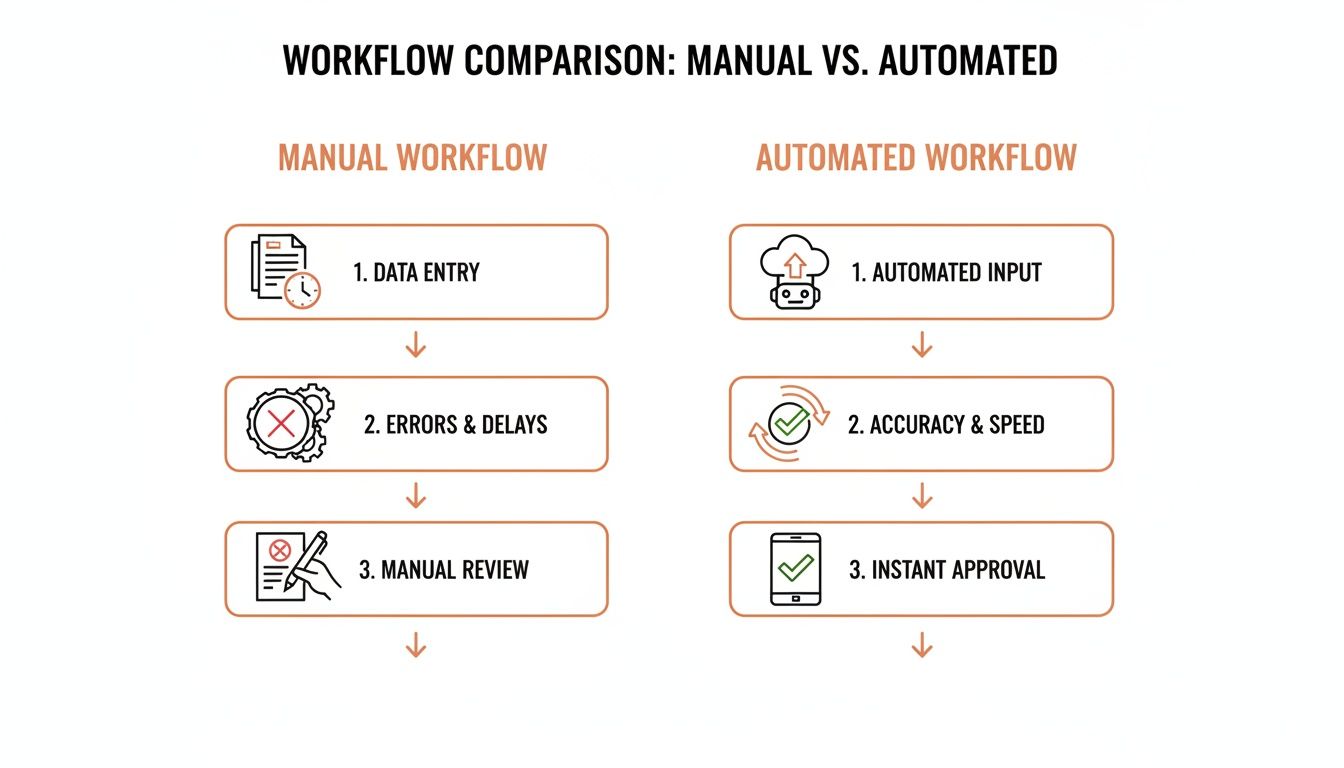
What you’re really doing is turning bottlenecks into smooth, hands-off operations. That change ripples through everything, from how quickly you pay vendors to the quality of the data you use for forecasting.
The Five Core Stages of Automation
Your entire architecture can be broken down into five essential components. Picture these as the key stops a document makes on its journey from a raw file to a fully integrated data point in your accounting software.
- Ingestion: This is the front door. How are documents getting into your system in the first place? Emails, uploads, SFTP drops?
- Preprocessing: Before the magic happens, documents need to be cleaned up. Think of it as prep work to ensure the AI has the best possible source material.
- AI Parsing: This is the engine room. An AI model reads the document and transforms the unstructured text into structured JSON data.
- Validation: Automated business rules run against the extracted data to catch errors and ensure everything looks right.
- Integration: The final, verified data gets pushed into its destination—your ERP, accounting platform, or database.
Understanding the role each stage plays is absolutely critical. It’s the difference between a system that just works and one that works reliably under the pressures of a real business.
Mapping the End-to-End Process Flow
Let's walk through a real example. An invoice lands in a dedicated invoices@yourcompany.com inbox. That's Ingestion. The system automatically pulls the attachment, whether it's a PDF, JPG, or PNG, and queues it up for the next step.
During Preprocessing, the system might straighten a crooked scan or boost the contrast on a blurry photo someone took with their phone. These small tweaks can have a huge impact on the accuracy of the data extraction that comes next.
Then, the cleaned-up document is sent to an AI parsing service like ExtractBill. This is where the heavy lifting occurs. The AI reads the document, intelligently identifies fields like invoice_number, total_amount, and line_items, and structures it all into a clean, predictable JSON format. This structured output is the foundation for everything that follows.
The real power of an automated workflow isn't just pulling text off a page; it's the seamless journey from unstructured chaos to structured insight. Your goal is to build a pipeline where data moves intelligently, only requiring a human to step in for true exceptions.
This transition from manual to intelligent processing is why Intelligent Document Processing (IDP) is projected to become a $6.78 billion market by 2025. Companies are racing to automate these exact workflows. For a service like ExtractBill, this means leveraging AI to parse over 50 document types with 99.9% accuracy, typically in just a few seconds.
Visualizing the API and Webhook Sequence
For the developers in the room, the handshake between your application and the parsing service is where the rubber meets the road. This is usually handled with a combination of a REST API and webhooks, which creates a clean, asynchronous process that scales beautifully.
Here’s how that technical "dance" usually plays out:
- Your App → Parsing Service (POST Request): Your system sends the document file (or a link to it) to the parsing service’s API endpoint.
- Parsing Service → Your App (API Response): The service immediately responds with a unique
Job ID. This isn’t the data yet; it’s just a confirmation saying, "Got it. I'll get to work." - Parsing Service → Your App (Webhook): A few seconds later, once the document is fully processed, the service sends the complete JSON payload to a webhook URL you've configured on your server.
- Your App (Webhook Listener): Your server catches the incoming data, validates it one last time, and triggers the next step in your workflow, like creating a draft bill in your ERP.
This asynchronous model is incredibly efficient. Your application doesn't have to sit there, holding a connection open and constantly asking, "Are you done yet?" It just fires off the request and trusts that the webhook will deliver the results when they're ready.
If you want to dig deeper into the strategy behind this, our guide on accounts payable automation best practices covers some of these patterns in more detail.
By mapping out these technical components early, you create a clear roadmap for development. It ensures everyone, from engineers to stakeholders, understands exactly how the system will function, turning your automation goals into a tangible, robust solution.
Building Your Integration with REST APIs and Webhooks
Once your architecture is mapped out, it’s time to bring it to life with code. This is where the theoretical plan to automate document workflow gets real. The entire integration hinges on two workhorses of the modern web: REST APIs for sending documents out and webhooks for getting the results back.
I like to think of it this way: the API is like calling a courier to pick up a package (your document). The webhook is the secure drop-box where the courier delivers the return package (your extracted data) once they're done.
This asynchronous, two-step dance is the secret to a scalable workflow. Your application isn't stuck waiting around. It sends the file, gets a confirmation, and moves on to its next task. For any developer who's built a modern distributed system, this pattern feels right at home.
Sending Documents via REST API
First things first, you need to get your documents into the parsing engine. This is almost always handled with a POST request to the service’s API endpoint. In that request, you’ll bundle up the document file itself along with your authentication, typically an API key.
Here’s a quick and dirty example using Python with the popular requests library. This snippet just grabs a local invoice file and fires it off for processing.
import requests import os
Best Practice: Store your API key in an environment variable, not in your code!
API_KEY = os.environ.get("EXTRACTBILL_API_KEY") API_ENDPOINT = "https://api.extractbill.com/v1/process"
The path to the document you want to process
file_path = "path/to/your/invoice.pdf"
headers = { "Authorization": f"Bearer {API_KEY}" }
try: with open(file_path, "rb") as document_file: files = {"document": (os.path.basename(file_path), document_file)}
    # Send the document to the API
    response = requests.post(API_ENDPOINT, headers=headers, files=files)

    # Check for a successful initial submission (e.g., HTTP 202 Accepted)
    if response.status_code == 202:
        job_data = response.json()
        print(f"Successfully submitted document. Job ID: {job_data['job_id']}")
    else:
        print(f"Error submitting document: {response.status_code} - {response.text}")
except FileNotFoundError: print(f"Error: The file was not found at {file_path}") except Exception as e: print(f"An unexpected error occurred: {e}")
Take a look at what the code doesn't do. It doesn't sit there waiting for the final JSON. Instead, it expects a fast confirmation—usually a 202 Accepted status—and a job_id. This job_id is your tracking number, confirming the service received your document successfully and your system can carry on.
Receiving Processed Data with Webhooks
After the API service does its magic—which usually takes a few seconds—it needs a way to push the structured data back to you. That’s the job of the webhook. A webhook is just a fancy name for the service making a POST request to your server at an endpoint you've set up.
Building a webhook listener is non-negotiable for a truly automated, real-time system.
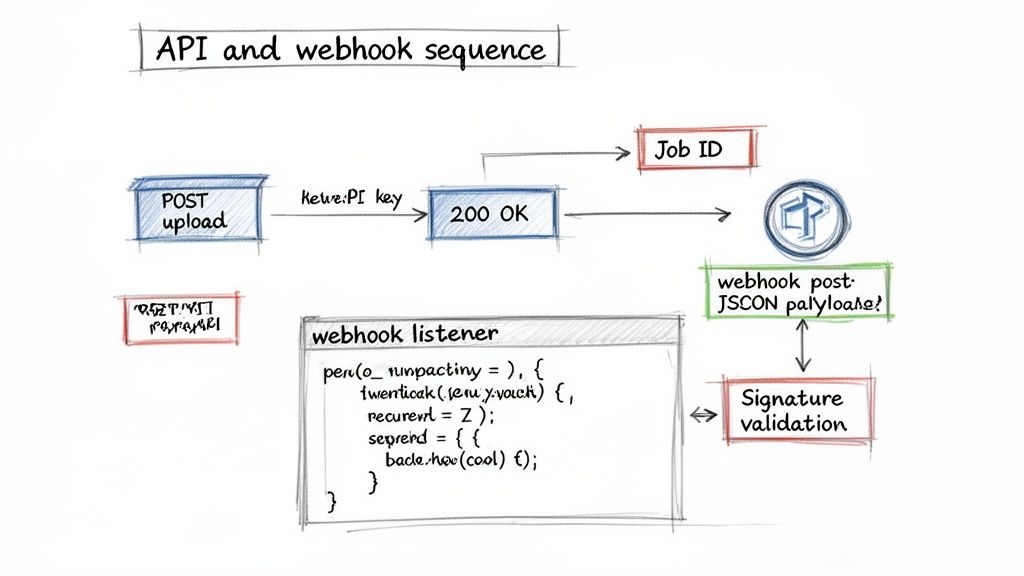
This diagram lays it out perfectly: you upload a file, get a job ID back, and a few moments later, the complete JSON payload is delivered right to your webhook endpoint.
Here’s a barebones listener built with Flask, a lightweight Python web framework. It listens for incoming JSON, checks if it's legitimate, and then prepares the data for the next step in your workflow.
from flask import Flask, request, jsonify import hmac import hashlib import os
app = Flask(name)
Your webhook secret, also stored as an environment variable
WEBHOOK_SECRET = os.environ.get("EXTRACTBILL_WEBHOOK_SECRET").encode('utf-8')
@app.route('/webhook-receiver', methods=['POST']) def webhook_receiver(): # 1. Verify the signature to ensure the request is authentic signature = request.headers.get('X-ExtractBill-Signature') if not signature: return "Missing signature", 400
# Calculate the expected signature
payload = request.get_data()
expected_signature = hmac.new(WEBHOOK_SECRET, payload, hashlib.sha256).hexdigest()

if not hmac.compare_digest(signature, expected_signature):
    return "Invalid signature", 403

# 2. Process the valid data
data = request.json
print(f"Received valid data for Job ID: {data.get('job_id')}")

# Next step: Add the data to a queue (e.g., RabbitMQ, Celery)
# for processing by your accounting system integration.
# process_invoice_data(data)

return jsonify({"status": "success"}), 200
if name == 'main': app.run(port=5000)
Critical Tip: Always, always validate the webhook signature. This cryptographic check is the only way to prove the request came from the service you trust and wasn’t faked or modified. Skipping this step opens a massive security hole in your application.
Essential Best Practices for Integration
There's a big difference between an integration that works and one that's robust, secure, and won't give you a headache at 3 AM. As you automate document workflow logic, keep these principles in mind.
- Use Environment Variables for Secrets: Never, ever hardcode API keys or webhook secrets in your code. They belong in environment variables, completely separate from your codebase. This is non-negotiable for security.
- Implement a Queuing System: Your webhook endpoint should be lightning fast. Its only job is to validate the request and hand the data off to a message queue (RabbitMQ, Celery, SQS, etc.). This makes your system resilient to traffic spikes and allows you to retry processing if a downstream system, like your ERP, is temporarily down.
- Log Everything: You can't fix what you can't see. Keep detailed logs of all your API requests, responses, and incoming webhook payloads. When an error pops up—and it will—those logs will be your best friend.
For a deeper technical breakdown of setting up your webhook listeners and handling security, check out our detailed guide on configuring webhooks. Following these patterns will ensure your integration is truly production-ready.
Validating Parsed Data and Handling Exceptions
Pulling raw text from a document is just the first step. The real magic happens when you can trust that the structured data you get back is accurate, logical, and ready for your accounting systems. This post-parsing validation is the crucial quality control gate that turns messy data into reliable business intelligence.
An AI parsing engine will hand you a neat JSON object, but it has no idea if the invoice total actually adds up. That’s where your own system’s business logic comes in. You need to build a final gatekeeper to catch potential issues before they ever touch your financial software. This is what separates a decent workflow from a truly robust one.
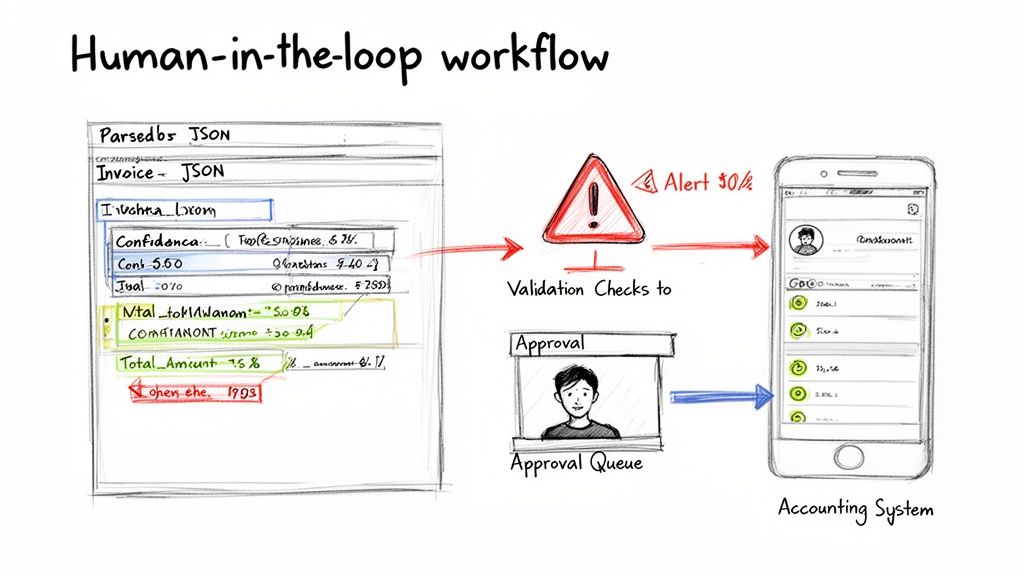
Ultimately, this whole process is about building confidence in your automation. When your system can reliably flag and route the weird stuff, it frees up your team to focus only on the documents that genuinely need a second look.
Implementing Essential Validation Checks
Once your webhook gets the JSON payload, it should kick off a series of validation functions. These checks are surprisingly simple but incredibly powerful for preserving data integrity. Think of it as a digital checklist that every single invoice has to pass before it moves on.
For any invoice workflow, these are the absolute must-haves:
- Mathematical Consistency: This is the big one. Does the sum of all
line_itemamounts, plus tax, shipping, and other fees, actually equal thetotal_amount? If not, it's an immediate red flag. - Data Type Verification: Make sure numeric fields like
total_amountare actually numbers—not strings cluttered with currency symbols or commas. You’ll also want to confirm thatinvoice_dateis a valid date format that your system can parse. - Presence of Critical Fields: Check that essential fields like
invoice_number,vendor_name, andtotal_amountaren't null or empty. An invoice without an invoice number is pretty much impossible to track. - Format Conformance: If you know an identifier like a
purchase_order_numbershould follow a specific pattern, check for it. This simple regex can catch a surprising number of typos or AI misinterpretations.
These basic rules will catch the vast majority of common extraction errors. If you want to dive deeper into the extraction process itself, check out our guide on what data parsing is and how it works.
Here’s a quick reference table of validation rules you should be applying to every invoice you process.
Essential Data Validation Checks for Invoices
| Field | Validation Rule | Example |
|---|---|---|
total_amount |
Must be a positive number. | 125.50 is valid; "-$125.50" is not. |
invoice_date |
Must be a valid date format (e.g., YYYY-MM-DD). | "2024-08-15" is valid; "August 15 2024" might need parsing. |
invoice_number |
Must not be null or empty. | A blank invoice_number should fail validation. |
line_items sum |
Sum of line_item[total] + tax must equal total_amount. |
If line items total 100.00 and tax is 8.00, total_amount must be 108.00. |
due_date |
Must be a date that occurs after the invoice_date. |
An invoice dated 2024-08-15 with a due date of 2024-08-01 is invalid. |
vendor_name |
Check against a list of known vendors if possible. | "ACME Corp" is a known vendor; "ACME Cpr" might be a typo. |
currency |
Must be a valid ISO 4217 currency code. | "USD", "EUR", "GBP" are valid; "dollar" is not. |
Implementing these checks is the foundation of a reliable, automated system that your finance team can actually trust.
Designing a Human-in-the-Loop Workflow
Look, no AI is perfect. Don't chase the fantasy of 100% "touchless" processing right out of the gate. The real goal is intelligent automation—building a system smart enough to know when it needs a human to step in. This is the whole idea behind a human-in-the-loop (HITL) system.
An effective HITL workflow automatically sends any document that fails validation or has a low AI confidence score to a manual review queue.
Your automation shouldn't be a black box. It should be a smart assistant that handles the 80% of easy work and neatly organizes the challenging 20% for your team's expert review. This hybrid approach delivers the best of both worlds: speed and accuracy.
This strategy isn't just a nice-to-have; it's becoming a cornerstone of modern finance operations. The Document AI market is exploding, projected to grow from $14.66 billion in 2025 to $27.62 billion by 2030. A huge driver of this growth is the demand for smart, integrated systems that can handle the massive volume of B2B invoices. You can find more data on this trend from MarketsandMarkets.
To build this, you just need a simple UI where a team member can see the original document image right next to the extracted (and flagged) JSON data. From there, they can quickly correct a value, approve the document, and send it on its way. This closes the loop and guarantees every single document is perfect before it hits your books.
Ensuring Security, Compliance, and Scalability
It's one thing to build a prototype that can process a few documents. It’s an entirely different challenge to build a system that's secure, reliable, and ready for prime time. As soon as your workflow graduates from a pilot project to a core business function, these "non-functional" requirements suddenly become the most important things you'll work on.
Get them wrong, and you're looking at potential data breaches, painful compliance fines, or system crashes right during month-end close.
To truly automate a document workflow that your business can depend on, you have to treat security and scalability as day-one priorities, not afterthoughts. This means protecting sensitive financial data at every single step and designing a system that can handle 10,000 invoices a month just as gracefully as it handles 10.
Fortifying Your Workflow Against Threats
When you're handling invoices and receipts, you're responsible for someone's sensitive financial data. A rock-solid security posture isn't just a "nice-to-have"—it's non-negotiable. This calls for a layered approach to protect data both as it's moving between systems and while it's sitting on your servers.
Start with the fundamentals of data protection:
- Encryption in Transit: Every single bit of communication between your application and any third-party API must use TLS encryption. This is standard practice for any modern API and stops bad actors from snooping on data as it travels across the internet.
- Encryption at Rest: When you store the extracted JSON data or the original document files—even temporarily—they must be encrypted. This protects the information on your server or in your database, even if the physical storage is somehow compromised.
- Secure Credential Management: Your API keys and webhook secrets are literally the keys to your kingdom. Never, ever hardcode them into your application. Use a proper secret management service (AWS Secrets Manager, Google Secret Manager, HashiCorp Vault) or, at the very least, environment variables to keep them completely separate from your codebase.
Beyond these technical controls, you have to think about regulatory compliance. If you're processing documents with personal data from EU citizens, for instance, your entire workflow has to be built around GDPR principles from the ground up. According to a Gartner prediction, 30% of enterprises will automate over half of their network activities by 2026, making auditable and compliant workflows more critical than ever.
A secure workflow isn't just about fending off attacks; it's about building trust. When you can clearly demonstrate strong security controls and compliance, you earn confidence from both your customers and your own internal finance teams.
Designing for Growth and Resilience
Scalability doesn't mean you need to spin up massive, expensive servers from day one. It’s about smart design—creating a system that can handle wild swings in document volume without needing a human to intervene. A business might process 100 invoices a day for most of the month, but then get slammed with 1,000 on the last day. Your architecture needs to absorb those spikes without breaking a sweat.
This is exactly where serverless computing shines.
By deploying your webhook handler as a serverless function (like AWS Lambda or Google Cloud Functions), you get scaling practically for free. The cloud provider instantly spins up the resources needed to handle a sudden flood of webhooks and then scales everything back down to zero when the traffic dies down. This approach is far more cost-effective and resilient than paying for a traditional server that might sit idle 95% of the time.
Resilience is the other side of the scalability coin. What happens if your accounting software’s API is down for maintenance when your webhook tries to push data? A poorly designed system will just fail, and that invoice data is gone forever. A resilient one expects things to fail and already has a backup plan.
You need to implement a robust retry mechanism, like exponential backoff. If an API call fails, don't just hammer it again immediately. Instead, wait one second, then try again. If it fails a second time, wait two seconds, then four, and so on. This simple strategy gives the downstream system a chance to recover.
When you pair this with a message queue (like Amazon SQS or RabbitMQ), your system becomes bulletproof. Failed jobs are simply placed in the queue to be retried later, ensuring no data is ever lost because of a temporary outage.
Frequently Asked Questions
When you're looking to automate a document workflow, you're bound to have questions. It's a big step, and getting straight answers is the best way to move forward and sidestep the usual headaches. Here are a few of the most common things we hear from teams getting ready to launch their first automation project.
What Is the Real ROI of Automating Document Workflows?
The return on investment goes way beyond just saving a few minutes on data entry. The financial wins are immediate: you cut labor costs, wipe out late payment fees, and become nimble enough to snag early payment discounts from vendors.
Operationally, data accuracy shoots through the roof, which means no more costly accounting mistakes that can take weeks to unravel. But the strategic value is the real game-changer. Your team gets freed from mind-numbing, repetitive work. Instead of chasing down invoice approvals, they can finally focus on high-value tasks like financial analysis, cash flow forecasting, and building better relationships with suppliers.
Think about it this way: a business processing just 1,000 invoices a month can save over 80 hours of productivity every single month by shaving off only 5 minutes per document. That alone is usually more than enough to justify the cost of an automation service.
How Do I Handle Documents the AI Cannot Read Accurately?
No AI is perfect, and a smart workflow needs to plan for exceptions with a human-in-the-loop (HITL) system. This isn’t a sign of failure; it's a core feature of an intelligent process that knows its own limits.
When an AI flags a field with a low confidence score, or the numbers just don't add up (like line items not matching the total), the document should be automatically flagged and routed to a review queue. A simple UI showing the original document next to the extracted data lets a team member spot-check and correct any issues in seconds.
This hybrid approach gives you the speed of automation for the vast majority of your documents while guaranteeing 100% data integrity for your financial records.
What Are the Biggest Challenges in Setting Up an Automated Workflow?
The hurdles usually fall into two camps: technical integration and change management. With a bit of planning, both are completely manageable.
On the technical side, the main job is getting your API connections and webhook listeners set up securely. This does take some development time to get right—handling authentication, validating webhook signatures for security, and building in solid error handling.
The other piece is bringing your team along for the ride. This is about more than just showing them a new dashboard. It's about:
- Training them on the new, simpler process.
- Showing them how it helps their day-to-day (less tedious work, more interesting analysis).
- Redefining their roles to focus on managing the exceptions and using all this new structured data for smarter insights.
Our advice? Start with a small pilot project. Pick one or two key vendors to test the flow. It’s a great way to work out any technical kinks and get your team comfortable before you go all-in.
Can I Automate More Than Just Invoices and Receipts?
Absolutely. The architecture and principles we've covered here aren't just for financial documents. You can apply this same playbook to all kinds of paperwork across the company.
Intelligent Document Processing (IDP) platforms are built to handle a huge variety of formats, including:
- Purchase Orders
- Bills of Lading
- Bank Statements
- Contracts and Legal Agreements
- New Hire Paperwork (like W-9 and I-9 forms)
The core workflow doesn't change: ingest the document, use an API to parse it into structured JSON, run it through your own business validation rules, and then push that clean data into whatever system needs it—whether that's a CRM, ERP, or a custom internal database. The real power here is in how flexible and adaptable this approach is for nearly any document-heavy process.
Ready to stop the manual data entry grind and start building a smarter, faster workflow? ExtractBill can turn any invoice or receipt into clean, structured JSON in seconds. Try it for free and see how easy it is to reclaim your team's time and supercharge your financial operations. Get started with ExtractBill today.
Ready to automate your documents?
Start extracting invoice data in seconds with ExtractBill's AI-powered API.
Get Started for Free