Automate expense reports: A Practical AI-Powered Guide
When people talk about automating expense reports, they're really talking about ditching the shoeboxes full of paper receipts, the endless spreadsheets, and the frustrating email chains for approvals. The idea is to let smart software handle the grunt work—capturing receipt data, categorizing expenses, and processing everything automatically. This shift doesn't just save a few minutes; it gives both your employees and your finance team their valuable time back, slashing errors and operational headaches in the process.
Why Manual Expense Reporting Is Costing You More Than Time
If you ask any team what the biggest problem with manual expense reports is, they'll almost always say "wasted time." And they're not wrong, but that’s just the tip of the iceberg. The real damage runs much deeper, hitting everything from employee morale to your company's actual bottom line. These hidden costs and operational drags create a ton of friction that holds a business back.
Think about it. Your top salesperson is spending the last two hours of their Friday taping crumpled receipts to a sheet of paper instead of closing a deal. Or someone on your finance team is dedicating half their day just chasing managers for approvals on a $15 lunch. These aren't just minor annoyances; they're a huge opportunity cost. Every single minute spent on tedious admin is a minute not spent growing the business.
The True Financial Drain
The real financial pain becomes crystal clear when you dig into the numbers. Processing a single expense report the old-fashioned way costs an average of $58 and takes up about 20 minutes of someone's time. Worse yet, nearly 19% of those reports have errors. Each mistake tacks on another $52 and 18 minutes of rework to fix. You can dive deeper into the financial automation statistics to see just how quickly this adds up. It's a vicious cycle of errors and corrections that quietly eats away at your resources.
The real problem with manual expense reporting isn't just that it's slow—it's that it forces your most valuable people to focus on low-value work. Shifting from reactive paperwork to proactive automation is a strategic necessity for growth.
Beyond the direct costs, inconsistent data entry is a compliance nightmare waiting to happen. Without standardized, automated checks, it's way too easy for out-of-policy spending to slip through the cracks. This makes audits a painful process and exposes the business to unnecessary risk. It also means leadership can never get a clean, real-time look at company spending, which makes quick financial decisions nearly impossible.
Let's break down the difference with a simple comparison.
Manual vs. Automated Expense Processing at a Glance
This table gives a high-level view of just how different the two approaches are. It's not just an upgrade; it's a fundamental change in how work gets done.
| Metric | Manual Processing | Automated Processing |
|---|---|---|
| Time per Report | ~20 minutes | ~2-3 minutes |
| Cost per Report | ~$58 | ~$5-10 |
| Error Rate | Up to 19% | Less than 1% |
| Approval Time | Days or weeks | Hours or minutes |
| Data Visibility | Delayed, fragmented | Real-time, centralized |
| Compliance | Risky, hard to enforce | Built-in policy checks |
| Employee Experience | Frustrating, tedious | Simple, fast |
Seeing it laid out like this makes the choice pretty clear. The manual process is a constant drain on time, money, and morale, while automation turns expenses into a smooth, efficient, and almost invisible background task.
Ultimately, the drive to automate expense reports is about so much more than just efficiency. It's a strategic decision to reclaim lost productivity, plug financial leaks, and empower your team to focus on the work that actually matters.
Building Your Automated Expense Workflow Foundation
Before you can truly automate expense reports, you need to build a solid foundation. It all starts with creating a single, reliable entry point for every single expense document that comes through the door.
Forget the usual chaos—paper receipts stuffed in wallets, invoices buried deep in email threads, and digital confirmations scattered across a dozen different apps. The goal is to funnel everything into one centralized system, no matter where it comes from.
This isn’t just theory; it's about putting practical, simple systems in place. A great first move is creating a dedicated email inbox, something like expenses@yourcompany.com. From there, you can set up simple forwarding rules so any invoice or receipt sent there is automatically piped into your processing workflow. This step alone kills the need to manually hunt through countless individual inboxes.
And for all those physical receipts from travel or team lunches? Your team needs a dead-simple mobile solution. The key here is to find a scanning app that’s so easy to use it becomes second nature. If it takes more than a few taps to snap a picture and upload it, your team simply won't use it, and you’ll be right back to chasing down paper.
It's easy to underestimate just how much a manual system drains resources in ways that aren't immediately obvious. The old way of doing things introduces three core problems: high costs, wasted time, and a constant stream of errors.
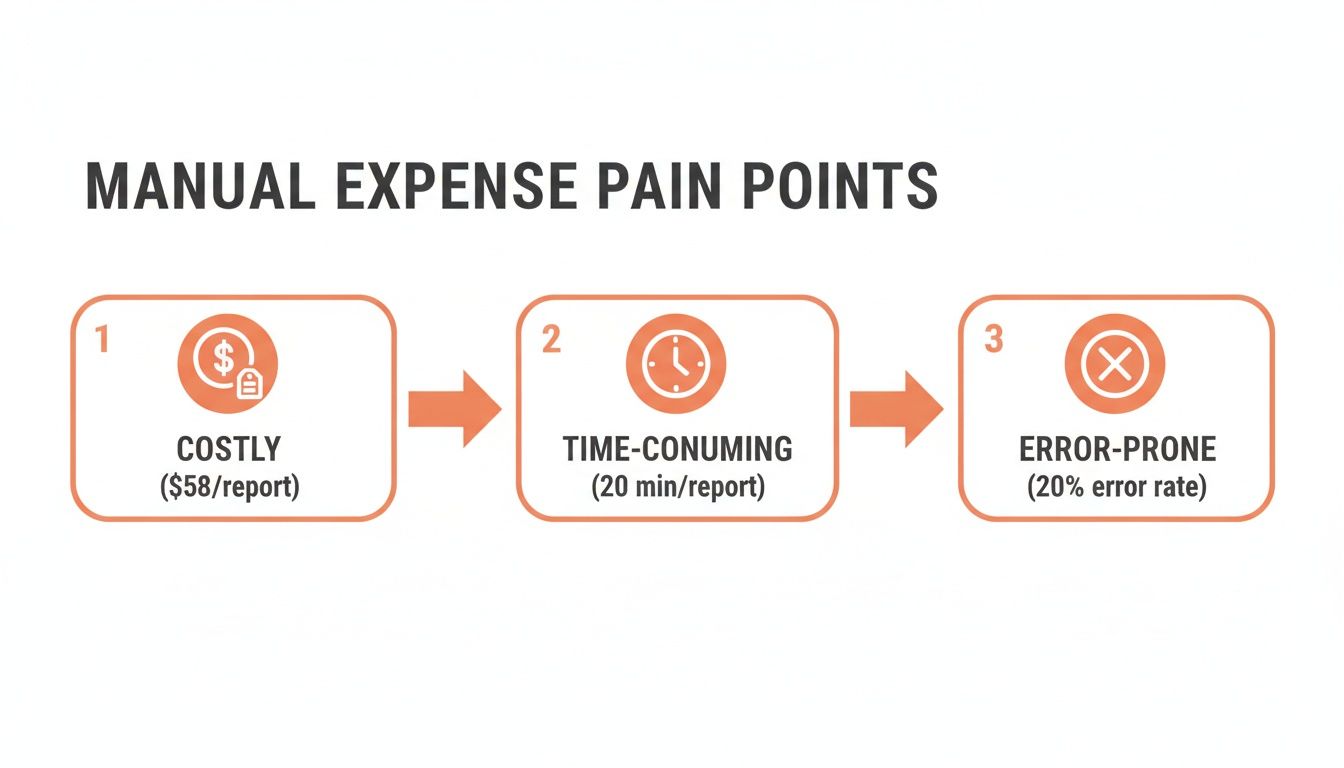
As you can see, these issues are all connected. They create a nasty cycle where ballooning costs are driven by time-sucking work that’s practically guaranteed to have mistakes.
Preprocessing for High-Quality Input
Once you’ve nailed down how to capture documents, the next job is making sure they’re clean and ready for the machines. The quality of your input data directly dictates the success of your entire automation workflow. It’s the absolute rule here: garbage in, garbage out.
A little bit of preprocessing can make a world of difference for the AI OCR tools that will extract the data later on. This involves some basic but critical tweaks to the images and documents you’ve collected.
Here are a few essential steps you can’t skip:
- Image Rotation: Make sure all documents are right-side up. An upside-down receipt is useless to both humans and machines. Most modern systems can handle auto-rotation, but it’s a crucial first check.
- De-skewing: Straighten out any crooked or tilted images. A receipt photographed at an angle can warp the text, which is a fast track to extraction errors.
- Image Enhancement: A quick adjustment to brightness and contrast can make faded or poorly lit receipts much easier to read. This is a lifesaver for photos snapped in less-than-ideal conditions, like a dimly lit restaurant.
Think of preprocessing as tuning an instrument before a performance. Sure, you could play an out-of-tune guitar, but the result is going to be messy and unreliable. Taking a few moments to clean up your input ensures the entire automation process runs smoothly and accurately.
Establishing a Consistent File Format
In the world of automation, consistency is your best friend. As documents flow in from emails, mobile scans, and vendor portals, they’ll arrive in a mix of formats—PDF, JPG, PNG, you name it. A critical foundational step is to standardize everything.
For example, you might decide to convert all incoming files into a high-resolution PDF. Doing this creates a uniform input type for your data extraction engine, which simplifies your code and dramatically reduces the potential for errors.
Another small but powerful tactic is standardizing your file naming conventions. A consistent format like VendorName_InvoiceNumber_Date makes every file instantly searchable and helps maintain a clean, organized digital trail for audits.
This initial setup might feel a bit tedious, but it’s a one-time investment that pays off big time. By building a clean, organized, and consistent capture and preprocessing system, you’re creating the perfect launchpad for everything that comes next. This groundwork ensures that when you bring in advanced tools like AI OCR, they have the high-quality data they need to perform at their best, finally making your goal to automate expense reports a reality instead of a constant struggle.
Using AI OCR to Extract Structured Expense Data
Once your expense documents are neatly captured and prepped, the real magic begins. This is where modern AI-powered Optical Character Recognition (OCR) comes in, and it's a world away from the clunky, old-school OCR you might remember.
Legacy OCR was notoriously dumb. It could pull text from an image, but it had zero clue what that text actually meant. It was just a string of characters.
Today’s AI models are different. They don’t just read; they understand. When you automate expense reports with this tech, the system can look at a crumpled receipt from a business dinner and instantly identify the vendor's name, the transaction date, the subtotal, tax, and the final amount. It's the difference between a tool that lists words and one that comprehends financial data.
This intelligence is what allows the AI to turn messy, unstructured documents into clean, predictable, machine-readable data. The go-to format for this is JSON (JavaScript Object Notation), which neatly organizes everything into key-value pairs that other software can easily digest.
If you want to go deeper into the weeds of how this works for receipts specifically, check out our guide on OCR for receipts.
From Messy Receipts to Clean JSON
To really get a feel for what AI-driven extraction can do, let's look at a classic example. Picture a blurry photo of a hardware store receipt submitted by a team member. Trying to key this in manually isn't just slow—it's practically an invitation for typos.
The image below shows this process in action. An advanced AI tool takes that visually complex receipt and transforms it into perfectly structured JSON.
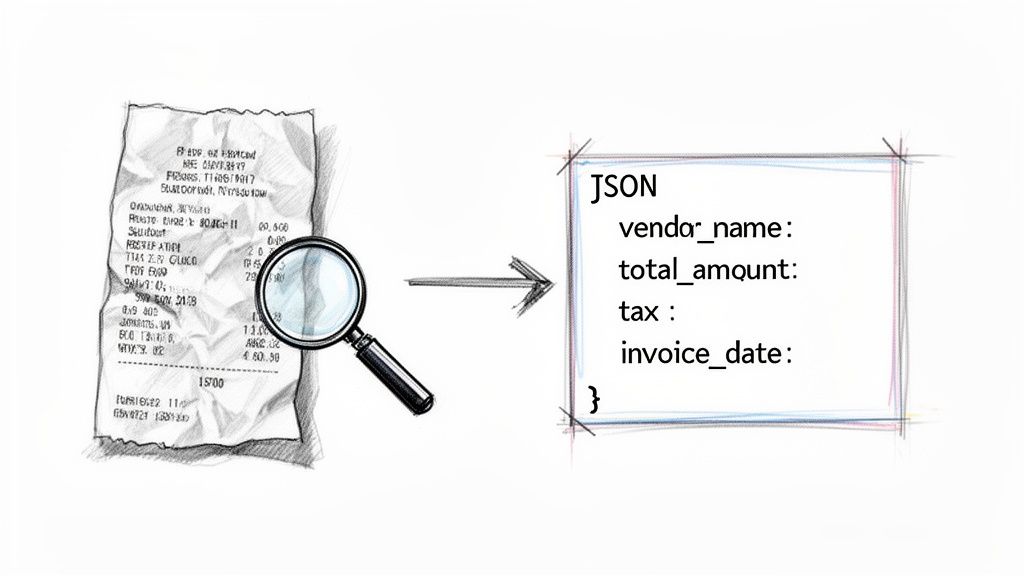
This transformation is the absolute heart of reliable expense automation. The output isn't just text; it's a structured dataset where every piece of information is clearly labeled—think vendor_name, invoice_date, and total_amount.
This structured data is the bedrock for the rest of your automated workflow. Without it, building reliable validation rules, smooth accounting integrations, or accurate financial reports is impossible. This one step eliminates the most error-prone part of the entire process: manual data entry. Some studies have found manual processes can have error rates as high as 19%—a massive problem that AI OCR solves almost completely.
Key Data Fields AI OCR Can Identify
A solid AI OCR solution is trained to spot and pull a huge range of data points from all sorts of documents, not just simple receipts. This is what makes it possible to automate everything from complex, multi-page invoices to simple utility bills.
Here are some of the most critical fields these systems are trained to recognize:
- Vendor Information: The supplier’s name, address, and contact details. The AI is smart enough to distinguish the main vendor from other text on the page.
- Transaction Dates: It can pinpoint the invoice date, due date, and even service periods, understanding the subtle differences between them.
- Financial Totals: The system accurately extracts the subtotal, tax amounts (like VAT or GST), shipping fees, discounts, and the grand total.
- Line Items: For detailed invoices, it can parse individual line items—description, quantity, unit price, and total for each. This is a game-changer for granular budget tracking.
- Payment Details: Critical identifiers like invoice numbers, purchase order (PO) numbers, and account numbers are easily pulled out.
The real breakthrough with AI OCR is its ability to generalize. It learns the concept of an invoice or a receipt. This allows it to accurately process documents it has never seen before, from thousands of different vendors and in countless formats.
Handling Document Variety and Complexity
One of the biggest headaches when you try to automate expense reports is the sheer variety of documents. Every vendor uses a different invoice layout. Some receipts are long and detailed, while others are tiny slips of thermal paper that fade if you look at them wrong.
This is where AI blows older, template-based systems out of the water. Template-based OCR forced you to manually define zones on a document where specific data lived. If a vendor tweaked their invoice layout, the template would break, and your automation would grind to a halt.
Modern AI models, on the other hand, use a combination of natural language processing (NLP) and computer vision to understand the document contextually.
- It spots visual cues, like logos and headings.
- It analyzes the text, recognizing keywords like "Total" or "Invoice #".
- It understands spatial relationships, knowing that the number next to a "Total" label is probably the total amount.
This approach makes the system incredibly resilient. It doesn't care if the vendor’s name is on the top left or top right; the AI finds it. This flexibility is non-negotiable for building a scalable, low-maintenance automation workflow that can handle the beautiful chaos of real-world financial documents.
Getting Your Data into Your Accounting System
Having clean, structured JSON data is a huge win, but it’s only half the battle. That data doesn't do you any good sitting in a folder somewhere. The final, critical step is to build a bridge between your OCR engine and your financial source of truth—your accounting system.
This integration is what closes the loop. It takes that neatly labeled information, like vendor_name and total_amount, and pushes it directly into the right fields in your accounting software, whether that's QuickBooks, Xero, or NetSuite. This is where the manual data entry truly disappears for good.
The most common and flexible way to build this bridge is with a REST API. Think of an API as a waiter in a restaurant. Your application makes a request (places an order), the accounting system's API (the waiter) takes it to the system (the kitchen), and brings back a response.
Mapping JSON Fields to Your Accounting Software
Once you're connected via an API, the real work begins: mapping the data. This is where you tell your system, "When you see vendor_name in the JSON, I want you to put that value into the 'Supplier' field in QuickBooks." This mapping is the essential blueprint for the entire integration.
Every accounting platform has its own quirks—unique field names and data structures. The total_amount from your JSON might need to be mapped to a field called TotalAmt in one system but just Total in another. Getting this translation right is fundamental.
Here’s a simplified Python example showing how you might map and push data to a hypothetical accounting API.
import requests
Assume this is the JSON output from your OCR tool
expense_json = { "vendor_name": "Office Supplies Co.", "invoice_date": "2023-10-26", "total_amount": 115.50, "line_items": [ {"description": "Printer Paper", "amount": 45.00}, {"description": "Blue Pens", "amount": 70.50} ] }
This is the structure your accounting API expects
accounting_payload = { "SupplierName": expense_json["vendor_name"], "TransactionDate": expense_json["invoice_date"], "Total": expense_json["total_amount"] }
Make the API call to create a new bill
api_endpoint = "https://api.youraccountingsystem.com/v1/bills" headers = {"Authorization": "Bearer YOUR_API_KEY"}
response = requests.post(api_endpoint, json=accounting_payload, headers=headers)
if response.status_code == 201: print("Expense successfully created in accounting system!") else: print(f"Error: {response.text}")
This little script captures the essence of the process: define your mapping, structure the payload, and send it off. For developers building out more complex integrations, our guide on how to convert PDF files to structured JSON offers a much deeper look into preparing data for this exact step.
Using Webhooks for Real-Time Updates
API calls are great for pushing data, but they’re typically kicked off by your system. What if you want your accounting software to notify you the instant something happens on its end? That’s where webhooks come in.
Webhooks completely reverse the flow of communication. Instead of your app constantly polling the accounting system and asking, "Anything new yet?", the accounting system automatically sends a message to your app the moment an event occurs—like when a bill is paid or a new vendor gets created.
A webhook is basically a push notification for servers. It's the key to building a truly reactive, real-time automated workflow, eliminating the lag time between an action and its reflection in your systems.
You could set up a webhook to fire off an alert in Slack every time an expense over $1,000 is synced, giving managers immediate visibility into significant spending. This real-time capability is no longer a luxury. In fact, 70% of finance teams say real‑time expense visibility is their top priority, as it gives leaders an up-to-the-minute view of spending. You can find more insights about business expense management trends on ExpenseOut.com.
Ensuring Data Consistency and Integrity
A successful integration isn't just about moving data from point A to point B; it's about maintaining its quality along the way. Before you push anything, it's smart to implement a few checks to prevent common headaches.
- Idempotency: Make sure that sending the same expense data twice doesn't create duplicate entries in your accounting system. The best way to do this is to use a unique identifier, like an invoice number, to check if the record already exists before creating a new one.
- Data Formatting: Always confirm that dates, currency formats, and decimal points match what the destination system expects. For example, some APIs need dates in
YYYY-MM-DDformat, while others might use a different standard entirely. - Error Logging: When an API call inevitably fails, log the error message and the exact data payload that caused it. This will make troubleshooting a failed sync infinitely easier down the road.
By thoughtfully mapping your data, using webhooks for instant updates, and building in checks for data integrity, you create a robust and reliable pipeline. This final step transforms your automated extraction process into a complete, end-to-end solution that keeps your financial records perfectly in sync—without anyone lifting a finger.
Implementing Validation Rules and Exception Handling
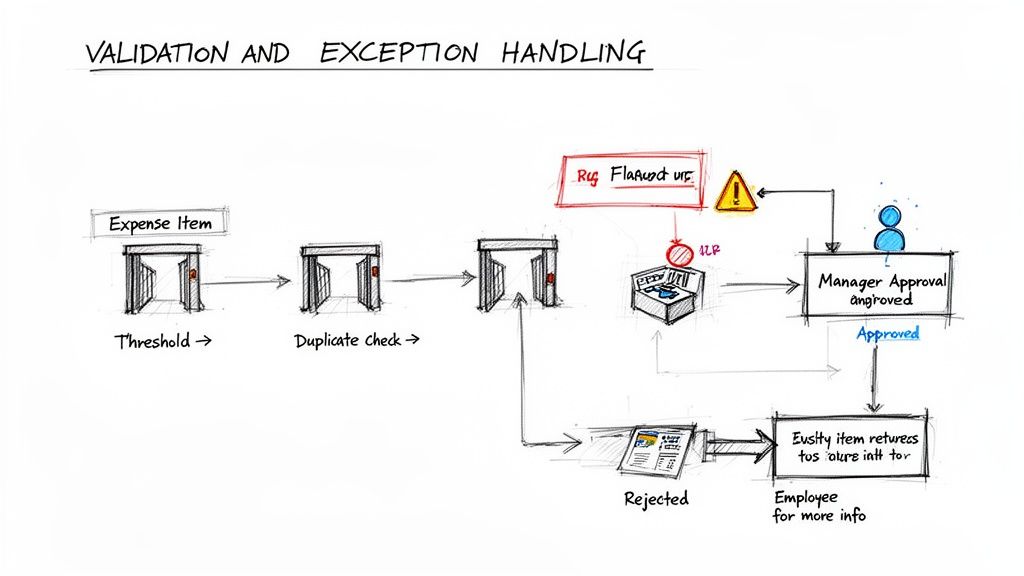
True automation isn't just about speed; it's about control. Once you’ve got data flowing cleanly from receipts into your accounting software, the next crucial step is building an intelligent validation layer. This is where you turn a simple data pipeline into a policy-enforcing machine that never sleeps.
This layer acts as your first line of defense, automatically checking every single expense against your company's spending policies. It catches out-of-policy spending, duplicate submissions, and simple human errors before a manager ever has to see them.
Building Your Core Business Rules
The idea here is to translate your company's expense policy into a concrete set of logical checks. Think of them as digital guardrails. Your system can be programmed to scrutinize every submission for the most common issues, saving your finance team countless hours.
Here are a few high-impact rules you can set up immediately:
- Threshold Limits: Automatically flag any expense that goes over a set amount. For instance, any single meal over $100 or a software purchase exceeding $500 could be routed to a senior manager for a closer look.
- Submission Deadlines: Keep your books clean by flagging claims submitted more than 30 or 60 days after the transaction. This simple rule dramatically improves the accuracy of your financial forecasting.
- Category Restrictions: Depending on your policy, you can block or flag expenses from certain merchant categories, like liquor stores or casinos.
- Duplicate Detection: This is a big one. A smart rule can check for matching invoice numbers or identical combinations of vendor, amount, and date to prevent accidental double payments. For a deeper dive, you can explore techniques like two-way matching in accounts payable.
Automation without validation is just a faster way to make mistakes. By implementing clear business rules, you create a system that not only processes expenses but also protects the company's bottom line by enforcing policy with perfect consistency.
Designing an Exception Handling Workflow
Catching a policy violation is only half the battle. What happens next is what makes your system truly effective. A well-designed exception workflow ensures flagged expenses are handled efficiently without creating bottlenecks or frustrating your employees.
Instead of just hitting a "denied" wall, the workflow should intelligently route the expense based on the specific rule it broke. This gets the right eyes on the problem with all the context needed for a quick decision.
Creating Smart Routing and Notifications
The key is to map out automated, multi-step pathways for different kinds of exceptions. This logic-based routing keeps things moving and makes it clear who needs to do what.
Let's look at a few real-world scenarios:
- The Issue: An expense is over the employee's spending limit but still within their manager's authority.
- The Workflow: The system automatically forwards the report to the employee's direct manager. The notification clearly highlights the policy breach, allowing the manager to approve or deny it with one click.
- The Issue: A submitted receipt is missing or totally unreadable.
- The Workflow: An automated notification goes straight back to the employee asking for a new upload. The expense is parked in a "pending information" state and doesn't move forward until the documentation is fixed.
- The Issue: The system flags a potential duplicate invoice.
- The Workflow: The expense is immediately routed to someone on the finance team for a manual investigation. The notification should include a link to the original transaction to make comparison easy.
This approach transforms your system from a passive data processor into an active participant in your financial controls. When you combine solid validation rules with smart exception workflows, you can truly automate expense reports in a way that delivers speed, accuracy, and rock-solid policy compliance.
Measuring Success and Calculating Your ROI
So, you've automated your expense reports. Great! But how do you actually prove it was worth the investment? "It feels faster" isn't going to cut it with leadership. You need hard data to show the tangible value you've created.
The first move is to know your starting point. Before you flip the switch on the new system, you have to benchmark your current process. How long, on average, does it take for a single report to go from submission to reimbursement? What's your best guess for the cost per report? Answering these questions gives you the crucial "before" picture for a powerful comparison.
Key Performance Indicators to Track
To really see the impact, focus on a handful of key performance indicators (KPIs) that speak directly to efficiency and cost savings. These numbers will tell the story for you.
- Processing Time Per Report: This is the big one. Track the clock from the moment an employee submits an expense to when it's fully approved and synced. You should see this metric plummet from days or weeks down to just a few hours—or even minutes.
- Cost Per Report: The old manual way can easily cost $58 per report when you factor in all the hidden labor. Automation absolutely demolishes this number. Calculate your new cost by factoring in your software subscription and the massively reduced employee time.
- Error Rate: Keep a close eye on the percentage of reports that get kicked back for corrections. A well-oiled automated system should get your error rate below 1%, a dramatic improvement from the typical 19% error rate of manual processing.
- Employee Reimbursement Cycle Time: When reports get processed faster, your team gets paid back faster. This is a huge win for employee satisfaction and a powerful metric to share.
Proving ROI isn't just about the direct cost savings. It's about quantifying all that reclaimed time. You can now show how your finance team is free to focus on strategic analysis instead of chasing down receipts and fixing typos.
A Simple Formula for Calculating ROI
Calculating your return on investment doesn't require a master's degree in finance. A straightforward approach works best to show the financial upside.
You can use this basic formula as your starting point:
ROI (%) = [(Financial Gain - Cost of Investment) / Cost of Investment] x 100
Here, your Financial Gain is the total savings from reduced labor and the costs you've eliminated by preventing errors. Your Cost of Investment is simply your software subscription fees and any one-time setup costs.
This simple calculation gives you a clear, powerful number to present to stakeholders. It’s the same data-driven thinking you'd apply when you automate the accounts payable process—demonstrating tangible value is always the key to getting buy-in for future automation projects.
Common Questions
Whenever you're looking at automating a core business process like expense reporting, a few key questions always come up. Teams want to know about security, how it fits with their existing tools, and if it can handle the messiness of a global business. Let's tackle those head-on.
Security is usually the first thing on everyone's mind, and for good reason. You're dealing with sensitive financial data. Any serious automation platform is going to use end-to-end encryption for data both in transit (when you upload a receipt) and at rest (when it's stored). This basically means your documents are locked down from the moment they leave your device until they're archived, following the same tough security standards your bank uses.
Handling Custom and International Needs
"Will this even work with our ancient, custom-built accounting software?" That's a classic, and a fair question. The good news is that modern tools are designed for this exact problem. They almost always offer a flexible REST API, which is a developer's way of saying "you can connect this to pretty much anything." Your team can build a simple connector to push the clean, structured data into any system you have, so you don't have to rip and replace your existing tech.
And what about companies that operate across borders? This is where the AI really shines.
- Multi-Currency Support: A good OCR model doesn't just see numbers; it sees context. It recognizes currency symbols like $, €, and £, and can even spot three-letter codes (like USD or JPY). It extracts the amount and the currency, making it simple to convert everything to a single base currency for clean, consistent reporting.
- Language Versatility: These systems have been trained on millions of documents from all over the world. That means they can read and pull data from a receipt in French, Spanish, or Japanese just as easily as one in English, no manual translation needed.
At the end of the day, a modern automation tool is built for the real world. It has to be secure, flexible enough to integrate with what you already use, and smart enough to handle the complexities of a global business right out of the box.
Ready to stop chasing down receipts for good? ExtractBill gives you a powerful AI-driven API that turns messy invoices and receipts into structured JSON in seconds. Get started with three free extractions and see just how easy it is to build a fully automated expense workflow.
Ready to automate your documents?
Start extracting invoice data in seconds with ExtractBill's AI-powered API.
Get Started for Free