Mastering automate invoice processing: Boost Efficiency and Accuracy
Automating invoice processing is all about swapping out the soul-crushing manual data entry and endless approval chains for smart software. The goal is to let technology handle the grunt work—capturing invoice details, extracting the data, and validating it—so your finance team doesn't have to.
This isn't just a minor tweak. Moving from manual keying to an automated system is a serious financial decision that modern businesses can't afford to ignore. It frees up your best people for work that actually requires a brain.
Why Manual Invoice Processing Is Holding You Back
Before we get into the nuts and bolts of how to automate, let's talk about the real costs of sticking with the old way. It’s so easy to underestimate the drain that manual workflows put on your resources. Many teams just see it as "the cost of doing business," but the reality is far more painful.
This isn't just about the time someone spends typing numbers into a spreadsheet. It’s about the very real, cascading problems that sprout from any system that depends entirely on human touchpoints. Every single invoice you process by hand is a potential error, a likely late payment, and a definite missed discount.
The Hidden Financial Burdens
Sure, labor is the most obvious cost, but the financial bleeding goes much deeper. Manual workflows are just plain slow and riddled with opportunities for mistakes that create massive headaches down the road.
- Human Error: It takes just one tiny typo—a wrong invoice number or a misplaced decimal point—to cause a duplicate payment or throw off your financial reports. Then you're stuck spending hours trying to fix it.
- Late Payment Penalties: When invoices get buried in an email inbox or sit on someone's desk for a week, you're going to get hit with late fees. Those penalties are a direct shot to your bottom line.
- Missed Early Payment Discounts: Lots of suppliers offer a small discount for paying early. A sluggish manual process makes it almost impossible to grab these savings, which can easily add up to thousands of dollars every year.
The thing is, all these "small" inefficiencies pile up into a constant drag on your profitability. Instead of managing cash flow, your team is stuck playing defense—chasing down paperwork and fixing mistakes that should have never happened in the first place.
Damaged Vendor Relationships and Lost Visibility
The problems go beyond the balance sheet. Consistently paying vendors late because your internal process is a mess is a great way to wreck important relationships. It can damage your reputation and lead to less favorable payment terms on your next contract.
Worse, a paper-based system gives you zero real-time visibility into what you actually owe. If you don't know which bills are due and when, you can't forecast cash flow accurately or make smart financial decisions. Automating your invoice process isn't just a tech upgrade; it's a fundamental improvement to how you run your business.
The numbers don't lie. Manually processing a single invoice can cost anywhere from $15 to over $22. With automation, you can crush that down to under $2 per invoice—a massive saving of more than 70%. By adopting a few accounts payable automation best practices, even the smallest teams can reclaim dozens of hours each month and slash those per-invoice costs.
Building Your Automated Invoice Workflow
Switching to an automated system isn't like flipping a switch. It’s more like designing a smart, interconnected pipeline for your accounts payable. The real goal is to create a seamless flow where raw invoices go in one end, and approved, validated data pours into your accounting system at the other—often without a single person having to touch it.
Your first move, and this is non-negotiable, is to map out your current AP process. You need a brutally honest look at where things grind to a halt. Is it the mind-numbing data entry? The endless back-and-forth approval emails? Or is it manually punching numbers into your ERP system? Pinpointing these bottlenecks tells you exactly where automation will give you the biggest bang for your buck.
For many businesses, the biggest time sink is just getting the invoices into the system in the first place. They arrive from dozens of vendors through every channel imaginable—PDFs, scanned images, even blurry phone photos. Just centralizing that intake is a massive win.
Establish Smart Document Ingestion Channels
Before any AI can work its magic, you need a bulletproof way to get documents into the system. The idea here is to completely remove the step where an employee has to download an email attachment and upload it somewhere else. You want to create automated entry points.
A common and highly effective strategy is setting up a dedicated email address, like invoices@yourcompany.com. You simply tell your vendors to send all their bills there. Your automation platform then polls that inbox, automatically grabbing new attachments the moment they land.
For higher-volume workflows or more tech-savvy suppliers, an API endpoint is the gold standard. This lets a vendor's system push invoice data directly to your platform, creating a true machine-to-machine link that’s instant and cuts email out of the loop entirely.
This chart really drives home the difference between the old manual grind and a modern, automated flow.
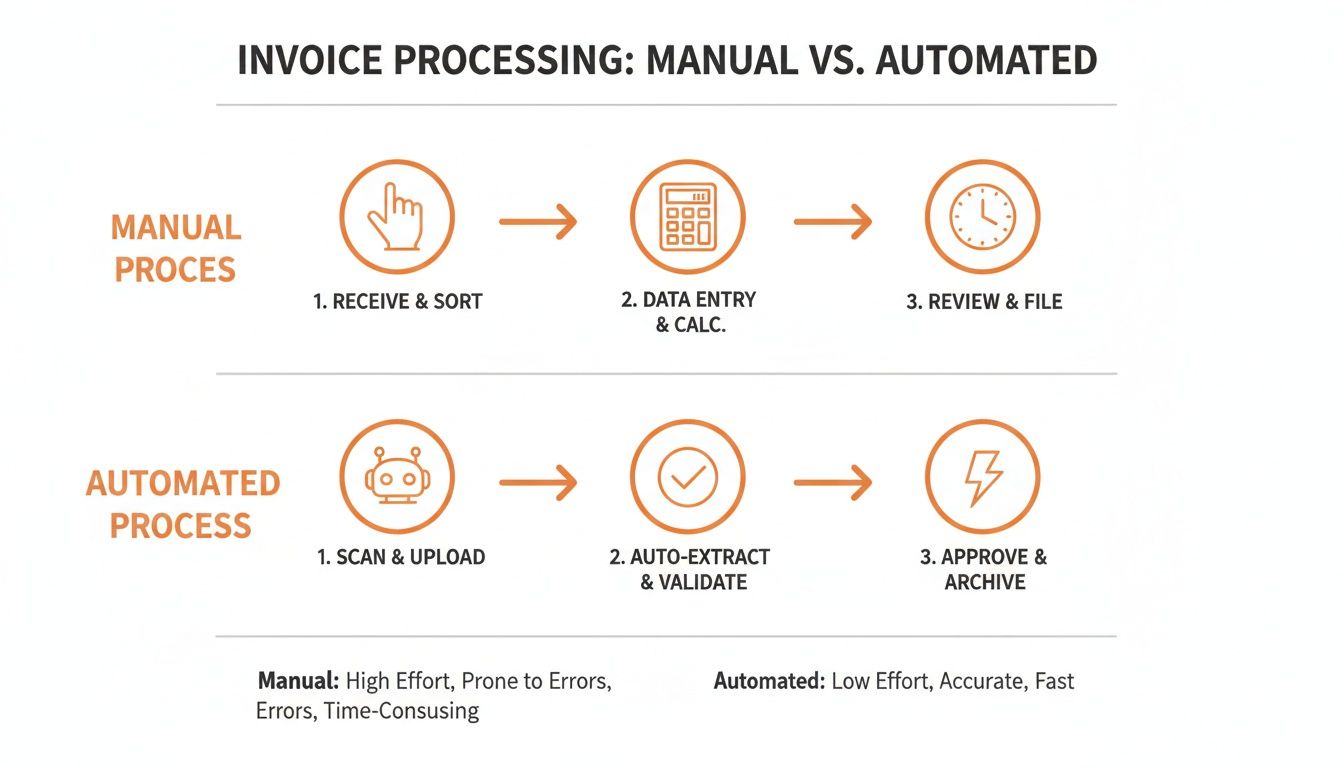
It's clear how automation swaps out manual labor and long waits for robotic precision and speed, fundamentally changing the rhythm of your financial operations.
To give you a clearer picture, here's a breakdown of what a complete, end-to-end workflow looks like.
Core Components of an Automated Invoice Workflow
This table summarizes the key stages and technologies you’ll need to build a robust system.
| Workflow Stage | Objective | Key Technology / Method | Example with ExtractBill |
|---|---|---|---|
| Document Ingestion | Centralize incoming invoices from all sources. | Dedicated email inbox, direct API endpoint, mobile upload. | Configure your system to monitor invoices@company.com or have vendors POST invoices directly to ExtractBill’s API. |
| Data Extraction | Convert unstructured PDFs/images into structured data. | AI-powered OCR and data parsing models. | ExtractBill analyzes the document, identifies key fields (vendor, date, total, line items), and returns clean JSON data. |
| Data Validation | Verify the accuracy and legitimacy of the invoice data. | Business rules engine, PO matching, duplicate checks. | Your system cross-references the invoice number against existing records and compares line items to the corresponding purchase order. |
| Approval Routing | Route the invoice to the correct person for approval. | Conditional logic, user hierarchy mapping. | Invoices under $500 are auto-approved; invoices over $5,000 are routed to the finance director via a Slack notification. |
| System Integration | Sync the approved data with accounting/ERP systems. | REST API calls, webhooks. | Once approved, your application makes an API call to create a new bill in QuickBooks, populated with data from ExtractBill. |
Each stage builds on the last, creating a chain of automation that moves an invoice from receipt to reconciliation without human intervention.
Implement AI-Powered Data Extraction
Once an invoice is in the system, the real work begins: data extraction. This is where a tool like ExtractBill becomes essential. Instead of a person squinting at a PDF and typing out the vendor name, invoice number, and line items, an AI model does it all in seconds.
Modern AI isn't chained to rigid templates that shatter the second a vendor tweaks their layout. It actually understands the context of the document. It knows "Invoice #" and "Inv. No." are the same thing and can find the total amount even if it’s buried in a weird spot. This flexibility is what makes true "touchless" processing possible.
The real magic of AI extraction is its ability to turn unstructured documents—like a messy PDF—into perfectly structured data, like JSON. That structured format is what allows other software systems to understand and act on the information without a human translator.
To get into the nitty-gritty of how this works, check out our guide on how to extract data from invoices with today's AI.
Define Your Validation and Approval Logic
Pulling the data is only half the job. Next, you have to automatically validate it and send it for approval. This is where you bake your company's business rules directly into the workflow.
Your system can be set up to run several checks automatically:
- Duplicate Invoice Check: Does an invoice with this number from this vendor already exist?
- PO Matching: If there's a purchase order number, do the line items and amounts line up?
- Mathematical Accuracy: Do the line items, subtotals, and taxes actually add up to the final amount?
After validation, the system takes care of approvals. Forget manually forwarding emails. You can build an automated hierarchy right in. For example, invoices under $500 might get approved automatically. Anything between $500 and $5,000 gets routed to a department manager, while invoices over $5,000 might need a second look from the finance director. This logic keeps you compliant without creating frustrating delays.
Integrate with Your Core Financial Systems
The final piece of the puzzle is integration. All this beautifully extracted and approved invoice data is useless if it’s stuck in the automation tool. It needs to flow right into your accounting software or ERP, creating a bill payable record automatically.
This is usually done with REST APIs and webhooks. Think of an API as a messenger that lets your automation tool speak the same language as your accounting software. When an invoice is fully approved, the system makes an API call to create a new bill in QuickBooks, Xero, or NetSuite, filling in all the fields for you.
Webhooks kick things up a notch. Instead of your system constantly bugging the accounting software for updates, a webhook lets the automation tool send an instant alert the moment a job is done. For instance, once ExtractBill processes an invoice, it can trigger a webhook that immediately starts the validation and approval workflow in your own application.
This kind of real-time communication is what enables a truly end-to-end process, closing the loop from document receipt to payment without anyone having to lift a finger.
Choosing the Right AI and OCR Technology for Invoices
The engine driving your entire invoice automation effort is the technology that actually reads the documents. Get this part wrong, and you'll end up with a clunky system that’s barely an upgrade over manual entry.
The choice really comes down to two camps: old-school templates versus modern AI.
For years, the go-to method was template-based Optical Character Recognition (OCR). The concept was simple: you’d create a fixed map for each vendor's invoice. The invoice number goes here, the date goes there, and the total is always in the bottom right corner.
It worked, for a while. But the moment a vendor tweaked their invoice design—moved a field, added a new logo, or changed a column width—the template would shatter. Your "automated" system would grind to a halt, waiting for someone to manually build a new template. This constant maintenance cycle completely defeats the purpose of a hands-off workflow.
The Shift from Rigid Templates to AI Vision
Thankfully, we've moved far beyond that brittle approach. Modern systems, including ExtractBill, use a combination of computer vision and natural language processing to understand the document's context, not just its layout.
An AI model doesn't need a rigid template because it has already been trained on millions of real-world invoices. It learns to recognize concepts, not just fixed coordinates.
It understands that "Inv. No.", "Invoice #", and "Invoice Number" all mean the same thing. It can pinpoint the final amount whether it’s labeled "Grand Total," "Amount Due," or is simply the last number in a column of figures.
This contextual understanding is the secret sauce behind true "touchless" processing. It’s what lets a system process an invoice from a brand-new vendor with the same accuracy as one you've worked with for years. You eliminate the endless cycle of building and fixing templates.
This adaptability is non-negotiable in the real world. You're constantly onboarding new suppliers, and you can't afford to hit the brakes every time a new invoice format shows up. An AI-based system handles this variety effortlessly, making your automation robust and scalable from day one. To get a better sense of the landscape, check out this deep dive into the best invoice OCR software on the market today.
What to Look for in a Data Extraction Service
When you're evaluating different technologies, a few key capabilities separate the basic text-scrapers from a true enterprise-ready solution. Here's what should be on your checklist:
- Broad File Type Support: Your vendors won't all use the same format. Your system needs to seamlessly handle everything from clean PDFs and scanned documents to clear photos snapped on a phone (JPG or PNG).
- Accurate Line-Item Capture: Just grabbing the invoice total is table stakes. A powerful tool must parse every single line item with precision—description, quantity, unit price, and item total. This granular data is essential for three-way matching and deep financial analysis.
- Structured Data Output: The extracted data has to be delivered in a clean, predictable, machine-readable format. JSON is the gold standard here. It's lightweight, developer-friendly, and plays nicely with just about any accounting or ERP system's API.
Think about it: a supplier sends a multi-page PDF. A top-tier service won't just process all the pages; it will identify complex tables that span across pages and deliver all that data back to you in a single, well-organized JSON object. That's the level of reliability you need.
The Power of Contextual AI in Practice
Let’s walk through a real-world scenario. Your company partners with a new freight provider. Their invoices are complex, with tables full of fuel surcharges, accessorial fees, and taxes all listed as separate line items.
A template-based OCR tool would choke on this immediately. It wouldn't have a map for that table, and you’d be stuck creating a tangled mess of rules to try and capture each fee type.
An AI model, on the other hand, analyzes the document visually. It identifies the table structure, recognizes the column headers ("Description," "Rate," "Amount"), and correctly extracts each line—all in about 2-5 seconds.
The final output is a structured JSON file, ready to be fired off to your accounting system to be validated against the original purchase order. This is the difference between automation that creates more work and automation that actually eliminates it.
Seeing It in Action: A Practical Run-Through with ExtractBill
Theory is one thing, but let's get our hands dirty. I'll walk you through a real-world example of how you can build a basic invoice automation workflow using the ExtractBill API. This isn't some massive, multi-week project—you can get a proof-of-concept running in minutes to show just how powerful this approach is.
The core idea is beautifully simple. You fire off a document (a PDF, a JPG, whatever) to an API endpoint. A few seconds later, you get a clean, structured JSON object back with all the important data neatly extracted. No more manual typing, no more clunky templates. Just pure, machine-readable data ready to go.
This diagram nails the entire value proposition: turning document chaos into structured, usable information.
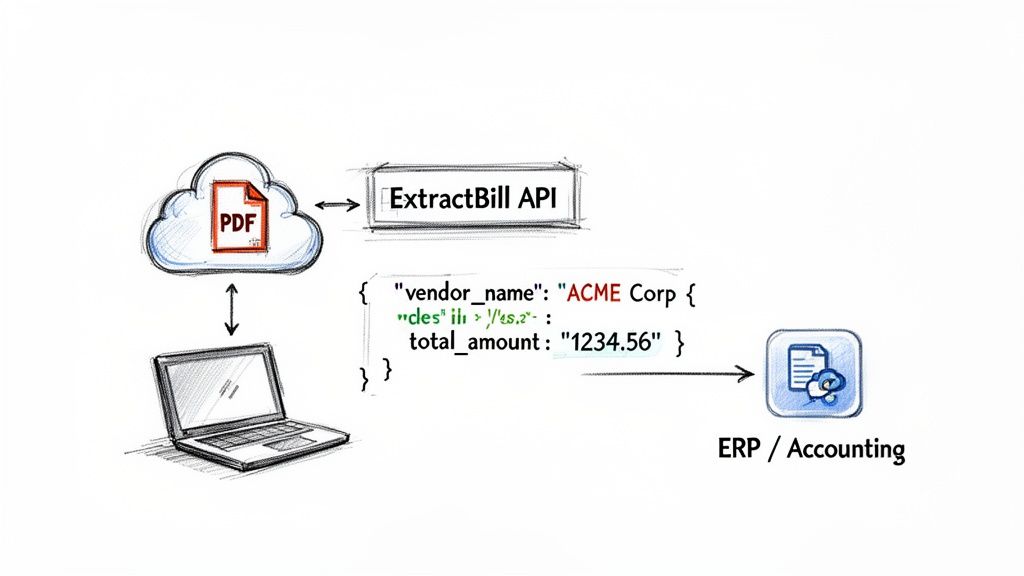
The API is the critical bridge. It takes those messy, unstructured files and transforms them into a universal format (JSON) that your accounting software or ERP can instantly understand and ingest.
Your First API Call
Ready to try it? All you need is a sample invoice file and your unique API key from ExtractBill. The API call itself is dead simple. You're just making a POST request to the API endpoint, passing your key for authentication and the invoice file itself.
Here’s a quick and dirty example using Python's requests library, which is a go-to for this kind of task. This little script just grabs a local PDF named sample_invoice.pdf and sends it off for processing.
import requests
Your API key and the file you want to process
api_key = "YOUR_API_KEY" invoice_file_path = "sample_invoice.pdf" api_url = "https://api.extractbill.com/v1/process"
Prepare the request headers and file
headers = {"x-api-key": api_key} files = {"file": open(invoice_file_path, "rb")}
Send the request to the API
response = requests.post(api_url, headers=headers, files=files)
Print the JSON response
if response.status_code == 200: extracted_data = response.json() print(extracted_data) else: print(f"Error: {response.status_code} - {response.text}") That's it. Those few lines of code just replaced the entire soul-crushing process of manual data entry.
Making Sense of the JSON Response
In about 2-5 seconds, the API will fire back a JSON response. This isn't some chaotic text dump. It's a perfectly organized object with standardized keys and values that your code can easily read and work with.
A typical response will look something like this:
{ "vendor_name": "Office Supplies Inc.", "invoice_number": "INV-7890", "invoice_date": "2024-10-26", "due_date": "2024-11-25", "total_amount": 150.75, "subtotal": 140.00, "tax_amount": 10.75, "currency": "USD", "line_items": [ { "description": "Stapler, Heavy Duty", "quantity": 2, "unit_price": 25.00, "amount": 50.00 }, { "description": "Printer Paper, Case", "quantity": 1, "unit_price": 90.00, "amount": 90.00 } ] }
From here, the possibilities are endless. Your application can grab the total_amount to kick off an approval workflow, match the line_items against a PO in your ERP, or use the data to create a new bill in QuickBooks via its own API. The fields are consistent and predictable, which makes the whole pipeline reliable.
For a full rundown of every possible field you can get back, check out the official ExtractBill API Reference.
This is the real magic of an API-first approach: speed and simplicity. A developer, or even a technical person on the finance team, can spin up a working demo in an afternoon. You can prove the value of automation without needing a six-figure budget and a year-long implementation project.
Going Fully Hands-Off with Webhooks
Making direct API calls is perfect for on-demand jobs, but a truly automated system shouldn't have to ask for updates. It should be told. That's where webhooks come in.
Instead of your system constantly pinging the API and asking, "Are you done yet?", a webhook lets the API notify your system the second the processing is complete. Think of it as a push notification for your servers.
Setting it up is a breeze:
- You build a listener: Create a simple URL (an endpoint) in your application that is ready to accept POST requests from ExtractBill.
- You register the webhook: Just tell ExtractBill what that URL is in your account settings.
- You get real-time data: That's it. Now, every time you send an invoice, ExtractBill will automatically push the full JSON output to your webhook URL the moment it's finished.
This event-driven model is incredibly efficient. It lets your validation rules, approval flows, and ERP integrations trigger instantly and automatically. This is how you build a "touchless" accounts payable pipeline where invoices flow straight through the system without anyone needing to babysit them.
Navigating Common Invoice Automation Challenges
Switching to automated invoice processing is a massive win, but let’s be real—it’s never a simple flip of the switch. Any new system comes with its own learning curve and potential hiccups. Knowing what to watch out for is the difference between a smooth rollout and a project that loses steam.
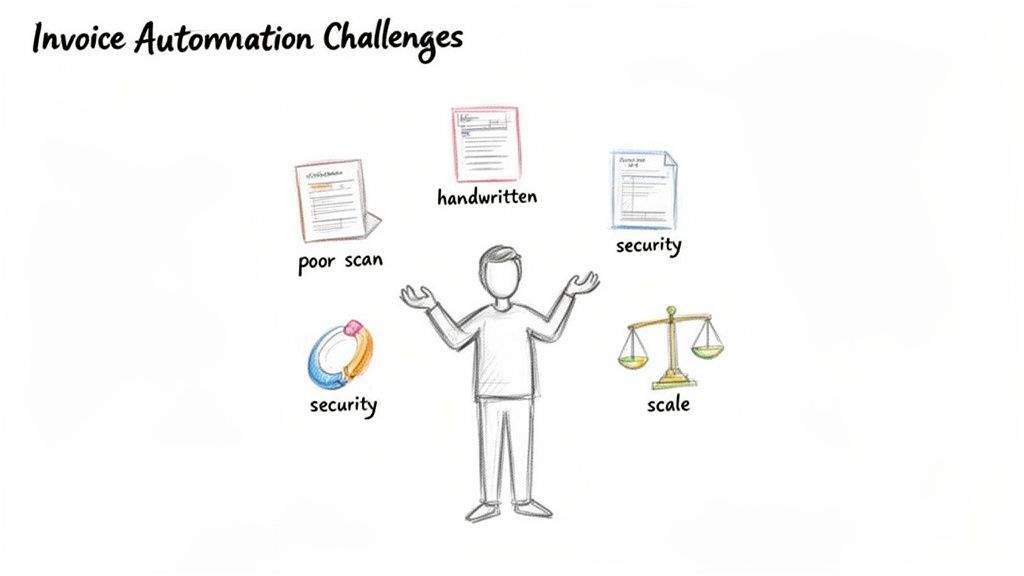
Honestly, the biggest hurdles usually aren't about the tech itself; they're about people. Your finance team has a workflow they know inside and out. Bringing in automation can feel like a major disruption, so managing that change is just as crucial as picking the right API.
Fostering Team Buy-In and Managing Change
The number one reason these projects fail? Lack of adoption. If your AP team sees the new tool as a threat or just another complicated thing to learn, they’ll find workarounds. And that defeats the whole purpose.
Get your team involved right from the very beginning. This isn't about replacing people—it's about getting rid of the soul-crushing, repetitive parts of their jobs, like manually keying in invoice data.
Here are a few tactics I’ve seen work wonders:
- Frame the "What's In It for Me?" Show them exactly how automation frees them up for higher-impact work, like managing vendor relationships, analyzing cash flow, or tackling complex billing discrepancies.
- Create "Automation Champions." Find one or two people on the team who are excited about the new tech. Train them up first and make them the go-to experts for everyone else. Peer-to-peer support is incredibly powerful.
- Start Small, Get a Quick Win. Don't try to automate everything at once. Pick a single, painful process—maybe capturing expense receipts—and nail it. Once the team sees how much time it saves, they’ll be asking what’s next.
Handling Problematic Invoices and Edge Cases
No AI is flawless, and you're always going to get some invoices that are just plain difficult. A solid automation workflow needs a plan for the curveballs that even the smartest systems can't hit.
Poor-quality scans are the classic offender. Blurry text, weird shadows, or crooked images can easily confuse an OCR engine. You'll also run into invoices with handwritten notes or non-standard layouts from smaller suppliers. It's a real-world problem—major companies like Uber deal with invoices in over 25 languages, which adds a whole other layer of complexity.
Don’t aim for 100% touchless processing from day one. That’s a recipe for frustration. A much more realistic and successful goal is hitting 60-80% automation. The real victory is building a system that sails through the majority of invoices and intelligently flags the tough ones for a quick human check.
Instead of letting these oddballs stop the line, build a dedicated "exceptions queue." When a tool like ExtractBill flags a field with low confidence, the invoice should automatically route to a person for a quick side-by-side review. This keeps things moving while making sure nothing slips through the cracks.
Addressing Security and Scaling Concerns
When you automate invoice processing, you're dealing with sensitive financial information. Security can't be an afterthought. Any service you consider must provide end-to-end encryption for data in transit (as it moves across the internet) and data at rest (when it's stored on a server). This is absolutely non-negotiable.
Scalability is the other big piece of the puzzle. Your system shouldn't just handle your current invoice volume; it needs to grow with you. An API-first service like ExtractBill is designed for this. You can process one invoice or ten thousand with the same reliability and speed. There are no bottlenecks or queues, which is critical as your business expands.
Finally, think about your Return on Investment (ROI) beyond just labor costs. Sure, you'll save money there. But the true value comes from closing the books faster, boosting team morale, and making smarter cash flow decisions because you finally have a real-time view of your liabilities.
A Few Common Questions About Invoice Automation
When businesses start thinking about automating invoice processing, the same few questions always pop up. Let's tackle them head-on, because getting clear answers is the first step toward making a confident decision.
How Much Does This Actually Cost to Get Started?
This is usually the first thing people ask, and the answer is a lot more flexible than you might think. The cost can range from a couple of hundred bucks a month for simple tools all the way up to massive, custom ERP projects. But today, API-first services like ExtractBill have completely changed the game.
You don't need a huge upfront investment anymore. Instead, you can get started with a usage-based, pay-as-you-go model. This lets you dip your toes in the water by automating a small, manageable workflow—like processing expense receipts—and then scale things up once you see the ROI for yourself.
Can I Trust This with Sensitive Financial Data?
Absolutely, as long as you pick the right partner. Security isn't just a feature; it's the foundation of any trustworthy automation platform. Look for services that use end-to-end encryption, which protects your data both while it's being uploaded (in transit) and when it's stored on their servers (at rest).
A reputable provider will be completely transparent about their security protocols. You want to see that your financial information is being handled with the same rigor you’d expect from your bank.
Will This Work with My Existing Software?
Integration is where the magic happens, and modern automation tools are built for it. Most connect through standard REST APIs and webhooks, making it straightforward to link your data extraction engine to almost any accounting software, ERP, or even a custom-built internal app.
Whether your team lives in QuickBooks, Xero, NetSuite, or something else entirely, an API-first approach ensures that the clean, extracted invoice data flows right into the systems you already depend on every day.
The whole point is to supercharge your current stack, not force you to replace it. Think of automation as a powerful data-processing engine that slots right into your existing workflow, feeding your main financial systems with accurate, validated information.
And this isn't just a niche trend anymore. The global accounts payable automation market hit $3.08 billion in 2023 and is growing fast. This massive adoption rate shows there's real, lasting demand for tools that get financial data ready for machines. You can dig into these trends and see what they mean for AP teams over at Docuclipper.
Ready to finally ditch the manual data entry grind? It's time to build a smarter, more efficient accounts payable workflow. Get started with ExtractBill today and process your first three documents completely free. See how it works at extractbill.com
Ready to automate your documents?
Start extracting invoice data in seconds with ExtractBill's AI-powered API.
Get Started for Free