Your Guide to AI-Powered Invoice Data Capture Software
Invoice data capture software is a fancy name for a simple idea: a tool that automatically reads invoices, pulls out the important details like who sent it, how much is owed, and what was bought, and turns it all into clean, structured data. It leans on tech like AI and OCR to finally kill the soul-crushing, error-filled chore of manual data entry.
Your Guide to Automated Invoice Processing
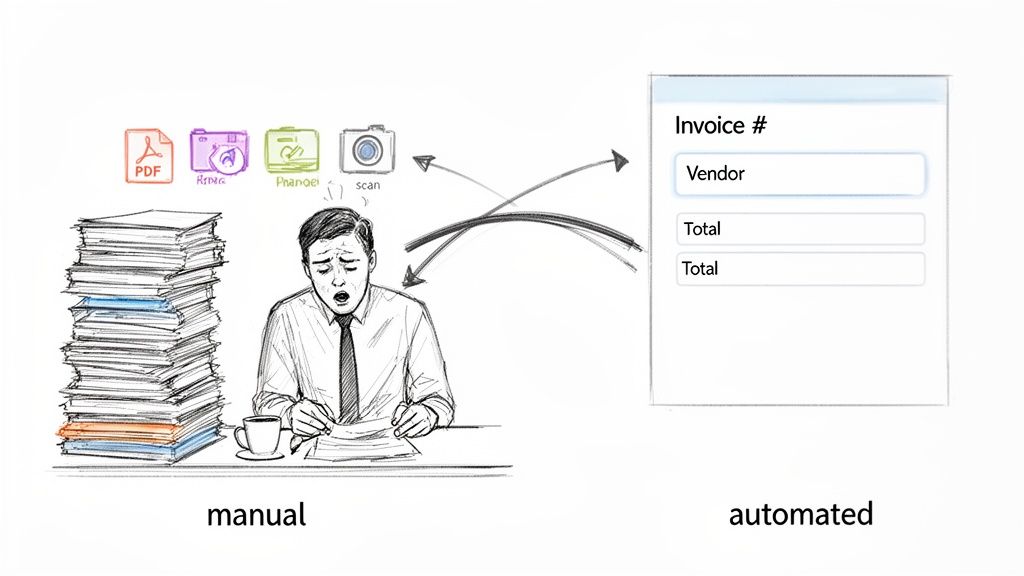
Picture your accounts payable team drowning in a sea of invoices. Every single PDF, scanned paper, and email attachment is another manual task on the pile. Open the file, hunt for the invoice number, find the due date, and then tediously type every single line item into your accounting system. This isn't just slow—it's a massive bottleneck that chokes growth and opens the door to expensive mistakes.
For a lot of growing businesses, this isn't just a hypothetical. It’s the daily grind. The real cost of manual processing isn’t just the hours spent typing; it’s the late payment fees, the missed early payment discounts, and the valuable time your team wastes on repetitive work instead of high-impact financial analysis. This is the exact problem invoice data capture software was built to solve.
Moving Beyond Manual Entry
At its core, this software is a smart translator. It takes chaotic, unstructured documents—everything from crisp PDFs to blurry photos snapped on a phone—and turns them into the organized, structured data your financial systems need.
Think of it as the ultimate digital assistant for your finance department. It’s a specialist that can:
- Read and understand any invoice layout without needing a pre-built template.
- Pinpoint and pull key fields like vendor names, PO numbers, total amounts, and tax details.
- Parse complex tables to grab every individual line item with stunning accuracy.
- Deliver clean, structured data that’s ready to be fed directly into your accounting or ERP system.
The main goal is to transform a mind-numbing, error-prone task into a fast, accurate, and completely automated workflow. It’s a fundamental shift that frees up your team to focus on what actually moves the needle: financial oversight, budget management, and strategic planning. If you want to dive deeper into how software organizes all this information, our guide on what data parsing is and how it works is a great place to start.
The real win here isn't just about saving time on data entry. It's about building a scalable, reliable financial operation that can handle more invoices without adding more people or sacrificing accuracy.
Manual vs Automated Invoice Processing at a Glance
The difference between sticking with the old way and embracing automation is stark. Let's break down the key contrasts in a side-by-side comparison.
| Metric | Manual Processing | Automated Data Capture |
|---|---|---|
| Cost Per Invoice | $15 - $25 (labor, errors, fees) | $3 - $5 (software fees, minimal labor) |
| Processing Speed | Hours or days per invoice | Seconds or minutes per invoice |
| Accuracy Rate | 3-5% error rate is common | 99%+ accuracy with AI validation |
| Scalability | Poor; requires hiring more staff | Excellent; handles volume spikes easily |
As you can see, the shift isn't just an incremental improvement. It's a complete overhaul of efficiency, cost, and reliability for any finance team.
The Financial Impact of Automation
Moving to automation isn't just a nice-to-have; it's becoming a core part of modern finance. The market for this software was valued at USD 3.37 billion in 2024 and is expected to rocket to USD 8.9 billion by 2032. This explosive growth is happening for one simple reason: the ROI is undeniable.
Manual invoice processing costs businesses anywhere from USD 15 to USD 25 per invoice. Switching to an AI-powered platform can slash those costs by an incredible 50–80%, delivering a powerful and immediate return on your investment.
How AI-Powered Invoice Capture Actually Works
To really get what makes invoice data capture software tick, you have to look under the hood. This isn't just about taking a picture of an invoice; it's about software that can read, understand, and organize information faster than any human ever could.
The whole process boils down to two key parts working together. Think of it as a set of incredibly powerful "eyes" and an even smarter "brain."
The Eyes: Optical Character Recognition
First, the software has to see the document. This is where Optical Character Recognition (OCR) comes in. When you upload a PDF, a scanned paper invoice, or even a quick photo from your phone, OCR gets to work, converting the image of text into actual, machine-readable text data.
But OCR by itself is just a reader. It can tell you the characters "I-N-V-1-2-3" are on the page, but it has no clue what that means. It just sees a jumble of letters and numbers without any context. That's where the real magic begins.
The Brain: AI and Machine Learning
Once the text is digitized, the AI-powered "brain" takes over. This is the heart of any modern invoice capture tool. Old, template-based systems made you manually map out where the invoice number or total amount was for every single vendor. AI, on the other hand, understands context.
This brain doesn't just see a date; it figures out if it’s an invoice date or a due date. It doesn't just find a random string of numbers; it knows the difference between a purchase order number and an invoice number. This is what allows the software to handle thousands of different invoice layouts without ever needing a rigid template.
AI models are trained on millions of real-world invoices, so they learn all the common patterns, layouts, and phrases used in financial documents. This training lets them:
- Pinpoint the Vendor: It can correctly identify the supplier's name and address, even if it's just a logo and a small line of text tucked away in a corner.
- Extract Key Fields: The software intelligently finds and pulls out critical data like the total amount, tax, subtotal, and currency.
- Parse Complex Tables: This is the big one. It can read and understand line items inside a table, accurately extracting each description, quantity, unit price, and line total.
By combining OCR "eyes" with an AI "brain," the system goes from just reading text to truly understanding what the document is all about. If you want to dive deeper into the tech, check out our guide on how to extract data from invoices.
From Messy Document to Structured Data
The end game here is turning a chaotic document into clean, structured data. This data is usually formatted in a universal language like JSON (JavaScript Object Notation), which nearly every other piece of software can instantly understand.
A single API call can take a messy, multi-page PDF invoice and, in just a few seconds, return a perfectly organized JSON file. This structured data is ready to be fed directly into your accounting software, ERP, or database, creating a truly hands-off workflow.
Here’s a quick look at what that transformation looks like. The software takes an image and spits out this clean, organized data:
{ "vendor_name": "Office Supplies Inc.", "invoice_number": "INV-84321", "invoice_date": "2024-10-26", "due_date": "2024-11-25", "total_amount": 149.97, "tax_amount": 12.48, "currency": "USD", "line_items": [ { "description": "Wireless Keyboard", "quantity": 2, "unit_price": 49.99, "line_total": 99.98 }, { "description": "Ergonomic Mouse", "quantity": 1, "unit_price": 49.99, "line_total": 49.99 } ] }
This clean output is the final piece of the puzzle. Through an API, your system can send an invoice for processing and get this structured data back. Even better, tools like webhooks allow the invoice capture software to instantly ping your system the moment the data is ready, kicking off the next step in your accounts payable process without anyone lifting a finger.
Evaluating Your Invoice Data Capture Software Options
Picking the right invoice data capture software can feel a bit like wading through a sea of vendors all shouting the same promises. The key is to cut through the noise and zero in on the features that will actually make a difference for your team and your bottom line. You aren't just buying a tool to fix today's data entry headaches; you're investing in a system that needs to grow with your business.
This isn't just a niche tool anymore. AI-powered invoice capture is driving the fastest-growing part of the financial software world. The market is set to explode from USD 2.8 billion in 2024 to an incredible USD 47.1 billion by 2034. Right now, software platforms already account for 64.9% of this market, showing a huge shift toward ready-to-use AI tools. The data extraction component alone makes up 28.6% of the market, proving that getting clean, structured data is the critical first step. You can read the full research about AI's role in invoice management to see just how big this shift is.
The whole process boils down to a few simple steps: the software gets a document, reads it, understands the content, and turns it into usable data.
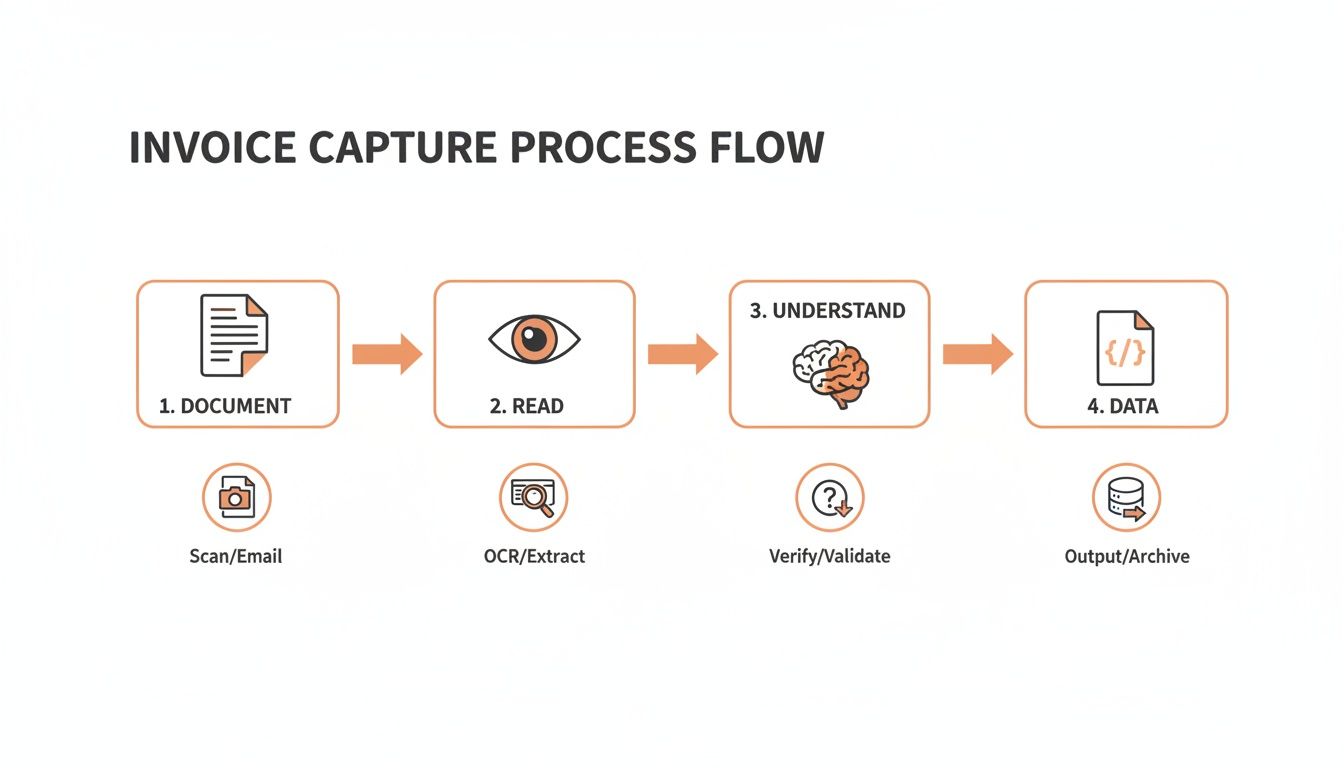
A good evaluation really comes down to how well a tool handles those last two stages: "Understand" and "Data."
Core Accuracy and Data Extraction Quality
First things first: accuracy. A tool that consistently makes mistakes isn't an asset—it's a liability that just creates more cleanup work. You should be looking for software that can hit 99% or higher accuracy on real-world invoices, not just the perfectly formatted PDFs vendors use in their demos.
But accuracy isn't just about getting the total right. The depth of data extraction is just as important. Pulling a vendor name and a total amount is the bare minimum. A truly powerful tool can handle the tricky details.
- Line-Item Extraction: Can the software grab every single line item from a long, multi-page invoice? That means the description, quantity, unit price, and total for each and every item.
- Table Parsing: Does it understand complex table layouts, even when they break across pages or use weird formatting?
- Field Recognition: How good is it at telling the difference between a PO number, a tax ID, and a shipping address versus a billing address?
Choosing a tool without solid line-item capabilities is like buying a car that can only drive in a straight line. You solve one part of the problem but create new limitations that prevent true end-to-end automation.
Technical and Integration Capabilities
A great data capture tool can't live on an island. It has to connect seamlessly with the systems you already use, which is where the technical features become non-negotiable. Without a solid technical foundation, you'll find yourself stuck exporting and importing data manually, which defeats the entire purpose.
Here are the critical questions to ask:
- Supported Document Types: Can it handle everything you get? This should include PDFs (both text-based and scanned images), JPGs, and PNGs at a minimum.
- Multi-Language Support: If you work with international suppliers, can the system read invoices in different languages and recognize various currency symbols and date formats?
- API and Webhooks: Does it have a well-documented REST API that your developers can actually use? Does it offer webhooks to send you real-time updates when a document is processed?
A robust API is the bridge that connects your accounting software, ERP, or custom tools to the data capture service. It's what makes a truly hands-off, automated accounts payable process possible.
To help you compare different platforms, we've put together a checklist of the must-have features. Use this to score potential vendors and make sure you’re covering all your bases.
Feature Checklist for Invoice Data Capture Software
| Feature | Description | Why It's Important |
|---|---|---|
| High Accuracy Rate | The percentage of fields the software extracts correctly without human intervention. | Anything less than 99% means your team will spend time correcting errors, defeating the purpose of automation. |
| Line-Item Extraction | The ability to capture individual items, quantities, and prices from the body of an invoice. | Essential for detailed cost analysis, inventory management, and 3-way matching against purchase orders. |
| Table Parsing | The capability to understand and extract data from structured tables, even with complex layouts. | Many invoices use tables for line items. Poor table parsing leads to jumbled, useless data. |
| REST API | A well-documented API for programmatic document submission and data retrieval. | Allows you to integrate the software directly into your existing workflows, ERP, or accounting systems. |
| Webhooks | Real-time notifications sent to your system when a document is finished processing. | Eliminates the need for constant polling and enables event-driven, real-time automation. |
| Multi-Language Support | The ability to process documents in various languages and recognize international formats. | Crucial for businesses with a global supply chain to avoid manual entry for foreign invoices. |
| Document Type Variety | Support for different file formats like PDF, JPG, PNG, and both digital and scanned documents. | Ensures you can process any invoice you receive, regardless of how it's sent to you. |
| Data Validation Rules | The ability to set up custom rules to check for common errors or enforce business logic. | Catches mistakes early (e.g., duplicate invoice numbers, incorrect totals) before they enter your system. |
| Security & Compliance | Adherence to security standards like SOC 2, GDPR, and CCPA, with features like data encryption. | Protects sensitive financial data and ensures you meet regulatory requirements. |
This checklist isn't exhaustive, but it covers the core functionality that separates a basic tool from a true automation platform. A solution that checks all these boxes will provide a strong foundation for a more efficient and accurate AP process.
Okay, let's get into the good stuff. Knowing the tech is one thing, but seeing how invoice data capture software actually works in the real world is where you'll see its true power. This isn't about some vague promise of "efficiency." It's about fundamentally changing how your finance team operates, saving real money, and letting your people focus on work that matters.
We’re going to look at three high-impact scenarios where this technology completely changes the game.
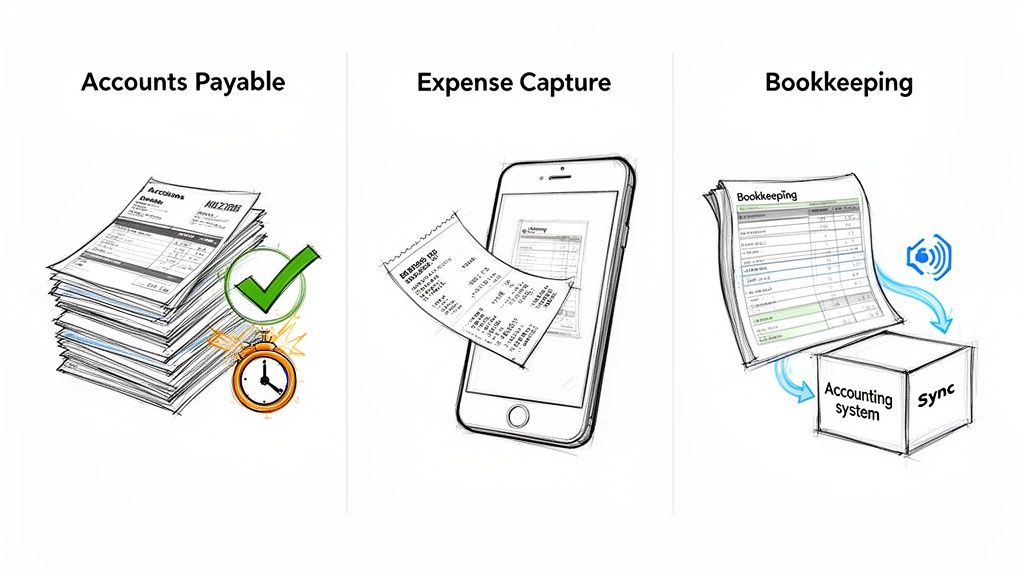
From killing off tedious accounts payable tasks to making expense reports a non-issue, these are practical fixes for some of the most common headaches in any business.
Supercharging Accounts Payable Automation
The first and most obvious win is in the accounts payable (AP) department. For most companies, AP is still a mess of paper, manual data entry, and endless email chains for approvals. Invoice capture software flips that entire process on its head.
The moment an invoice lands in an inbox, it's pulled in and processed automatically. In seconds, the software grabs everything—vendor name, invoice number, line items, totals—with incredible accuracy. That clean, structured data is then pushed right into your AP system, ready for the next step. No human hands required.
This shift delivers some serious, measurable wins:
- Slash Processing Times: Work that used to take days of manual keying is now done in minutes. This means you can pay suppliers on time, every single time.
- Wipe Out Late Payment Fees: By getting invoices processed on schedule, you stop bleeding money on penalties that do nothing but drain your profits.
- Grab Every Early Payment Discount: A lot of suppliers offer 2-3% discounts for paying early. Automation makes it easy to consistently catch these savings, which can add up to thousands of dollars a year.
The real goal of AP automation isn't just speed. It's about transforming a cost center into a strategic part of your business that actively saves you money.
When you automate the grunt work of data entry, your team is free to focus on bigger things like managing cash flow and building better relationships with vendors. If you want to dive deeper, our guide on how to automate invoice processing lays out the full roadmap.
Streamlining Mobile Expense Management
For anyone who travels for work, expense reporting is a universally dreaded task. You're stuck hoarding a wallet full of flimsy receipts, then spending hours manually typing everything into a spreadsheet before you can get reimbursed. Invoice data capture tech makes this whole painful process disappear.
With a mobile app, an employee just snaps a photo of a receipt—from a business lunch, a cab ride, whatever. The software instantly reads it, pulls out the key details like the vendor, date, and total, and automatically fills out their expense report. Done.
This is a huge upgrade for a few reasons:
- Real-Time Submissions: Expenses get submitted the moment they happen. No more month-end panic trying to dig up lost receipts.
- A Better Employee Experience: You’re removing a major administrative headache for your team, which boosts morale and lets them focus on their actual jobs.
- Tighter Policy Compliance: The system can automatically flag expenses that are out of policy, giving your finance team much better control over spending before it happens.
Ensuring Flawless Bookkeeping and Reconciliation
Accurate, up-to-date books are the foundation of a healthy business. But manual bookkeeping is a minefield of human error. One typo or a single missed invoice can wreck your financial statements and create a nightmare of reconciliation work.
Invoice data capture software is the perfect bridge between your payables and your accounting system. As soon as data is pulled from an invoice, it's synced automatically with platforms like QuickBooks, Xero, or your main ERP.
This direct connection means your financial records are always a perfect mirror of reality. It kills data entry errors, makes sure every expense is accounted for, and turns the month-end close from a chaotic fire drill into a smooth, predictable process. The end result is financial reporting you can actually trust, which helps leaders make smarter, data-backed decisions.
A Step-by-Step Guide to Implementation
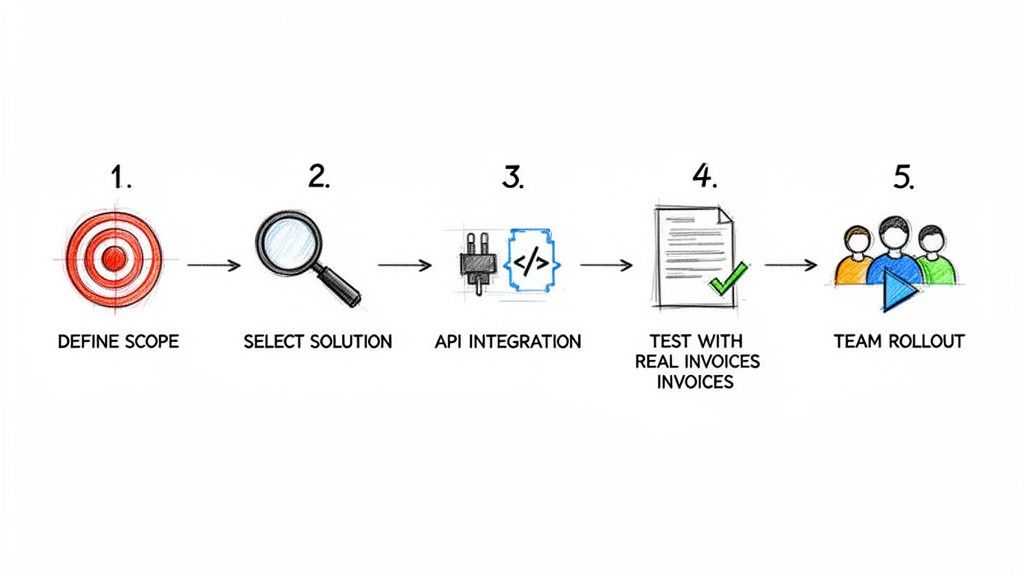
Adopting new software can feel like a huge project, but getting invoice data capture software up and running is an achievable goal that pays for itself—fast. If you break the journey down into a few clear phases, the whole process feels less like a complex technical overhaul and more like a smart upgrade to your financial workflow.
This isn't just a tool for massive corporations anymore. North America is leading the charge, making up 35–40% of the global demand for AP automation. We're seeing adoption rates over 70% in tech companies, 65% in manufacturing, and 60% in retail, all because they’re drowning in documents. These industries are specifically looking for AI-powered tools that can rip line items out of PDFs and images, pumping clean data directly into their financial systems. You can get more details on these global trends in AI invoice processing.
Phase 1: Define Your Project Scope and Goals
Before you even think about looking at software, you need a clear picture of what success looks like for your team. Start by mapping out your current invoice process, warts and all. Where are the real bottlenecks? Is it the soul-crushing manual data entry, the sluggish approval chains, or the constant errors during reconciliation?
Once you know the problems, set clear, measurable goals. Don't just aim to "be more efficient." Get specific.
- Cut invoice processing time by 75%.
- Eliminate late payment fees completely within three months.
- Get data entry errors below 1%.
Having these targets in hand will guide every decision you make, from which vendor you choose to how you train your team. It keeps the project laser-focused on solving your biggest headaches.
Phase 2: Select the Right Solution
With your goals locked in, you can start evaluating vendors. Use the feature checklist from the last section as your scorecard, paying close attention to accuracy, line-item extraction, and API power. The biggest mistake you can make is choosing a rigid, template-based system. Modern AI solutions should adapt to any invoice layout you throw at them, no manual setup required.
The best software isn't just a tool—it's a partner in your automation journey. Prioritize vendors with clear, pay-as-you-go pricing and excellent developer documentation, as this indicates a focus on flexibility and ease of integration.
Phase 3: Integrate and Test Thoroughly
After you've picked your solution, the integration work begins. This is where a solid REST API is non-negotiable. Your development team will wire up the invoice data capture software to your accounting or ERP system, creating a smooth pipeline for data to flow through.
Now for the most critical step: testing with real-world documents. Don't just feed it the perfectly formatted sample invoices the vendor gives you. Dig up your actual invoices—the messy ones, the multi-pagers, the ones with weird tables. This is how you find out if the system can actually handle the chaos your business receives every day.
Phase 4: Train Your Team and Go Live
The tech is only half the equation; a successful rollout hinges on your team. Run training sessions that focus on the new, automated workflow. Show them exactly how the software vaporizes their most tedious tasks, freeing them up for higher-value work like vendor management and financial analysis.
Start with a pilot group or a single department before going company-wide. This lets you collect feedback, iron out any kinks, and build some positive momentum. Once the pilot is a proven success, you can confidently launch the new process across the entire organization.
Meet ExtractBill: Your Modern Data Capture Solution
Knowing the theory behind invoice data capture is one thing, but putting it into practice is where the magic happens. This is where ExtractBill comes in. We built it specifically to solve the real-world headaches we've been talking about, for businesses ready to finally ditch manual data entry for good.
Where most tools stumble over messy PDFs or complex tables, ExtractBill delivers 99.9% accuracy. This isn't just basic text reading; our AI Vision model understands context and layout just like a human would. It correctly interprets everything from sprawling line items to confusing tax details, turning even the most chaotic invoices into clean, structured data you can actually trust.
Speed and Simplicity, Not One or the Other
In a fast-moving business, waiting minutes for a document to process is a serious bottleneck. We engineered ExtractBill for speed. Most invoices are done in just 2-5 seconds, which means you can build truly real-time automation, whether you're processing one invoice or thousands.
This isn't some clunky, enterprise-grade interface. It's simple drag-and-drop.
The whole point is to get you from a messy document to structured data in seconds, without a bunch of complicated steps in between.
For developers, plugging ExtractBill into your existing stack is a breeze. Our RESTful API is clean, powerful, and well-documented. This developer-first approach means you can connect it directly to your accounting software, ERP, or custom apps without a lengthy, painful setup. Add in webhooks for instant notifications, and you have a fully automated, event-driven workflow. You can dig into all the details on ExtractBill's powerful features and see how they enable seamless integration.
Pricing That Actually Makes Sense
High-end technology shouldn't require a complicated contract or a massive budget. We threw out the old enterprise pricing playbook and built something simple and transparent.
There are no subscriptions, no hidden fees, and no long-term commitments. You just pay for what you use. That's it. This pay-as-you-go model lets you scale up or down whenever you need to, without being locked into a plan that no longer fits.
This approach tears down the financial barrier to entry, making top-tier automation accessible whether you're a startup or a Fortune 500 company.
Ready to see it in action? The next logical step is to experience the speed and accuracy for yourself. Try ExtractBill for free and see how quickly you can leave manual processing in the rearview mirror.
Frequently Asked Questions
Diving into invoice data capture software? You've probably got questions. We’ve been in this space for a long time, and we've heard them all. Here are the straight answers to the most common ones we get.
How Accurate Is This Stuff, Really?
It’s incredibly accurate—far more than you might expect. Forget the clunky, template-based tools of the past. Modern AI-powered systems consistently hit 99% accuracy or higher.
These platforms have been trained on millions of real-world documents, so they understand context, not just characters. That means they can pull the right data even from a poorly scanned invoice with a bizarre layout. This level of precision is the key to true "touchless" processing, where you don't need a human to double-check every single entry.
What Kind of Documents Can It Handle?
Your suppliers don't use a standard format, so your software shouldn't expect one. A solid invoice data capture tool needs to be a jack-of-all-trades, ready for whatever comes its way.
At a minimum, it should chew through:
- PDFs: Both the clean, digitally-born kind and the grainy, scanned ones.
- Image Files: JPEGs and PNGs are a must. Think of employees snapping photos of receipts on their phones.
- Any Layout Imaginable: The system absolutely cannot rely on templates. It has to be smart enough to read an invoice from a brand-new vendor without any setup.
The whole point is to create one simple workflow for every document, no matter how it lands on your desk.
The real magic of modern invoice AI isn't just reading text; it's making sense of the chaos. It's built for the messy reality of business, where every vendor sends you something different.
Is My Financial Data Secure?
It has to be, period. When you're dealing with financial data, security isn't just a feature; it's the foundation. Any reputable provider will have built their platform like a fortress.
Look for non-negotiables like end-to-end encryption, which protects your data whether it's being uploaded or just sitting on a server. Also, check for compliance certifications like SOC 2, GDPR, and CCPA. These aren't just acronyms; they're proof that a provider takes security seriously and has passed rigorous independent audits.
How Does It Plug Into My Existing Software?
This is where the automation really comes to life. Top-tier solutions are built for developers, offering a clean, well-documented REST API. This is the universal adapter that lets your team connect the service directly into the tools you already use every day:
- Accounting platforms like QuickBooks or Xero
- Your main ERP system
- Any custom software your team has built
Many platforms also offer webhooks, which are even better. Instead of you asking "is it done yet?", the service instantly notifies your system the moment an invoice is processed. This lets you build powerful, event-driven workflows that kick off approvals or payments automatically, with zero human lag time.
Ready to stop typing and start automating? ExtractBill delivers 99.9% accuracy in just 2-5 seconds. Our simple pay-as-you-go model means you only pay for what you use. Give it a try for free at https://www.extractbill.com.
Ready to automate your documents?
Start extracting invoice data in seconds with ExtractBill's AI-powered API.
Get Started for Free