A Guide to Accounts Payable Process Improvement
Accounts payable process improvement isn't just about shuffling papers faster. It's about fundamentally changing how your AP department operates—swapping out slow, manual tasks for smart, automated workflows that cut costs, eliminate errors, and prevent late payments.
This shift turns AP from a back-office cost center into a strategic asset that gives you real control over your cash flow and builds stronger relationships with your suppliers. For any business that wants to grow without being buried in paperwork, this is non-negotiable.
Why Outdated AP Processes Are Holding You Back
If your AP process still runs on paper invoices, manual data entry, and approvals chased over email, you’re not just dealing with tedious work. You are actively slowing your business down. This isn't just an administrative headache; it's a silent financial drain that eats away at your profitability through missed opportunities and needless costs.
Let's be blunt: manual AP workflows are a direct source of friction, inefficiency, and risk.
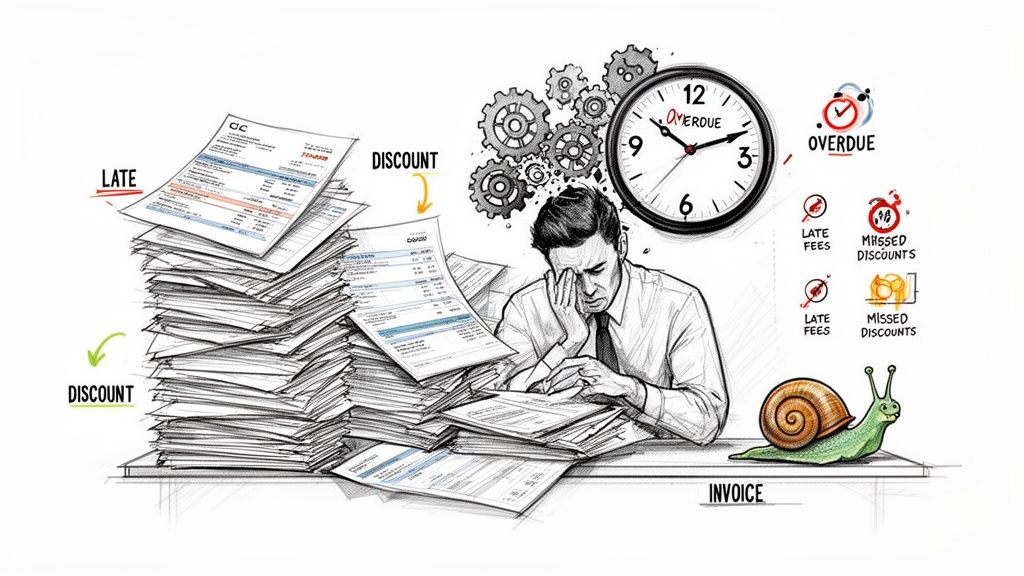
Does This Manual Overload Sound Familiar?
Picture this: it's Monday morning at a growing company. A mix of paper invoices and PDF attachments floods in. An AP clerk spends the next few hours painstakingly keying details from each one into the accounting software—a process that’s a breeding ground for typos and errors.
Once entered, that invoice starts its long, unpredictable journey for approval. Maybe it gets lost in a manager's overflowing inbox for days. Maybe it gets sent to the wrong person. The AP team then has to waste even more time chasing approvals and fielding calls from vendors asking, "When are we getting paid?"
By the time the invoice is finally tracked down, approved, and paid, any chance of an early payment discount is long gone. Worse, you might even be staring down a late fee. This isn't a worst-case scenario. For many businesses, it's just another Tuesday.
The Hidden Costs of Inefficiency
The real cost of these outdated methods is probably much higher than you think. It's not just about the obvious expenses. When you factor in labor, fixing errors, and postage, the average cost to process a single invoice manually can be staggering. And beyond the hard costs, the damage to your supplier relationships can be even more painful.
These are the pain points I see every day with manual AP:
- High Processing Costs: The hours spent on data entry, document handling, and chasing approvals add up fast, driving up the cost per invoice.
- Missed Early Payment Discounts: Slow approval cycles mean you’re leaving free money on the table. Those 2% discounts are pure profit.
- Late Payment Penalties: Inefficient workflows are the number one cause of overdue payments, leading to unnecessary fees and putting you in a bad spot with vendors.
- Zero Visibility: Without a central system, getting a real-time view of your liabilities is impossible. Cash flow forecasting becomes a complete guessing game.
An inefficient AP department isn't just slow—it's a strategic liability. It traps your best people in low-value tasks, makes accurate financial planning impossible, and can fray the partnerships that are crucial to your supply chain.
Fortunately, fixing this doesn't require a massive, complex enterprise overhaul anymore. Modern, AI-powered automation tools have made accounts payable process improvement accessible for businesses of any size.
For example, services like ExtractBill use AI to instantly capture and structure invoice data with near-perfect accuracy, getting rid of manual entry entirely. If you want to see exactly how this works, our detailed guide on accounts payable automation benefits breaks it all down. This single change frees up your team to focus on what really matters: strategic financial management, not chasing paper.
How to Find the Bottlenecks in Your Current AP Workflow
You can't fix a problem you don't know you have. Before you even think about new software or processes, you have to get an honest, unfiltered look at your current AP workflow. This isn't some formal, fifty-page audit. It's about rolling up your sleeves and seeing where things really get stuck.
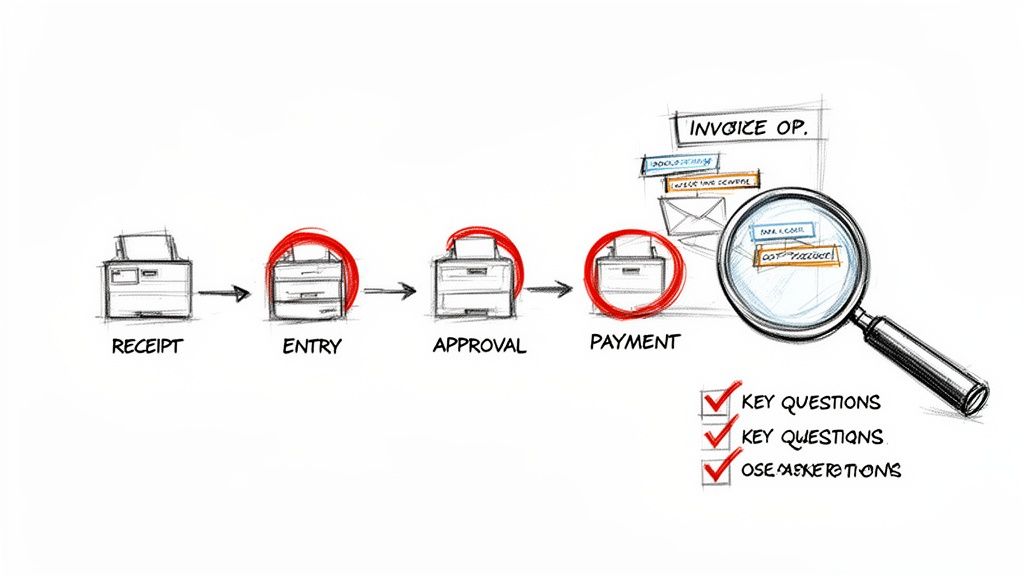
The goal is simple: follow an invoice from the moment it hits your company to the second the payment goes out. I’ve run this exercise with dozens of finance teams, and almost every single one is shocked by what they find—the number of hands an invoice passes through, how long it sits idle in an inbox, or the little workarounds people have invented just to get the job done.
Trace the Invoice's Journey
Start by grabbing a few recent invoices—maybe one that was super straightforward and one that was a total headache. Now, physically or digitally, walk it through every single touchpoint.
Don't just look at the official flowchart hanging on the wall. Follow what actually happens. Who opens the mail? Who types in the data? Where does it go next? You're looking for the unofficial "shadow workflows" that people create to navigate a clunky process. These are pure gold for spotting bottlenecks.
Your map should identify the key stages:
- Invoice Arrival: How do they even get to you? Email? Snail mail? A carrier pigeon?
- Data Capture: Is someone’s job to manually punch numbers from a PDF into your accounting software?
- Coding & Matching: Who’s assigning GL codes? Is anyone doing a three-way match against purchase orders?
- Approval Routing: How does it get to the right manager? Is it a chaotic email forward chain?
- Payment Processing: Once it’s finally approved, what happens next to get the payment scheduled and sent?
When you lay it all out, you create a visual story of your AP process, making the weak links glaringly obvious.
Ask the Tough Questions
With your process map complete, it's time to put each step under the microscope. This is where you turn vague feelings like "our approvals are too slow" into hard data that builds a rock-solid case for change.
Start with the most manual parts of the process. I’ve seen studies showing that up to 70% of an AP professional's day is eaten up by repetitive, manual tasks. Your first big win is finding out exactly what those tasks are in your own department.
The most powerful question you can ask is often the simplest: "Why do we do it this way?" You’d be amazed how often the answer is, "Because we've always done it this way." That's your cue to dig deeper.
Here’s a quick checklist to guide your investigation:
- How long does an invoice sit at each stage? Measure the "wait time"—the gap between when it lands in an inbox and when someone actually touches it. Idle time is the silent killer of efficiency.
- How many people touch a single invoice? Every handoff is a potential delay or a point where something can get lost. If a standard invoice needs more than three people to get paid, that's a red flag.
- What's our average approval time? Clock it from the moment an invoice is sent for approval until it's officially signed off. If it's taking more than a couple of days, you're almost certainly missing out on early payment discounts.
- How much time is spent on manual data entry per invoice? Time it. Five minutes might not sound like much, but multiply that by hundreds of invoices a month, and you’re looking at days of wasted productivity.
- What is our real cost to process one invoice? This is the eye-opener. Add up the hourly wages of everyone involved and the time they spend on each step. The number is almost always shockingly higher than leadership thinks.
Answering these questions gives you a clear, data-backed snapshot of your AP department’s health. You're no longer guessing; you have a treasure map pointing directly to the bottlenecks that are costing you time and money.
Setting Performance Metrics That Actually Matter
Once you’ve mapped out your entire AP process and pinpointed the obvious spots where things grind to a halt, it's time to get serious. The next step is moving from gut feelings to hard data. Vague goals like "we need to be faster" or "let's be more efficient" just don't cut it. To make any real progress, you need specific, measurable Key Performance Indicators (KPIs).
Think about it: without clear metrics, you're flying blind. You have no real way of knowing if the changes you're making are actually moving the needle. More importantly, you can't build a compelling case to your leadership for investing in new tools or processes. Setting the right KPIs turns your improvement project from a hopeful guess into a data-driven strategy.
Core AP Metrics You Need to Track
Top-performing finance teams aren't drowning in dozens of vanity metrics. They focus on a handful of powerful KPIs that tell the real story of their AP department's health, speed, and cost.
You'll want to start by establishing a baseline for these three critical areas:
- Cost Per Invoice: This is the ultimate efficiency metric. To figure this out, add up all the direct and indirect costs tied to your AP department—think salaries, software, maybe even a portion of office overhead—for a specific period. Then, divide that total by the number of invoices you pushed through in that same timeframe. For many, seeing this number for the first time is a real wake-up call.
- Average Invoice Processing Time: How long does it take for an invoice to get from your inbox to "approved for payment"? This KPI measures that entire lifecycle. A long processing time is a flashing red light for bottlenecks and is the number one reason companies miss out on early payment discounts and get hit with late fees.
- Early Payment Discount Capture Rate: This metric translates directly to your bottom line. Look at the total value of early payment discounts your vendors offered you, then calculate the percentage of that value you actually captured. A low rate here means you're literally leaving free money on the table.
Tracking these KPIs gives you a clear "before" picture. As you start rolling out changes, you can measure against this baseline to show a tangible return on your efforts.
The goal isn't just to collect data—it's to use that data to tell a story. When you can say, "We cut our invoice processing time from 15 days to 5," you're not just showing efficiency; you're showing a direct impact on cash flow and your relationships with suppliers.
This data-first approach is what separates the best from the rest. For instance, best-in-class organizations have crushed their invoice processing times down to an incredible 3.1 days, a world away from the sluggish 17.4 days for average performers. That kind of leap isn't just about speed; it completely changes the game for managing cash flow. Thanks to automation and AI-driven workflows, a single AP employee can now handle over 23,000 invoices per year, a massive jump in productivity from the old manual limit of 6,000. You can dig into a full breakdown of these powerful AP metrics that matter on Medius.com.
AP Performance Benchmarks Manual vs Automated
Seeing the numbers laid out side-by-side often provides that final push needed to justify investing in automation. The difference between a manual, paper-shuffling process and a modern, automated one isn’t just a small step up—it’s a total transformation.
The table below gives you a clear comparison of how these core KPIs stack up in the real world, pitting industry averages for manual processes against the performance of best-in-class teams that have embraced automation.
| KPI (Key Performance Indicator) | Manual Process (Industry Average) | Automated Process (Best-in-Class) |
|---|---|---|
| Cost to Process a Single Invoice | $12 - $40 | Under $3 |
| Average Invoice Processing Time | 17 - 25 days | 3 - 5 days |
| Early Payment Discount Capture Rate | 15% - 25% | 70% - 90% |
| Invoice Exception Rate | 20% - 30% | Under 10% |
The data speaks for itself. Automation doesn't just nudge the numbers in the right direction; it completely rewrites the economics of your accounts payable function. When your invoice exception rate plummets from 30% to below 10%, your team stops spending their days putting out fires and can finally start focusing on higher-value work, like financial analysis and strategy.
Establishing these metrics is the critical step that connects your initial audit to real, tangible results. It gives you a roadmap for your improvement journey and the proof you need to celebrate every win along the way.
A Practical Roadmap for Implementing AP Automation
Alright, you've done the hard work of mapping out your current process, spotting the jams, and setting some solid KPIs. Now for the fun part: building the path to a modern, efficient AP department.
This isn't about flipping a switch and hoping for the best. It's a practical, phased approach designed for small and mid-sized teams. We'll focus on getting quick wins that build momentum, turning your ideas for improvement into real, tangible results.
We'll break this down into three simple stages: digitizing your inputs, automating the grunt work, and finally, connecting everything for a smooth, end-to-end data flow. Think of it like building a house—you pour the foundation before you put up the walls.
This visual gives you a great overview of the core loop: map, measure, and improve. It’s a simple but powerful framework.
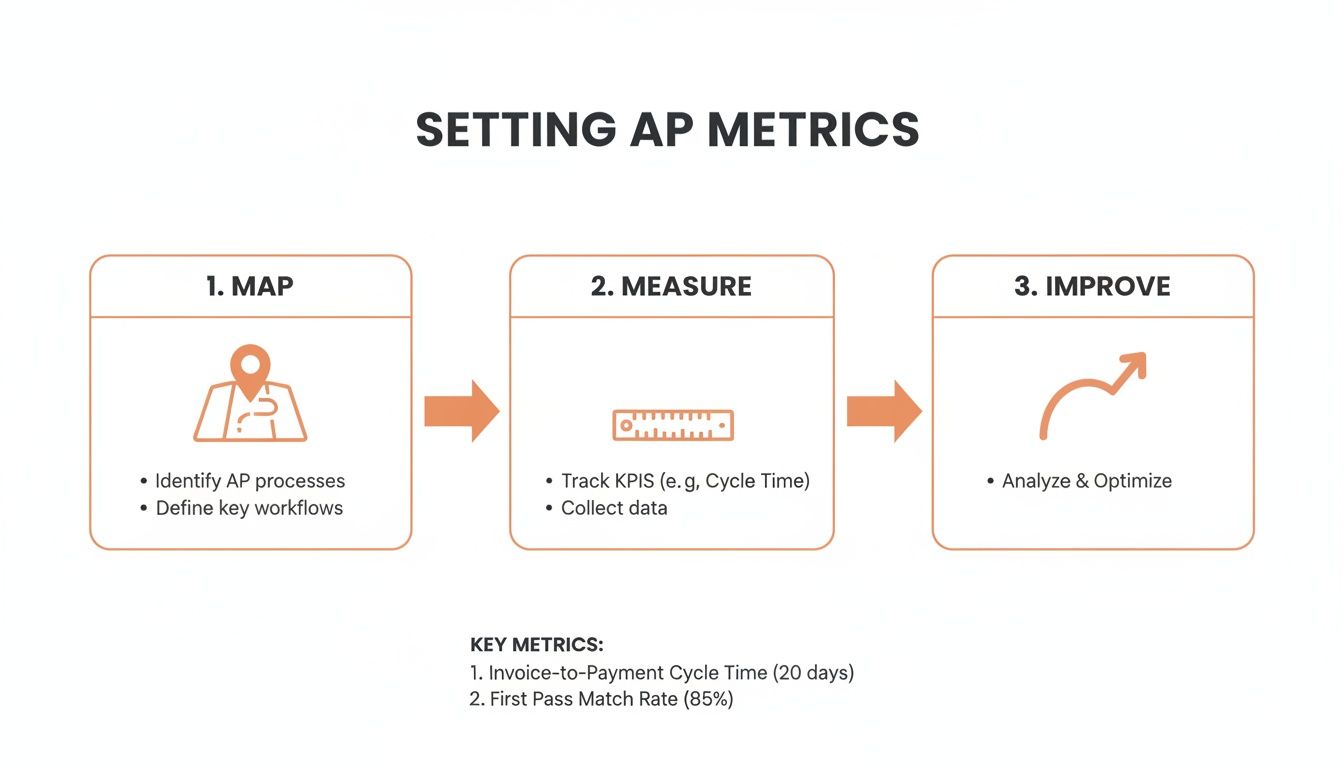
You can't fix what you can't see. First, you visualize the workflow, then you measure it, and only then can you make it better based on what the data tells you.
Phase 1: Digitize and Centralize
First things first: end the paper chase. The goal here is to create one digital inbox for every single invoice, no matter how it gets to you—email, snail mail, or a picture from a phone. This simple change instantly stops documents from getting lost in the shuffle.
This phase is all about capturing the data accurately from the get-go. With an AI-powered tool, you can automatically grab all the key information from any invoice format. The AI reads the document—whether it’s a PDF or a scanned image—and pulls out critical details like the vendor, invoice number, due date, and line items, turning them into structured, usable data.
Just like that, you've eliminated manual data entry, the single most error-prone step in the entire AP process.
Phase 2: Automate Core Workflows
Now that you have clean, structured data coming in, you can start automating the repetitive tasks that eat up your team's day. This is where you'll see massive gains in speed and efficiency. The aim is to make as many invoices as possible "touchless."
It all starts with smart approval routing. Instead of your team manually forwarding emails and chasing down managers, you can build rules that automatically send invoices to the right person based on the vendor, amount, or GL code.
Here are a few automation plays to start with:
- Approval Rules: Set up a rule to automatically route any invoice under $500 straight to a finance manager, while larger invoices go to the specific department head first.
- GL Coding Suggestions: The system can learn from how you've coded past invoices and start suggesting the right general ledger codes, which saves time and keeps your books consistent.
- Exception Handling: Any invoice with a problem, like a PO mismatch, gets automatically flagged and sent to a designated person for review. This lets all the clean, simple invoices fly through the system without delay.
A mid-sized marketing agency I worked with implemented these exact rules and cut their average invoice approval time from eight days down to just two. They didn't hire anyone new; they just gave their existing team a smarter process.
This phase is all about letting the software handle the predictable, boring work. This frees up your team to focus their brainpower on the exceptions that actually need a human touch. For a deeper look at the tech, check out our guide on the best accounts payable automation tools available today.
Phase 3: Integrate and Analyze
The final phase is where it all comes together. You connect your new, automated AP system directly to your accounting software or ERP. This creates a single, reliable source of truth for your financial data, gets rid of manual reconciliation headaches, and gives you a real-time view of your company's liabilities.
With a proper integration, as soon as an invoice is approved, all the data flows seamlessly into your accounting platform, ready for payment. This is usually done through API connections or pre-built connectors that don't require a team of developers to set up.
The payoff is immediate and significant:
- Real-Time Data Sync: Your books are always up-to-date, which makes cash flow forecasting way more accurate.
- No More Duplicate Work: Nobody has to re-key approved invoice data from one system into another. Ever again.
- Audits Become a Breeze: You have a complete digital trail for every single invoice—from receipt to payment—all stored in one searchable place.
The impact of this three-phase approach isn't small. In fact, companies that go all-in on automation see a staggering 78% reduction in their invoice processing costs. Top-performing teams now spend just $2.78 per invoice, a far cry from the industry average of $12.88. This shift is happening fast, with 68.3% of payments now being electronic and 75% of companies adopting AI, which has helped cut exception rates from 22% down to just 9%.
By following this roadmap, even a small team can go from drowning in paper to running a streamlined, data-driven AP operation in a matter of weeks, not years.
Getting Your Team Onboard with New Workflows
Let’s be honest: the most powerful automation on earth is completely useless if your team refuses to use it. True AP process improvement is as much about the people as it is about the software. The human side of this change boils down to communication, training, and rethinking your workflows to match the new speed you’ve unlocked.
Resistance to change almost always stems from uncertainty. People worry about their roles changing, or worse, they see automation as a threat to their job security. Your first and most important job is to get ahead of those fears and frame this change for what it is: an upgrade to their daily work, not a replacement for them.
Communicating What’s Actually in It for Them
The secret to getting buy-in is to laser-focus on the “what’s in it for me?” factor for every single person this touches. Forget high-level corporate speak like "improving efficiency." Get specific. Get personal. Show them exactly how this new system eliminates the most tedious, soul-crushing parts of their day.
Frame the conversation around these tangible benefits:
- No More Manual Data Entry: Make it clear that the days of mind-numbing, line-by-line invoice keying are officially over.
- Less Time Chasing People Down: Show them how automated routing and reminders mean they can stop sending a million follow-up emails just to get an approval.
- Focus on Work That Matters: Explain that this isn’t about removing work; it’s about swapping low-value tasks for high-value ones. They'll have time for vendor relationship management, spend analysis, and contributing to strategic cash flow decisions.
When your team sees the technology as a tool that solves their biggest headaches, they’ll quickly go from being resistant to being your biggest champions.
Redesigning Workflows for a Faster Pace
Your old approval process was probably built for a world of paper, staples, and interoffice mail. You can't just slap a piece of software on top of a broken workflow and expect magic. This is your chance to build a smarter, faster system from the ground up.
A fantastic place to start is with tiered approval rules. A recurring $150 utility bill should absolutely not follow the same multi-step approval chain as a one-time $20,000 capital expenditure.
The goal is to build a process that trusts both your team and the system for routine, low-risk transactions. This frees up your managers' time to focus on invoices that actually require their strategic oversight, not just rubber-stamping predictable expenses.
For example, you could create a rule that auto-approves any invoice under $250 from a known vendor, as long as it’s within 10% of the previous month’s amount. A single rule like this can instantly make a huge chunk of your invoice volume completely touchless, saving hours for both the AP team and department heads.
How to Get Buy-In from Every Level
For this to stick, you need a united front, from the AP clerks all the way up to the CFO. Every stakeholder has different priorities, so you need to tailor your message and get them involved early.
Here’s a simple breakdown of how to approach each group:
- For the AP Team: Frame this as an empowerment move. Give them hands-on training and position them as the new experts managing a more sophisticated system. They’re graduating from data entry clerks to process managers.
- For Department Managers (The Approvers): Sell them on convenience. Show them how they can approve invoices in two clicks from their phone or email, instead of digging through a cluttered inbox for a PDF attachment.
- For Senior Leadership/CFOs: Speak their language: data and ROI. Use the KPIs you set earlier to present a clear picture of the projected cost savings, improved cash flow visibility, and reduced risk of late payment fees.
When you involve everyone in the redesign and clearly show how the new process makes their specific job easier, it stops feeling like a top-down mandate. It becomes a collaborative effort, turning potential friction into enthusiastic adoption.
Measuring Success and Fostering Continuous Improvement
Getting your new software up and running isn't the finish line; it’s really just the start of a new race. The real win in any accounts payable process improvement comes from using data to get smarter over time. Your focus now pivots from implementation to optimization, building a culture where the team is always looking for small ways to fine-tune the process.
This is where those KPIs you set up earlier become your most important tool. They aren't just baseline numbers anymore—they're the heart of a live performance dashboard.
Don't overthink the dashboard. It doesn't need to be some complex, custom-coded behemoth. A simple spreadsheet or a built-in feature in your new AP software is more than enough to track how you're doing against those initial goals.
Building Your AP Performance Dashboard
Your dashboard should give you a clean, at-a-glance view of your AP department’s health. I recommend focusing on just a few key metrics that directly show the impact of your new automated workflows.
You’ll want to keep a close eye on metrics like these:
- Touchless Processing Rate: What percentage of your invoices fly from receipt to approval without anyone having to lift a finger? This is your ultimate efficiency metric. The goal here is to nudge this number up every single quarter.
- Early Payment Discount Capture Rate: Now that your cycle times are way faster, are you actually grabbing those discounts? This number is a direct measure of your ROI. It’s cash back in the bank.
- Average Invoice Cycle Time: Keep tracking this to make sure old bottlenecks don't creep back in as your invoice volume grows or changes.
Sitting down with your team to review this data monthly or quarterly keeps everyone on the same page. It shifts AP management from a purely reactive, "put-out-the-fire" task into a proactive, data-driven strategy.
Your AP data is more than just a record of what you've paid. It's a goldmine of financial intelligence. When you have clean, structured data from tools like ExtractBill, you unlock insights that were previously buried in piles of paper. This helps you forecast cash flow with way more accuracy and can even give you leverage to negotiate better terms with suppliers.
Fostering a Culture of Continuous Improvement
The end goal is to create a simple feedback loop: data informs a decision, that decision leads to a small process tweak, and that tweak generates new data. It's a virtuous cycle.
For instance, if your dashboard shows that invoices from a specific supplier are constantly getting flagged for manual review, that’s a clear signal. It's time to reach out to that supplier and work with them to fix whatever formatting or data issues are causing the problem.
This iterative approach is what ensures your AP function keeps evolving. For more strategies on how to maintain peak performance long-term, check out our guide on accounts payable automation best practices.
By constantly measuring and refining, you cement your AP department's role as a strategic asset, not just a back-office cost center.
Common Questions About Upgrading Your AP Process
When teams start looking at improving their accounts payable workflow, a few key questions always come up. Let's tackle the big ones—cost, complexity, and whether this stuff actually works with the mess of invoices you deal with every day.
Isn't Automating AP Expensive to Get Started?
That’s a common myth, usually based on old-school enterprise software that came with massive upfront fees. Things have changed.
Modern AI services are built on a pay-as-you-go model, which makes them incredibly accessible. You can often process a single invoice for as little as $0.11 per document, with no locked-in subscriptions. This means you can get started without a huge capital investment.
Can Automation Really Handle All Our Different Invoice Formats?
Yes, and honestly, this is where today's AI really shines. It's not like the rigid templates of the past.
Advanced platforms use what's called AI Vision to understand and interpret over 50 different document types. It doesn't matter if it's a clean PDF from a major supplier, a scanned paper invoice, or even a JPG photo of a receipt snapped on a phone. The system is smart enough to find and pull the key data, then organize it into a clean, standard format for you.
Do I Need to Hire a Developer or Have a Big IT Team?
Not usually. While there are always developer-friendly APIs for companies that want deep, custom integrations, most modern AP automation tools are built for finance pros, not coders.
Many services have simple drag-and-drop web interfaces that let you upload documents and get data back in minutes. For connecting to your other systems, you can often use pre-built integrations or simple webhooks that don't require you to write a single line of code.
Ready to stop the soul-crushing manual data entry and get hours back in your week? Give ExtractBill a try and process your first three documents completely free. See how it works at ExtractBill.com.
Ready to automate your documents?
Start extracting invoice data in seconds with ExtractBill's AI-powered API.
Get Started for Free