A Guide to the Modern OCR Receipt Scanner
An OCR receipt scanner is a piece of tech that uses Optical Character Recognition (OCR) and Artificial Intelligence to automatically pull all the important details from a paper or digital receipt. It’s the tool that turns a crumpled photo of a receipt into clean, organized data, killing off manual data entry for good.
The End of Manual Data Entry
Think about a classic accountant, hunched over a desk piled high with receipts. They grab one, squint at the faded thermal paper, and meticulously type every single detail—date, vendor, tax, total—into a spreadsheet. It’s brutally slow, boring, and a single typo can throw off the books for hours.
Now, imagine an AI that does the same job. You feed it that same mountain of receipts, and in seconds, it’s all done. Every piece of data is read, understood, and neatly organized with stunning accuracy. That's the whole point of a modern OCR receipt scanner: to swap a soul-crushing, error-prone task with a fast, automated, and reliable workflow.
The Frustration of Old-School Methods
For anyone in finance, development, or business operations, the old way of handling receipts is a constant headache. The problems are always the same:
- Wasted Hours: Your team spends way too much time punching in numbers instead of doing work that actually matters. One study even found that 40% of small businesses are still stuck in the muck of manual expense processing, which is a huge drag on productivity.
- Human Error: Let's be honest, mistakes happen when you're manually keying in data. A misplaced decimal or a transposed number can mess up bookkeeping, create nightmares during tax season, and lead to flat-out wrong financial reports.
- Lost or Damaged Receipts: Paper receipts get lost, fade, or get destroyed. This leaves gaps in your records and creates major compliance risks during an audit. It's especially bad with thermal paper receipts, which can become completely unreadable in just a few months.
An OCR receipt scanner solves these problems by creating a seamless bridge between the physical and digital worlds of your finances. If you're curious about how this fits into the bigger picture of business automation, it's worth reading up on modern document capture software.
This technology isn't just about scanning; it's about intelligence. A modern scanner doesn't just see numbers and letters—it understands context. It knows the difference between a subtotal and a tax amount, and it can accurately parse complex line items from a crumpled photo taken on a smartphone.
Ultimately, bringing in an OCR receipt scanner is the first real step toward getting back countless hours, radically improving your data's accuracy, and building a much smarter financial foundation for your business.
How AI Powers an OCR Receipt Scanner
Ever wonder how a crumpled receipt from your pocket transforms into perfectly structured digital data? It’s not magic, but it’s close. The whole process is driven by a sophisticated AI that acts like a digital detective, piecing together clues from a simple photo.
This journey from a blurry image to clean JSON data isn’t a single step. It’s a smart, multi-stage workflow where each part builds on the last to pull out every last detail with surprising accuracy.
It all kicks off the moment you upload a receipt image. The first, and arguably most important, step is image preprocessing. A smart OCR receipt scanner doesn’t just "see" the image; it cleans it up for analysis, automatically fixing common issues that would trip up a more basic system.
- Deskewing: It digitally straightens out receipts that were snapped at an angle, making sure the text is perfectly level.
- Noise Reduction: It clears away shadows, blurs, and other visual "noise" that can hide important characters.
- Binarization: It cranks up the contrast, turning the image into a crisp black-and-white version where the text pops.
Once the image is prepped and ready, the core Optical Character Recognition (OCR) engine gets to work.
From Pixels to Text
Think of the OCR layer as a digital eye learning to read. It meticulously scans the clean image, spotting patterns of pixels and matching them to letters, numbers, and symbols. A simple OCR might handle standard fonts on a clean document, but modern receipts are a chaotic mix of fonts, logos, and layouts.
This is where a truly intelligent OCR receipt scanner shines. It doesn’t just read characters; it understands them.
The chart below shows just how different this is from the old way of doing things.
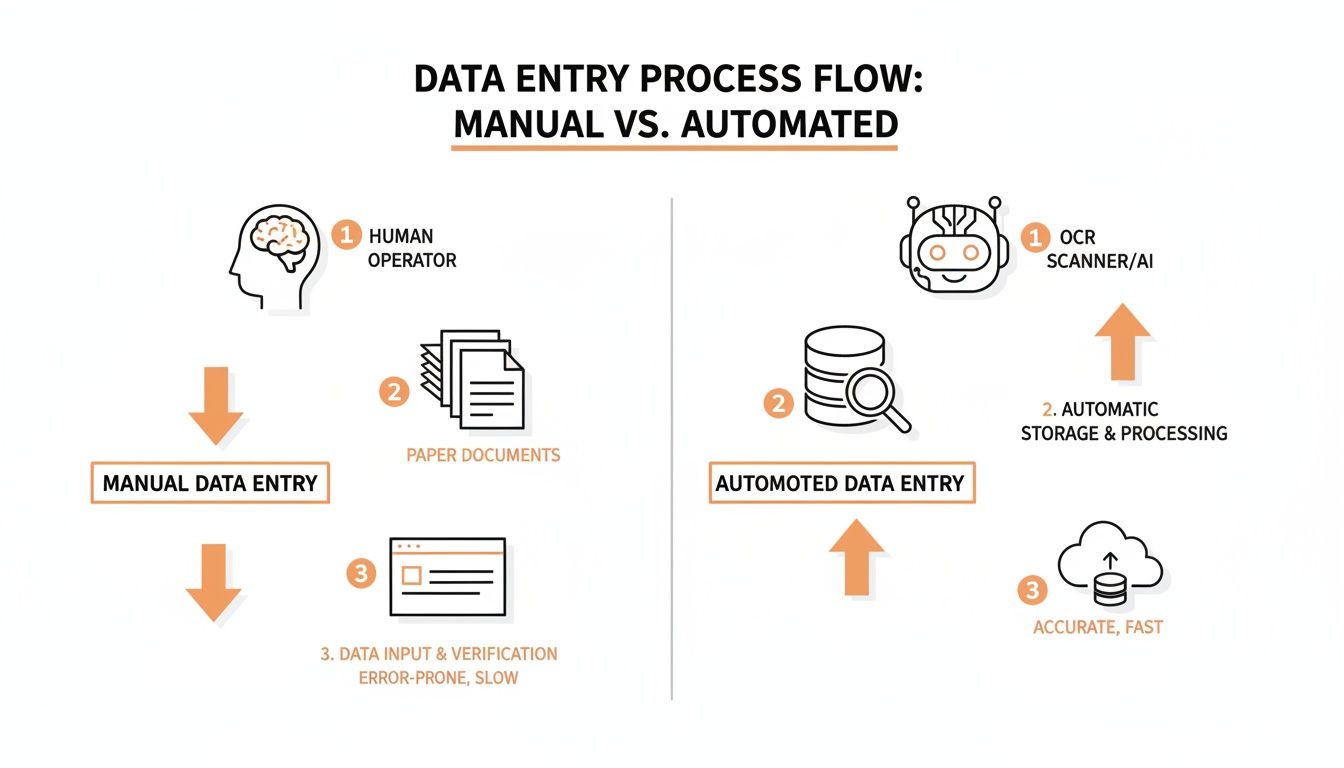
It’s a fundamental shift, replacing hours of mind-numbing manual entry with an efficient, AI-powered process that plugs directly into your digital tools.
Understanding Context and Structure with AI
After the text is pulled from the image, the real brainpower kicks in. AI and computer vision models analyze the receipt's layout to figure out what all that text actually means. This is what separates a simple text-grabber from a powerful financial tool.
Instead of spitting out a random jumble of words and numbers, the AI identifies key fields by their position and relationship to other text. It knows the number next to the word "Total" is the final amount, while the number next to "Tax" is something different. This contextual awareness is everything.
An AI-powered scanner is trained on millions of receipts from countless vendors. It learns to tell a merchant's logo apart from a line item and can make sense of complex tables with columns for quantity, description, and price.
This massive training dataset is why the system gets smarter over time. Every receipt it processes helps it master new formats and tricky layouts, constantly improving its accuracy. And the demand for this is exploding—the OCR scanning software market hit USD 11,750.25 million as businesses everywhere race to digitize their paperwork. With a projected 10.2% CAGR, it's expected to reach USD 26,500.75 million by 2032. You can check out the full analysis in the ocr scanning software market report from futuremarketreport.com.
Ultimately, the AI doesn't just extract data; it gives it structure. The final output is usually a clean JSON file where every piece of information is neatly labeled and ready to go. This data can flow seamlessly into your accounting software, expense apps, or ERP systems, creating a completely hands-off workflow. To see how this applies to similar documents, take a look at our guide on invoice data capture software.
Choosing the Right OCR Scanner Solution
Picking the right OCR receipt scanner isn’t a one-size-fits-all deal. The market is crowded, and it's easy to get lost in flashy marketing claims. The trick is to cut through the noise and focus on what actually matters for performance.
The right solution won't just pull text off a page; it'll deliver clean, usable data that plugs right into your existing workflow, whether you're a small business owner manually tracking expenses or a developer building a full-blown fintech app. Making a smart choice means getting under the hood to look at the capabilities that truly define a quality service.
Key Evaluation Metrics for Performance
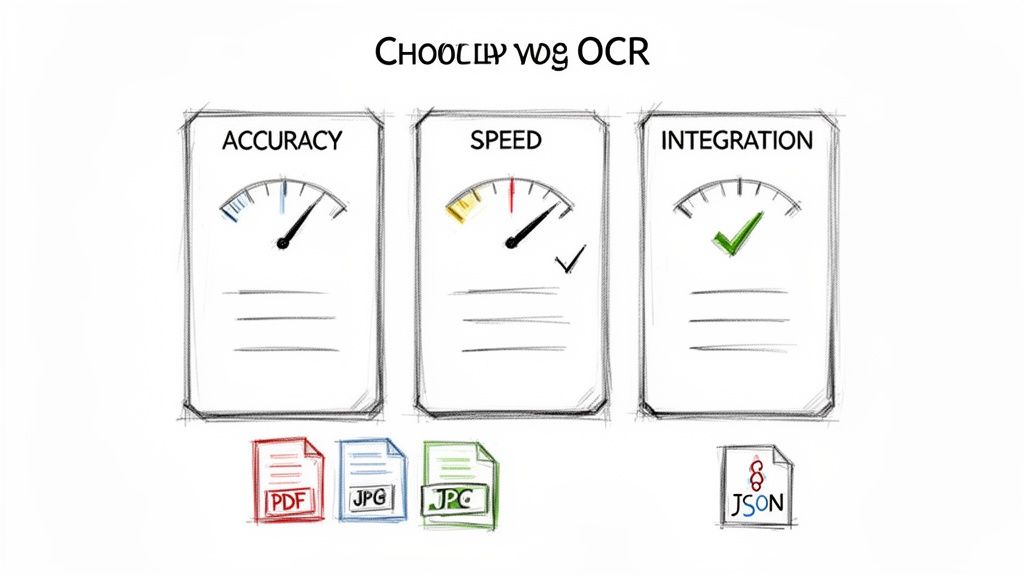
When you start comparing options, a few critical metrics will tell you almost everything you need to know about how a scanner will perform in the real world. These go way beyond a simple "yes" or "no" on a feature list.
- Field-Level Accuracy: Don't settle for a vague, overall accuracy percentage. The real test is field-level accuracy—how precisely it nails individual data points like the total amount, tax, and vendor name. A top-tier solution should hit over 99% accuracy on these key fields. Even tiny errors can throw your accounting completely off track.
- Processing Speed: How long does it take to get your data back after you upload a receipt? In a world of real-time operations, waiting minutes is a non-starter. Look for solutions that can process documents in 2-5 seconds. This is fast enough for immediate feedback and keeps your workflows fluid.
- Document Versatility: Receipts come in all shapes, sizes, and formats. A truly capable OCR scanner has to handle a wide range of file types (PDF, JPG, PNG) and make sense of messy, inconsistent layouts without forcing you to create templates for every new vendor.
These metrics are the bedrock of a reliable system. For a deeper look at specific software, it's also worth checking out guides on the best invoice OCR software, as many of the evaluation criteria overlap.
The Importance of Structured Data Output
Just extracting text is only half the battle. The real magic of a great OCR scanner is its ability to deliver that data in a clean, structured, and predictable format. Without that, you're just swapping one manual task (typing) for another (cleaning up a messy text file).
The gold standard for this is JSON (JavaScript Object Notation). A well-designed scanner API will return a standardized JSON object where every piece of data is clearly labeled and organized.
For developers, standardized JSON output is absolutely non-negotiable. It means you can write code once to handle the vendor name, total, and line items, and it will work reliably for every single receipt that comes through, no matter what the original layout looked like. This predictability is what makes scalable automation possible.
This structured output is the key that unlocks true automation, allowing data to flow directly into your accounting software, ERP, or custom apps without anyone needing to lift a finger.
Comparing User Experience for Different Needs
The perfect interface depends entirely on who’s using it. A tool built for a developer will feel clunky and confusing to an accountant, and a simple tool for a business owner won't have the power a developer needs.
- For Business Users: Look for a simple, intuitive drag-and-drop web interface. This lets non-technical folks in finance or accounting upload receipts and get structured data back in seconds, without ever touching a line of code. The focus is on ease of use and immediate results.
- For Developers: A robust and well-documented REST API is the top priority. Developers need clear instructions, code examples, and features like webhooks to build scalable, asynchronous integrations. Honestly, the quality of the API documentation can make or break an entire project.
To help you sort through the options, checking out reviews of the best receipt scanning apps can give you a feel for how different products are tailored to specific audiences. In the end, choosing the right OCR scanner comes down to one thing: aligning its core performance, data output, and user experience with your specific business goals.
Real-World Business Applications
Knowing how an OCR receipt scanner works is one thing. Seeing it solve the kind of messy, real-world problems businesses face every day is where the lightbulb really goes on. This isn't just abstract tech—it’s a practical tool that delivers tangible results, whether you’re in finance, running a small business, or building the next great app.
Let's move past the theory and look at how this technology actually gets put to work. You'll see how an OCR receipt scanner becomes the engine for automation, turning tedious manual chores into smooth workflows. The goal is simple: save time, kill errors, and free up people to focus on work that matters.
Transforming Accounts Payable for Finance Teams
Picture an accounting team at month-end. They're staring down a mountain of vendor invoices and expense receipts. The old way of doing things is a slow, painful grind of manual data entry, where a single misplaced decimal can derail reconciliation for hours. It’s a classic bottleneck that costs companies a fortune in wasted productivity.
Now, let’s plug an OCR receipt scanner into that workflow.
- The Challenge: The team is burning 20 hours every week just keying in data from hundreds of documents. This delays payments and holds up financial reporting.
- The OCR Solution: Instead of typing, each document gets scanned. The AI-powered system instantly pulls the vendor name, date, line items, and total amount, feeding it directly into the accounting software.
- The Measurable Outcome: Processing time gets slashed by over 85%. Month-end closing is suddenly faster, vendors get paid on time, and the team reclaims those 20 hours for high-value work like financial analysis and forecasting.
Empowering Small Business Owners for Tax Season
For any small business owner, time is the one resource they can't get back. Come tax season, the annual scramble to find every faded, crumpled receipt becomes a hugely stressful ritual. Missing a deduction means leaving money on the table, but organizing a year's worth of paper is a massive chore that pulls them away from actually running the business.
An OCR receipt scanner completely changes the game. The owner can just snap a photo of a receipt right after making a purchase. The data is immediately digitized, categorized, and stored away safely.
When tax season rolls around, the frantic search is gone. In its place is a clean, perfectly organized digital trail of every deductible expense, ready to go. A major annual headache becomes a simple, routine task.
Fueling Innovation for Developers
Developers are always on the hunt for powerful tools to build better products. If you're creating expense management software, a bookkeeping platform, or even a loyalty app, adding a reliable receipt parsing feature is a game-changer. But building that kind of complex AI from scratch is a massive, expensive undertaking.
This is where an OCR receipt scanner API becomes a developer's best friend.
A developer can integrate a ready-made API to give their app instant receipt-reading powers. This lets them build powerful features—like real-time expense tracking or automatic budget categorization—without needing a dedicated machine learning team. They get to focus on creating a fantastic user experience while the API does all the heavy lifting on data extraction. For some great examples of this in action, check out these case studies on AI receipt scanning solutions.
The push toward digitization is only getting stronger. The digital receipts market, which is built on this technology, was valued at USD 2.1 billion in 2023 and is expected to climb to USD 5.1 billion by 2033. This growth shows just how essential OCR has become, with some studies finding it can improve expense tracking by up to 80%.
Integrating an OCR Scanner with Your Software
For any developer or product manager, an OCR receipt scanner isn't just a nifty tool—it’s a powerful building block for serious automation. Once you see how cleanly it can turn a crumpled receipt photo into structured data, the next logical step is plugging that power directly into your own software. This is where a simple scanner becomes a fully automated financial engine for your business.
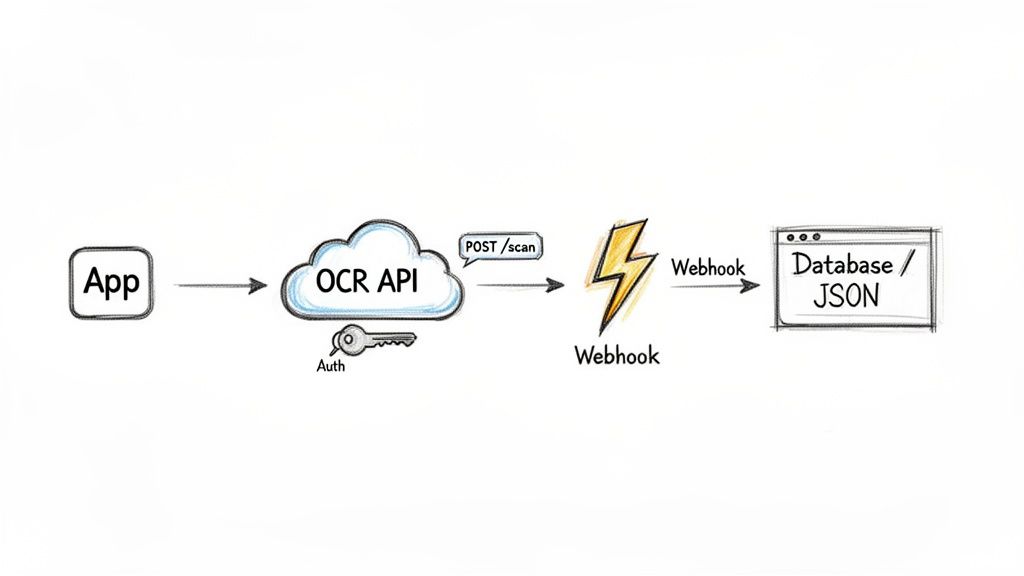
The industry-standard way to do this is with a REST API. Think of an API (Application Programming Interface) as a secure messenger that lets your app talk to the OCR service. It provides a clear, documented set of rules for sending a receipt image and getting structured data back, so you can build receipt processing directly into your expense management apps, accounting platforms, or internal tools.
The API Workflow From Start to Finish
Connecting to a receipt scanning API follows a familiar and straightforward pattern. While the small details might differ between providers, the core steps are always the same, making the integration feel surprisingly simple.
- Authentication: First, you secure the connection. You'll get a unique API key that works like a secret password. Your application sends this key with every request to prove it has permission to use the service.
- File Submission: Next, you send the receipt image to a specific API endpoint—a designated URL built for processing documents. This is typically done with an HTTP POST request, bundling the image file (like a PDF, JPG, or PNG) right into the request body.
- Data Reception: After a few seconds, the API sends a response back. Any decent service will return this data in a clean, structured JSON format. Every piece of information—vendor, total, tax, line items—is neatly labeled, which makes it incredibly easy for your application to read and use.
This direct, back-and-forth communication lets you build custom, real-time data extraction workflows that slot perfectly into your existing software.
Enabling Real-Time Updates with Webhooks
A standard API call is great for on-demand processing, but what if you need your system to react the instant a receipt is done? Constantly pinging the API with "Are you done yet?"—a process known as polling—is clunky and wastes resources. This is where webhooks come in.
A webhook flips the script entirely. Instead of your app constantly checking for updates, you give the OCR service a special URL. Once the receipt has been fully processed, the service automatically sends the completed JSON data straight to your URL.
Think of it like this: a standard API call is like knocking on a door every few minutes to see if a package has arrived. A webhook is like getting a delivery notification on your phone the moment the package hits your doorstep. It’s a proactive, event-driven approach that builds much faster and more efficient systems.
Using webhooks lets you create truly asynchronous workflows. You can fire off hundreds of receipts for processing and let your system get back to other tasks, knowing it will be notified instantly when each one is ready.
Security and Best Practices for Integration
When you're handling sensitive financial documents, security isn't optional. Integrating an OCR receipt scanner API means paying close attention to best practices to keep every piece of data protected.
- Encrypt Data in Transit: Always communicate with the API over HTTPS (using TLS/SSL encryption). This wraps the receipt images and the extracted data in a secure layer, shielding them from prying eyes as they travel across the internet.
- Secure Your API Keys: Treat your API key like any other high-value credential. Store it safely using environment variables or a secrets management service. Never, ever hardcode it directly into your application's source code where it could be accidentally exposed.
- Validate Data: Before you save the extracted data to your database, run a quick sanity check. Make sure the data types are correct (e.g., numbers are actually numbers) and that the essential fields you need are present.
The growth in this space is staggering. The global OCR market hit USD 12.25 billion and is projected to reach USD 51.23 billion by 2033, with industries like retail and finance leading the charge. For developers, this signals a massive trend where plugging into a powerful receipt scanning API is becoming the standard way to automate tedious back-office tasks and unlock huge time savings. You can dig into the numbers in a detailed OCR market report from congruencemarketinsights.com.
Of course. Here is the rewritten section, crafted to sound like an experienced human expert and match the provided style guide.
Frequently Asked Questions
After diving into the tech, the use cases, and the integrations, you probably have a few specific questions. Let's tackle the most common ones that pop up when businesses start looking seriously at receipt scanning.
These are the practical, real-world questions that move you from "what is this?" to "how can we use this?"
How Accurate Are Modern OCR Receipt Scanners?
This is the big one, and the answer is surprisingly good. The best AI-powered receipt scanners can hit over 99% accuracy on a field-by-field basis. But—and this is a big but—that number depends on the quality of the image and how messy the receipt layout is.
Your old-school OCR tool might completely fall apart with a blurry photo or a weird font. A modern solution, on the other hand, has been trained on millions of real-world documents. That means it’s seen it all: faded thermal paper, crumpled receipts from the bottom of a bag, and photos taken in a dimly lit car. It learns to read context, not just characters.
My advice? Always find a provider who is upfront about their accuracy rates and gives you a free trial. You need to test it with your actual receipts, not their perfectly curated samples.
Can One Scanner Handle Different Receipts and Invoices?
Absolutely. This is one of the biggest leaps forward from older tech. A modern OCR receipt scanner doesn't need you to create templates or tell it what to look for on a receipt from a new vendor.
Unlike rigid systems that had to be manually configured for every single layout, today's AI-driven scanners dynamically identify what matters. The system is smart enough to find the vendor's name, the total, the tax, and even the individual line items on almost any receipt or invoice you throw at it.
This flexibility is a game-changer for any business dealing with dozens or hundreds of different suppliers. You get a single, unified tool that automates the whole workflow instead of juggling a bunch of specialized, clunky systems.
Is It Secure to Upload My Financial Documents?
Security isn't just a feature; it's the foundation. Any reputable OCR provider is handling extremely sensitive financial data, and they have to treat it that way. When you're vetting a service, there are a few non-negotiables to look for.
First, they need a crystal-clear privacy policy and should comply with major data protection laws like GDPR or CCPA. For API integrations, unique, revocable API keys are the bare minimum for secure authentication.
You should always pick a service that's transparent about its security architecture. Look for things like end-to-end data encryption (using TLS/SSL) for any data in transit and strong encryption for any files stored at rest. This combination ensures your financial data is locked down and protected from prying eyes.
What Is the Difference Between OCR and IDP?
Great question. This gets right to the core of how the technology has evolved from simple text recognition to genuine understanding. Think of it as a two-stage rocket.
-
Optical Character Recognition (OCR): This is the first stage. It’s the foundational tech that does one job: it turns the pixels in an image into machine-readable text. It sees a picture of the word "Total" and converts it into the characters T-o-t-a-l. It's a crucial first step, but it has no idea what that word actually means.
-
Intelligent Document Processing (IDP): This is the second stage, where the real magic happens. IDP bolts AI, machine learning, and computer vision onto the OCR engine. It doesn't just read the text; it understands its context and meaning.
So, while a basic OCR tool reads the characters "$50.00," an IDP solution knows that this specific "$50.00" is the Total Amount because of its position on the page, the words around it, and its formatting. A top-tier OCR receipt scanner is really a highly specialized IDP solution, built from the ground up to turn messy financial documents into clean, structured, and meaningful data.
Ready to eliminate manual data entry and automate your financial workflows? With ExtractBill, you can turn any receipt or invoice into clean, structured JSON in seconds. Our AI-powered platform delivers 99.9% accuracy, handles over 50 document types, and processes files in 2-5 seconds via a simple API or drag-and-drop interface. Try it free today and see how easy automation can be.
Ready to automate your documents?
Start extracting invoice data in seconds with ExtractBill's AI-powered API.
Get Started for Free