Receipt Scanner OCR Your Guide to Automated Data Entry
Ever found yourself staring at a shoebox brimming with faded, crumpled receipts? For years, that was the painful reality of tracking expenses. Business owners and finance teams would lose entire days to the soul-crushing task of sorting, deciphering, and manually punching numbers into a spreadsheet.
It was slow, frustrating, and a perfect recipe for costly errors.
This is where receipt scanner OCR comes in. Think of it as the ultimate solution to the paper problem. Instead of letting receipts pile up, you just snap a photo. The technology doesn't just digitize the image; it actually reads and understands it, turning a messy paper trail into clean, structured data you can use immediately.
But how does it actually work? It’s not a single trick, but a clever, multi-stage process that takes a simple photo and transforms it into valuable financial data.
The Four-Step Journey From Paper to Digital Data
Turning a crumpled piece of paper into usable information is a fascinating journey. First, the image gets a cleanup. Then, a machine reads the text. After that, smart software figures out what each piece of text actually means—like telling the difference between a date and a total. Finally, it organizes everything into a neat, predictable format.
This entire process is far more advanced than just taking a picture of a document. If you're curious about the basics, you can learn more about the simpler technology in our guide on document capture software.
This diagram breaks down how that simple photo you take becomes structured data ready for your accounting software.
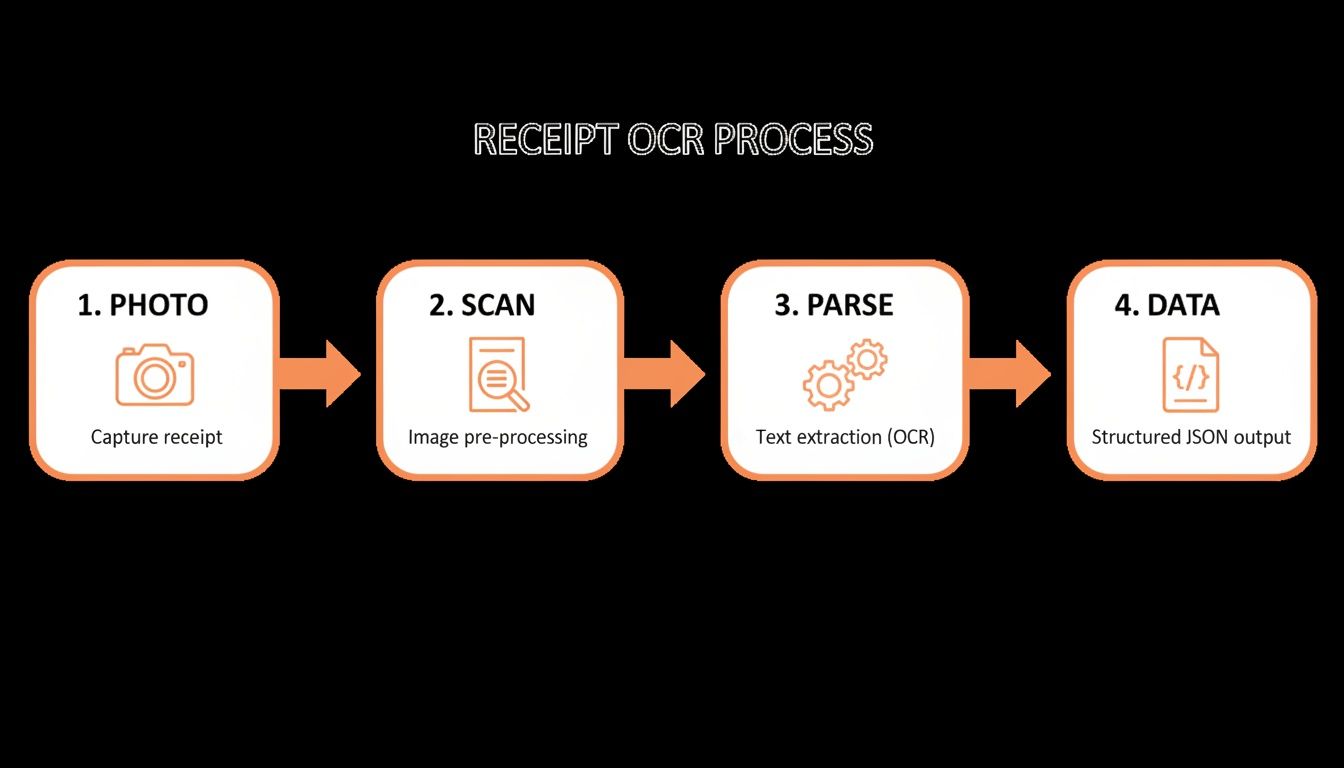
Each stage builds on the one before it, ensuring the final output is accurate and ready to go.
Breaking Down the OCR Process
So, what exactly happens behind the scenes? Let's walk through the four core stages of this digital transformation.
This table breaks down the automated journey from a physical receipt to structured digital data, explaining the purpose of each stage.
| Stage | What It Does | Analogy | Key Outcome |
|---|---|---|---|
| 1. Preprocessing | The software automatically cleans up the receipt image—fixing skewed angles, sharpening blurry text, and adjusting for bad lighting. | Like a photo editor automatically enhancing a dark picture before you even see it. | A clear, high-quality image ready for analysis. |
| 2. OCR Engine | This is the core "reading" phase where the system scans the cleaned-up image and converts all the printed characters into machine-readable text. | Translating a book from a foreign language into a language you can read. | A raw, digital text version of everything on the receipt. |
| 3. Data Parsing | AI and machine learning step in to add context. The system identifies which string of text is the merchant's name, which number is the grand total, and which date is the transaction date. | Like a librarian reading a book and creating a catalog card with the title, author, and publication date. | Contextualized information—the system now "understands" what it read. |
| 4. Structured Output | Finally, all the parsed data is organized into a clean, predictable format like JSON or CSV, ready to be imported directly into other software. | Taking the librarian's catalog card and entering it into a searchable digital database. | Actionable data that accounting software can use without any manual adjustments. |
As you can see, each step is critical for turning a simple photo into something your financial software can actually understand and work with.
This move away from manual data entry is a big deal. The global digital receipts market, which relies entirely on receipt scanner OCR, is expected to skyrocket from USD 2.1 billion in 2023 to USD 5.1 billion by 2033. It’s a clear signal that businesses are tired of wasting time and money on paper.
And when it comes time to organize receipts for taxes, having clean, structured digital data is a game-changer. No more shoeboxes, just searchable, organized records ready for your accountant.
Why Even Smart OCR Scanners Sometimes Stumble
Modern receipt scanner OCR can feel like a bit of magic, right? You snap a photo, and poof—structured data appears in your system. But anyone who’s worked with it knows that even the smartest tools can hit a wall.
It’s not because the tech is bad. It’s because the real world is messy. Understanding these hurdles is the key to appreciating why a truly intelligent, AI-powered solution is a game-changer for getting reliable results.
Think of a basic OCR tool as a speed-reader who only works with perfectly printed books under ideal lighting. The moment you hand it a crumpled page with a coffee stain, it starts guessing. That’s exactly what happens when a scanner meets the chaos of everyday receipts.
The Enemy of Accuracy: Poor Image Quality
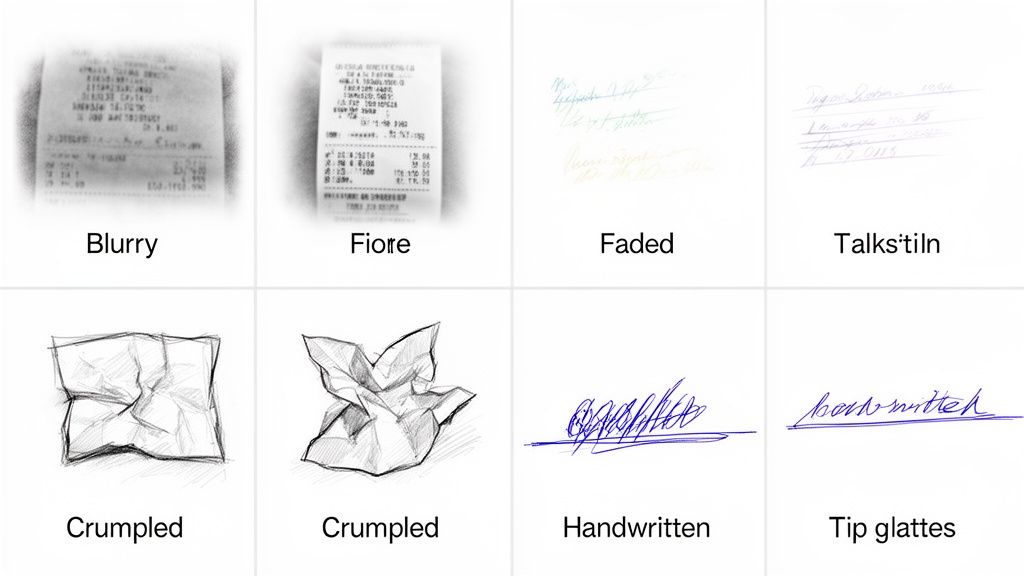
Far and away, the most common reason OCR trips up is a bad source image. A quick photo from a dimly lit restaurant or a moving car can create a minefield of problems for a standard OCR engine.
- Blurry or Out-of-Focus Photos: If the text isn't razor-sharp, the OCR might read an "8" as a "3" or a "c" as an "e." This simple mistake can throw off totals and vendor names completely.
- Shadows and Poor Lighting: Dark spots on a receipt can swallow characters whole, making it impossible for the software to even know they were there.
- Skewed or Warped Angles: Taking a photo from a steep angle distorts the text, which is enough to confuse the character recognition process.
This is where advanced receipt scanner OCR platforms like ExtractBill pull ahead. They run sophisticated preprocessing algorithms before the OCR even starts. They automatically de-skew the image, sharpen the text, and balance the contrast to give the engine a clean, readable document to work with.
When Receipts Live a Hard Life
Let’s be honest, receipts rarely stay pristine. They’re shoved into wallets, crumpled in pockets, and left on dashboards to fade in the sun. These physical battle scars create another big challenge for accurate data extraction.
A huge number of receipts are printed on thermal paper, which is infamous for fading quickly when exposed to heat or light. A receipt that's only a few months old can look ancient, making it a tough test for any OCR system.
A faded receipt forces the OCR to guess based on low-contrast text, which ramps up the error rate. Likewise, deep creases can distort a line of text or hide characters in the folds, leading to missing data. Basic scanners will just give up. AI-powered systems, however, can use contextual analysis to intelligently piece together what’s missing.
The Complexity of Modern Receipts
Not all receipts are a simple list. Think about a detailed bill from a hardware store, a group dinner receipt, or a long grocery list—they can be incredibly complex. For a simple OCR tool, it’s a nightmare.
- Multiple Tables and Columns: A single receipt might have separate tables for items, taxes, and payment info. Basic OCR often sees a jumbled wall of text, unable to tell a quantity from a price.
- Handwritten Additions: That tip you jotted down? Or a quick note? Standard OCR is trained on printed text and is completely blind to handwriting. More advanced systems use Intelligent Character Recognition (ICR) to decipher it.
- Ambiguous Line Items: It takes more than just reading words to distinguish between "Subtotal," "Tax," "Tip," and "Total." It requires an actual understanding of the document’s structure.
This is where AI-driven data parsing really proves its worth. After the text has been recognized, AI models analyze the layout and context to figure out what each piece of data actually is. They know the number next to "VISA" is a partial payment, not the grand total.
If you want to go deeper on this, our guide on what is data parsing explains how this layer of intelligence turns raw text into useful information.
How to Measure OCR Accuracy and Performance
Not all receipt scanner OCR solutions are built the same. You'll see vendors tossing around claims like "high accuracy," but that vague promise doesn't mean much without hard numbers to back it up. To really figure out if a service is worth your money, you have to look past the marketing fluff and understand how performance is actually measured.
Think of it like grading an exam. Getting a 95% score sounds fantastic, right? But what if the 5% the student missed was the single most important question? The same logic applies to OCR. A tiny error in a vendor's name is a minor annoyance, but getting the total amount wrong can cause real financial headaches.
That’s why getting familiar with the right metrics is the key to making a smart investment.
Key Accuracy Metrics That Matter
When you're digging into a receipt scanner ocr tool, you'll run into a few standard industry metrics. Each one tells a different piece of the accuracy story, from the smallest character to the most critical data fields.
Here are the three big ones you need to know:
- Character Error Rate (CER): This measures how many individual letters and numbers the OCR got wrong. A low CER means the engine is good at its most basic job—like telling an "8" from a "3."
- Word Error Rate (WER): This metric zooms out a bit to look at entire words. It's a slightly better gauge for readable text, but it can still miss what really matters. Getting the word "Starbucks" right is great, but it’s hardly the most vital piece of info on the receipt.
- Field-Level Accuracy: This is the metric that truly counts for business. It measures the accuracy of specific, structured fields like the total amount, tax, vendor name, and transaction date. A 99% field-level accuracy on the total is infinitely more valuable than a 99% CER.
For any business, field-level accuracy is the true test of an OCR solution's value. An engine that perfectly reads every character but fails to identify the final total is not a reliable tool for financial workflows.
This is exactly why so many businesses are shifting to AI-driven solutions. The market for OCR software is set to explode from USD 58.79 billion in 2024 to USD 208.5 billion by 2031. This massive growth is fueled by the need for near-perfect accuracy in tasks like invoice processing, where AI can deliver up to 95% fewer errors compared to manual data entry. You can discover more about this booming market and what's driving it.
Beyond Accuracy: Speed and Scale
While accuracy is king, performance under real-world pressure is just as important, especially as your business grows. Two key indicators to keep an eye on are latency and throughput.
- Latency (Processing Speed): How long does it take for the system to process a single receipt? If you need real-time data for an application, you need an answer in seconds, not minutes.
- Throughput (Processing Capacity): How many receipts can the system handle at once? A system that grinds to a halt when you upload a big batch is a bottleneck just waiting to happen.
Ultimately, a top-tier receipt scanner ocr has to strike a balance between pinpoint accuracy and the speed and scale your operations demand. To see how these numbers connect to your bottom line, take a look at our guide on essential accounts payable performance metrics.
Bringing Receipt Scanner OCR Into Your Workflow
Okay, so you've seen what makes receipt scanner OCR so powerful. The next logical question is: how do you actually plug this power into your business? Just pulling data out of a receipt is only half the battle. The real magic happens when that data flows seamlessly into your accounting software, ERP, or expense app without anyone having to lift a finger.
This is where integration comes in, acting as the bridge between the scanner and your systems.
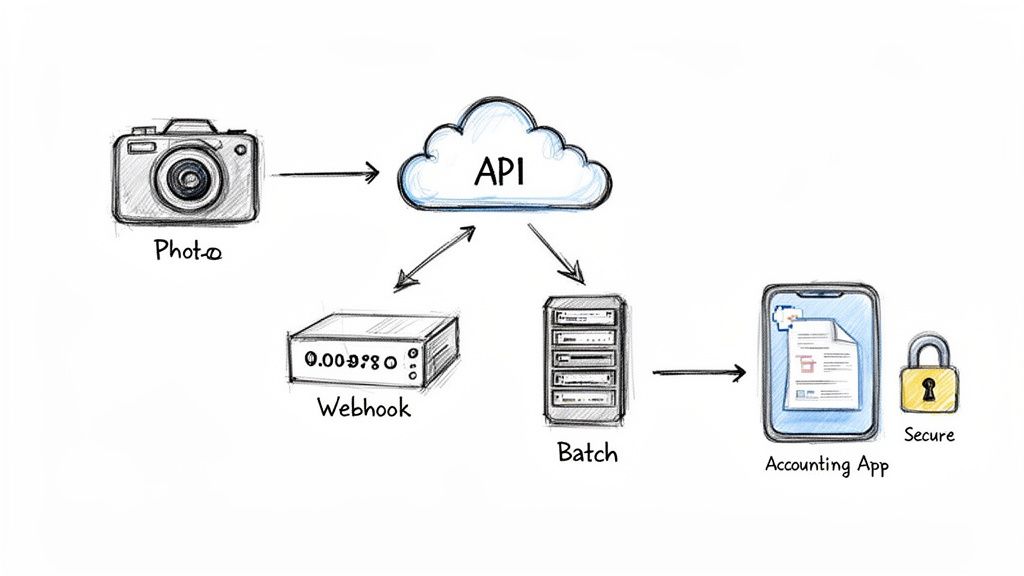
Think of it like setting up a plumbing system for your data. You have a source of clean water (the extracted receipt info) and a destination where it's needed (your accounting software). Integration is the network of pipes and valves that gets it there reliably. The type of "pipes" you choose depends entirely on your needs—whether you need instant data flow, big batches of data delivered periodically, or automated notifications that kick off other tasks.
Real-Time Data Flow with REST APIs
The most common and flexible way to hook up a receipt scanner OCR service is through a RESTful API (Application Programming Interface). At its core, an API is just a set of rules that lets different software programs talk to each other. It’s the universal translator that allows your application to ask the OCR service for data and understand the answer.
With an API, your app sends a receipt image to the OCR service. Within seconds, the service processes it and sends back neatly structured data, usually in a format like JSON. This real-time, back-and-forth conversation is perfect for any app where your users are waiting for immediate feedback.
Here are a couple of real-world examples:
- Mobile Expense App: An employee snaps a photo of a lunch receipt. The app fires off the image to the API and gets the merchant, date, and total back almost instantly, letting the employee categorize and submit the expense right on the spot.
- Vendor Payment Portal: A supplier uploads an invoice. Your system uses an API call to scan it, pull the amount due, and queue it up for payment—all without a human needing to key anything in.
An API-first approach gives you incredible control. You can build a fully automated system that fits your exact process by securely managing your API keys and mapping the structured JSON output directly to the fields in your own database.
Staying in the Loop with Webhooks
While an API is great for asking for data, webhooks are all about receiving it automatically. A webhook is basically a push notification for servers. Instead of your app repeatedly pinging the OCR service and asking, "Are we there yet?" the OCR service sends a message to your application the moment the job is done.
This is way more efficient. Your system can send a receipt off for processing and immediately move on to other things. Once the data is extracted, the webhook delivers the structured JSON payload to a URL you specify. This is perfect for event-driven workflows, like triggering a confirmation email or updating a status in a project dashboard. If you're looking to build these kinds of connected systems, it's worth learning how to automate your document workflow.
Handling the Flood with Batch Processing
But what if you don't need instant results for every single receipt? For many businesses, like accounting firms, processing happens in big bursts—at the end of the day or during the month-end crunch. This is where batch processing is a lifesaver.
Instead of sending receipts one by one, you can upload hundreds or even thousands of documents at once. The system churns through them in the background and delivers a single, complete, and structured dataset when the entire job is finished.
Here’s how these methods stack up:
| Integration Method | Best For | Typical Use Case | Analogy |
|---|---|---|---|
| RESTful API | Real-time, on-demand data needed for immediate user feedback. | Mobile expense apps, vendor portals. | Making a direct phone call. |
| Webhooks | Event-driven workflows where you need to trigger a follow-up action. | Notifying users, starting an approval process. | A package delivery notification. |
| Batch Processing | High-volume, non-urgent tasks that can run in the background. | Month-end financial reconciliation. | Dropping a big box of mail at the post office. |
By picking the right integration strategy, you can turn a receipt scanner OCR from a simple tool into a core, automated component of your operations, saving countless hours and eliminating the persistent risk of human error.
Calculating the True ROI of Automated Receipt Scanning
Let's get down to brass tacks. The tech is cool, but the decision to bring in a receipt scanner OCR solution always boils down to one simple question: what’s the real financial impact?
Figuring out the Return on Investment (ROI) isn't as simple as comparing a software subscription to an employee's salary. The real story is in all the hidden, often invisible, costs of sticking with manual data entry.
When you peel back the layers, the manual process is a financial leaky faucet. It’s a constant drain on resources, riddled with quiet expenses that chip away at your profits every single day.
Uncovering the Hidden Costs of Manual Entry
The most obvious cost is people's time. Just think about it—how many hours does your team sink each month into squinting at crumpled receipts, keying in numbers, and then double-checking their own work? That’s time they could be spending on things that actually grow the business, like financial analysis or talking to clients.
But the bleeding doesn't stop at hourly wages. It goes much deeper.
- The Price of Typos: Every misplaced decimal, misspelled vendor name, or incorrect date creates a ripple of chaos. Someone has to drop what they're doing, dig up the original receipt, fix the entry in the accounting system, and then verify it all over again.
- The Lag in Financial Reporting: Manual entry is a bottleneck, plain and simple. It slows down your entire financial closing process, forcing you to make critical business decisions with information that's already stale.
- The Grind of Employee Burnout: Let's be honest—nobody gets excited about manual data entry. It's repetitive, mind-numbing work. Forcing skilled people to do it is a recipe for low morale and high turnover, which brings its own expensive headaches of hiring and training.
And the ROI becomes even more compelling when you pair automation with specialized document management software tailored for accountants, which helps lock in efficient financial workflows and keep compliance airtight.
Businesses around the world process over 100 billion receipts a year. Sticking to manual entry leads to 1-5% error rates, costing millions in overpayments or audit penalties. By switching to OCR, companies crush processing times from days to mere seconds, saving an average of $5-10 for every single receipt they digitize. You can learn more about these staggering cost savings and the market behind them.
A Simple ROI Calculation Example
Let's run the numbers for a small business to see how this plays out. Imagine a company that processes 500 receipts every month.
Manual Processing Costs:
- An employee spends about 3 minutes on each receipt (that includes entry and verification).
- Total time spent: 500 receipts x 3 minutes = 1,500 minutes, or 25 hours per month.
- Let's say the employee's fully-loaded hourly rate (salary + benefits) is $30/hour.
- Monthly Labor Cost: 25 hours x $30/hour = $750
Automated Processing Costs (Using ExtractBill):
- The cost is just $0.11 per receipt.
- Monthly Software Cost: 500 receipts x $0.11/receipt = $55
Right there, the business saves $695 per month, which adds up to $8,340 per year. And that's just the direct labor cost. This simple calculation doesn't even touch the money saved from fewer errors or the massive value of giving an employee 25 hours back to do more important work.
The Intangible Benefits
Beyond the hard numbers, a receipt scanner OCR brings some powerful "soft" benefits that are just as important to your ROI. These are the advantages that make your entire operation run smoother.
- Happier, More Engaged Employees: Taking tedious work off your team's plate lets them focus on strategic, interesting projects. Job satisfaction goes up, and people stick around longer.
- Faster, Smarter Decisions: When data flows in real-time, you can close the books faster. This means you’re making agile business decisions based on what’s happening right now, not last month.
- Bulletproof Compliance and Audit Trails: Digital records are secure, organized, and instantly searchable. Tax season and audits become far less of a nightmare when every transaction has a clean, easily accessible digital footprint.
Your Checklist for Choosing the Right OCR Provider
Picking the right partner for your receipt scanner OCR is a huge decision. It’s not just about buying a piece of software; you’re embedding a critical function into your entire financial workflow. The market is noisy, but not all tools are built the same.
Think of it like hiring a new team member. You need someone reliable who gets the job done right the first time, without you having to constantly look over their shoulder. A great OCR provider delivers more than just code—they provide a rock-solid service you can count on.
This checklist is designed to help you cut through the marketing fluff and ask the questions that really matter.
H3: Technical Performance and Accuracy
The whole point of an OCR tool is to pull data accurately. Don’t settle for vague promises of “high accuracy.” You need to dig deeper and get verifiable numbers, especially for the fields that directly hit your bottom line.
- What’s your field-level accuracy? Get specific. Ask them for their accuracy rates on the total amount, tax, vendor name, and individual line items. A serious provider should be able to quote figures well above 99% for these core fields.
- How do you handle different types of documents? Your business gets more than just tidy, standard receipts. Ask how well their models handle messy invoices, credit card statements, and bills from different countries or industries. The more varied their training data, the better.
- Can I test it with my own stuff? The proof is in the pudding. A confident provider will practically insist you try it out. Look for a free trial or a pay-as-you-go model, like ExtractBill's, that lets you throw your worst, most crumpled, hard-to-read receipts at their system before you sign anything.
H3: Integration and Developer Experience
The most powerful OCR engine in the world is completely useless if your developers can't easily plug it into your existing apps. The quality of a provider’s API and its documentation speaks volumes about how much they actually care about their customers' success.
A well-documented API is the difference between a smooth, one-day integration and a frustrating, week-long mess. Clear code examples, active support, and predictable data formats aren't nice-to-haves; they're essential.
Look for a clean, modern RESTful API. Take a good look at their documentation—is it clear? Does it have code samples in the languages your team uses? Does it explain how to handle errors? The easier you make it for your developers, the faster you’ll see a return on this investment.
H3: Security, Compliance, and Pricing
At the end of the day, you're handing over sensitive financial data. Their security can't just be an afterthought; it needs to be bulletproof. And their pricing should be just as transparent.
- What are your data security and privacy policies? Make sure they encrypt data both in transit (while it's being sent) and at rest (while it's stored on their servers). If you operate in Europe or handle sensitive corporate data, ask about compliance standards like GDPR or SOC 2.
- How does your pricing work? Avoid complicated pricing tiers and long-term contracts designed to lock you in. The best model for most businesses is straightforward, usage-based pricing. A simple per-document cost is easy to understand, predict, and scale.
To make this process even easier, we've put together a checklist you can use when talking to potential vendors.
H3: Essential Vendor Evaluation Checklist
Use this checklist to compare receipt scanner OCR providers and ensure you choose a solution that meets your business needs for accuracy, integration, and security.
| Evaluation Criteria | Key Questions to Ask | What to Look For |
|---|---|---|
| Accuracy | What is your field-level accuracy for totals, taxes, vendors, and line items? | Verifiable stats (>99% for key fields), case studies, and transparent reporting. |
| Document Support | Do your models handle invoices, international receipts, or handwritten notes? | Proven experience with a wide range of document types relevant to your business. |
| Testing | Can I run a free trial with my own real-world documents before committing? | A generous free trial or pay-as-you-go option to validate performance firsthand. |
| API & Integration | Is your API well-documented with code samples in multiple languages? | Clear, comprehensive documentation, a modern RESTful API, and SDKs. |
| Developer Support | How do you support developers during and after integration? | Access to technical support, active forums, and a responsive engineering team. |
| Security | Are you GDPR/SOC 2 compliant? How do you encrypt data in transit and at rest? | Clear security policies, industry-standard certifications, and end-to-end encryption. |
| Pricing Model | Is your pricing based on usage? Are there hidden fees or long-term contracts? | Transparent, pay-as-you-go pricing without monthly minimums or confusing tiers. |
| Scalability | Can your system handle sudden spikes in volume? What are your uptime guarantees? | A robust infrastructure with a high uptime SLA (e.g., 99.9%) and auto-scaling capabilities. |
Choosing the right vendor is a foundational step. By asking these tough questions upfront, you set your project up for success from day one, ensuring you get a partner who can truly help you automate and grow.
Still Have Questions? Let's Clear Things Up.
Even after you get the big picture, a few practical questions always pop up. Let's tackle the most common ones I hear from finance teams and developers exploring receipt scanning for the first time.
How Accurate Is This Stuff, Really?
This is the big one, and the answer is: it depends. The accuracy you get varies wildly from one tool to another.
A basic, template-driven scanner might boast 80-90% accuracy, but that's usually under perfect conditions—think a crisp, flat, simple receipt. Throw a real-world, crumpled receipt at it, and that number can plummet.
On the other hand, modern AI-powered platforms can hit over 99% accuracy on the fields that actually matter, like the total, tax amount, and vendor name. They don't just read characters; they use AI vision to understand the document's layout and context. Always push a vendor for their specific accuracy stats on the data points critical to your workflow.
What About Handwritten Receipts or scribbled Notes?
Standard OCR is built for printed text and gets completely thrown off by handwriting. This is where a more advanced technology called Intelligent Character Recognition (ICR) comes into play. ICR is designed specifically to decipher handwritten script.
Many of the best receipt scanner OCR platforms now bake ICR into their systems. This lets them grab common handwritten additions like tips, quick notes, or a corrected total. While it's not quite as accurate as reading printed text, it's a must-have for any business where handwriting is part of the daily grind, like restaurants or field service companies.
The ability to handle both printed and handwritten text on the same document is what separates a simple scanner from a true, AI-driven data extraction solution.
What's the Difference Between a Mobile App and an OCR API?
This is a really important distinction, and it all comes down to who the tool is built for.
-
A Mobile Scanner App is made for individuals. Think of it as a personal finance tool designed to help one person scan and track their own expenses. It's a finished product, not something you build on.
-
An OCR API is a tool for developers and businesses. Companies use an API to plug automated data extraction right into their own software—whether that's an accounting platform, an expense management app, or a vendor payment portal.
Essentially, an API gives you the raw power, scale, and automation to build custom workflows that can chew through thousands of documents without anyone lifting a finger. A standalone mobile app just can't match that level of integration or efficiency for business operations.
Ready to stop typing out receipts for good? ExtractBill delivers 99.9% accuracy, turning messy invoices and receipts into structured, usable data in seconds. Try ExtractBill for free and see how much time you can save.
Ready to automate your documents?
Start extracting invoice data in seconds with ExtractBill's AI-powered API.
Get Started for Free