How a Receipt Scanner with OCR Transforms Your Business
A receipt scanner with OCR is a seriously clever piece of tech. It’s a combination of a digital camera and some smart AI that can automatically read and pull information from a physical or digital receipt.
For anyone who’s ever had to manually type details from a shoebox full of receipts, this technology is a game-changer. It turns that messy paper trail into clean, structured data you can actually use, killing the slow, mistake-ridden chore of data entry once and for all.
How a Receipt Scanner Actually Reads a Receipt
Think about trying to teach a computer to read that crumpled receipt you just pulled out of your pocket. It's not just about seeing letters; it's about knowing that "WALMART" is the merchant, "12/25/2024" is the date, and "$25.50" is the total you paid.
This is the surprisingly complex job a receipt scanner with OCR is designed to handle, and it does it in two main stages.
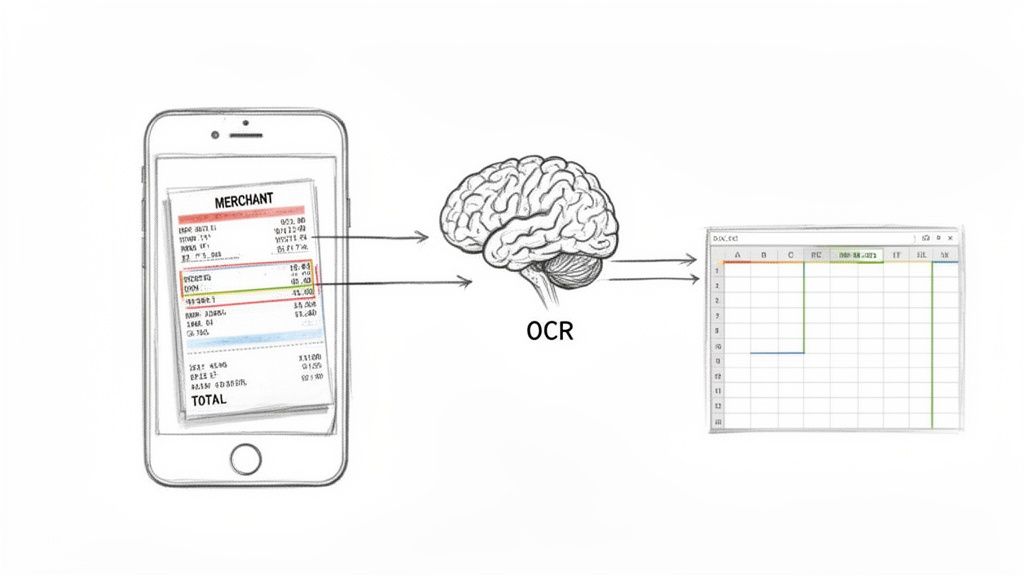
Step 1: The Scan and Image Cleanup
First, something needs to capture an image of the receipt. While you could use a flatbed scanner, today it’s almost always the camera on your phone. The quality of this initial picture is absolutely critical for getting accurate results.
But modern systems do more than just snap a photo. They run a series of pre-processing steps to clean up the image before the OCR engine ever sees it. This usually includes:
- Perspective Correction: If you took the photo at an angle, the software squares it up.
- Cropping: It automatically cuts out the background, like your desk or countertop, focusing only on the receipt.
- Binarization: The image is converted to a high-contrast black and white, making the text pop.
- Noise Reduction: Any shadows, blurs, or weird speckles that might confuse the software are removed.
These quick fixes make sure the "brain" of the operation gets the cleanest possible image to work with, which dramatically increases the chance of a perfect read.
Step 2: The OCR Brain and Data Structuring
With a clean image ready, the Optical Character Recognition (OCR) engine takes over. This is where the real intelligence comes in. Old-school OCR was pretty good at recognizing single letters and numbers, but it had no idea what they meant.
Today's tools use advanced AI that goes way beyond that. When you're looking into how these scanners work, it helps to have a basic grasp of the Machine Learning for Businesses principles that give them this contextual understanding.
The AI doesn't just read the text; it understands the layout. It spots key fields like the merchant's name, the date, the total, and the tax. Even more impressively, it can parse the table of items you bought, pulling out each product, its quantity, and how much it cost.
The real magic of a modern receipt scanner with OCR isn't just turning an image into text. It's turning that text into structured, intelligent data that your software can actually use.
This process transforms a jumble of visual information into an organized, machine-readable format. If you want to see what this looks like in practice, check out our guide on converting an image to JSON. The end result is clean, accurate data, ready to be sent to your accounting software, an expense report, or anywhere else you need it.
Why Automating Receipt Processing Is a Game Changer
For any business, that constant trickle of receipts is an all-too-familiar headache. We've all seen the shoebox overflowing with faded thermal paper. It’s not just clutter—it's a bottleneck, representing hours of mind-numbing manual work that could be poured back into actually growing the business. This is where a receipt scanner with ocr completely changes the game.
Imagine getting entire afternoons back that used to be lost to bookkeeping. For a small business owner, that's more time for sales, strategy, or just talking to customers. For accounting teams, it means killing off those tiny data entry errors that somehow snowball into massive reconciliation nightmares at the end of the month.
Switching to an OCR system to process receipts fundamentally shifts your team's focus. Instead of squinting at faded ink and punching numbers, they can focus on what really matters: financial analysis and planning. It's about moving away from tedious manual data entry and toward more strategic work.
Accelerating Your Financial Workflows
The perks go way beyond just saving time. Automating your receipts creates a faster, more responsive financial pulse inside your company. The moment an employee submits an expense, the process is no longer stuck in a queue waiting for someone to type out the details.
A quick scan with a mobile app can kick off the entire approval and reimbursement workflow in seconds. This speed has real, tangible benefits:
- Faster Reimbursements: Getting money back into employees' pockets quickly is a huge boost for morale and satisfaction.
- Real-Time Spending Insight: Managers get an immediate, clear picture of team and project spending, which means better, faster budget decisions.
- Smoother Month-End Closing: When data is captured accurately and consistently all month long, closing the books becomes a far less stressful event.
This isn't just a minor tweak. It transforms expense management from a slow, reactive chore into a dynamic, real-time process. You’re no longer looking at last month's spending; you're seeing what’s happening right now.
The Quantifiable Financial Impact
The return on investment here is crystal clear. The global digital receipts market, which leans heavily on OCR tech, was valued at USD 2.1 billion in 2023 and is on track to hit USD 5.1 billion by 2033. That explosive growth is happening for a reason: businesses are seeing serious cost savings.
It's common for companies to report 30-50% reductions in administrative overhead just by ditching manual data entry. On top of that, accounting teams can slash entry errors by up to 90%.
By cutting the hours spent on manual labor and fixing mistakes, businesses directly lower their administrative costs. This isn't just about being more efficient; it's about reallocating that budget from tedious tasks to initiatives that actually drive growth.
Plus, there’s a green angle. Moving away from paper receipts doesn't just cut down on physical waste; it also aligns with broader corporate sustainability goals—something that matters more and more to modern companies. You can dive deeper into how a receipt scanner software works in our detailed guide. Ultimately, this isn't just a tech upgrade; it's a strategic business decision with financial, operational, and environmental upsides.
What to Look For in a Modern OCR Solution
Picking a receipt scanner with ocr isn't like grabbing a simple utility off the shelf. You're choosing the engine that will power your financial workflows, and the difference between a basic tool and a truly intelligent platform is massive. Not all OCR is built the same.
You need to look past the marketing claims and dig into the core technology. The goal isn't just to find something that reads text; it's to find a solution that understands documents—the messy, crumpled, real-world kind—and reliably hands you clean, structured data every single time.
Unpacking the Core Capabilities
Think of it like test-driving a car. You wouldn't just see if it starts. You’d check its acceleration, its handling on tricky roads, and its safety features. The same logic applies here. You need to put any potential receipt scanner through its paces in the areas that actually matter to your daily operations.
These are the non-negotiables:
- Exceptional Accuracy: This is the big one. If the tool is constantly making mistakes, you’re just trading one manual task for another—endless double-checking and correcting. A modern, AI-powered solution should be hitting 99% or higher accuracy, even with receipts that are faded, wrinkled, or snapped in bad lighting.
- Detailed Line-Item Extraction: Just grabbing the total amount is old news. A truly useful tool needs to pull out every single line item on a receipt—the product name, how many were bought, the price per item, and the line total. This granular data is gold for proper expense tracking and sharp bookkeeping.
- High-Speed Processing: Business moves fast, and your tools need to keep up. Whether you’re uploading a single receipt or a batch of thousands at month-end, the system has to be quick. Top-tier platforms process a document in just 2-5 seconds, making sure you never hit a data-entry bottleneck.
- Broad Format Support: Receipts come in all shapes and sizes. A flexible solution has to effortlessly handle common file types like PDFs, JPGs, and PNGs, whether they come from a phone camera, a flatbed scanner, or an email attachment.
Integration and Security Must-Haves
A great receipt scanner doesn't work in isolation. It needs to plug right into the tools you already rely on, creating a seamless, automated bridge from receipt photo to your accounting software.
This is where its integration capabilities and security measures become make-or-break. An API (Application Programming Interface) is what lets different software systems communicate. A clean, well-documented RESTful API means your developers can wire the OCR engine directly into your own apps, expense platforms, or ERP systems. We dive deeper into how this works in our guide on document capture software.
A robust API and solid security aren't just technical details—they are the foundation of a scalable and trustworthy automation strategy. They ensure data flows where it needs to go, quickly and safely.
Security is just as critical. You’re dealing with sensitive financial information, so the platform must use strong encryption (like HTTPS/TLS) to protect data both as it travels and while it's stored. This is fundamental to keeping your company’s financial details private and secure.
Essential Features Comparison for OCR Receipt Scanners
To see the difference in action, let's compare what a basic, older OCR tool offers versus a modern, AI-driven platform. The gap in capabilities is what separates a frustrating experience from a genuinely automated one.
| Feature | Basic OCR Software | Advanced AI Platform (e.g., ExtractBill) |
|---|---|---|
| Accuracy | 70-85% on clean documents; struggles with real-world messiness. | 99%+ accuracy, even on crumpled, faded, or blurry receipts. |
| Line-Item Data | Often misses line items or extracts them as a single block of text. | Reliably extracts every line item as structured data (description, quantity, price). |
| Document Understanding | Sees text but doesn't understand context (e.g., mistakes a phone number for a total). | Understands the layout and semantics of a receipt, identifying fields correctly. |
| Processing Speed | Can be slow, often 10+ seconds per page, creating workflow delays. | Blazing fast, typically processing documents in 2-5 seconds. |
| Integration | Limited or clunky API, requiring significant custom development work. | Developer-friendly REST API with clear documentation and webhooks for easy integration. |
| Security | Basic security measures, may not meet modern compliance standards. | Enterprise-grade security with end-to-end encryption (TLS) and data privacy protocols. |
This table makes it clear: while a basic tool might seem adequate at first glance, an advanced platform is built to handle the complexity and scale that modern businesses require.
Evaluating Performance and Scalability
The market for Optical Character Recognition (OCR) is booming, and it's no surprise that invoice and bill processing makes up a huge 32.4% of it. This growth is powered by AI that leaves older tech in the dust. For example, a modern tool can hit 99.9% accuracy on tricky tables inside documents, while traditional OCR often tops out around 70-85%. Combine that precision with low-code SDKs that can slash data entry costs by 80%, and you see what really separates a true business solution from a simple character reader. You can find more market insights from the experts at Mordor Intelligence.
This all ties back to a simple truth: automation delivers real, measurable benefits.
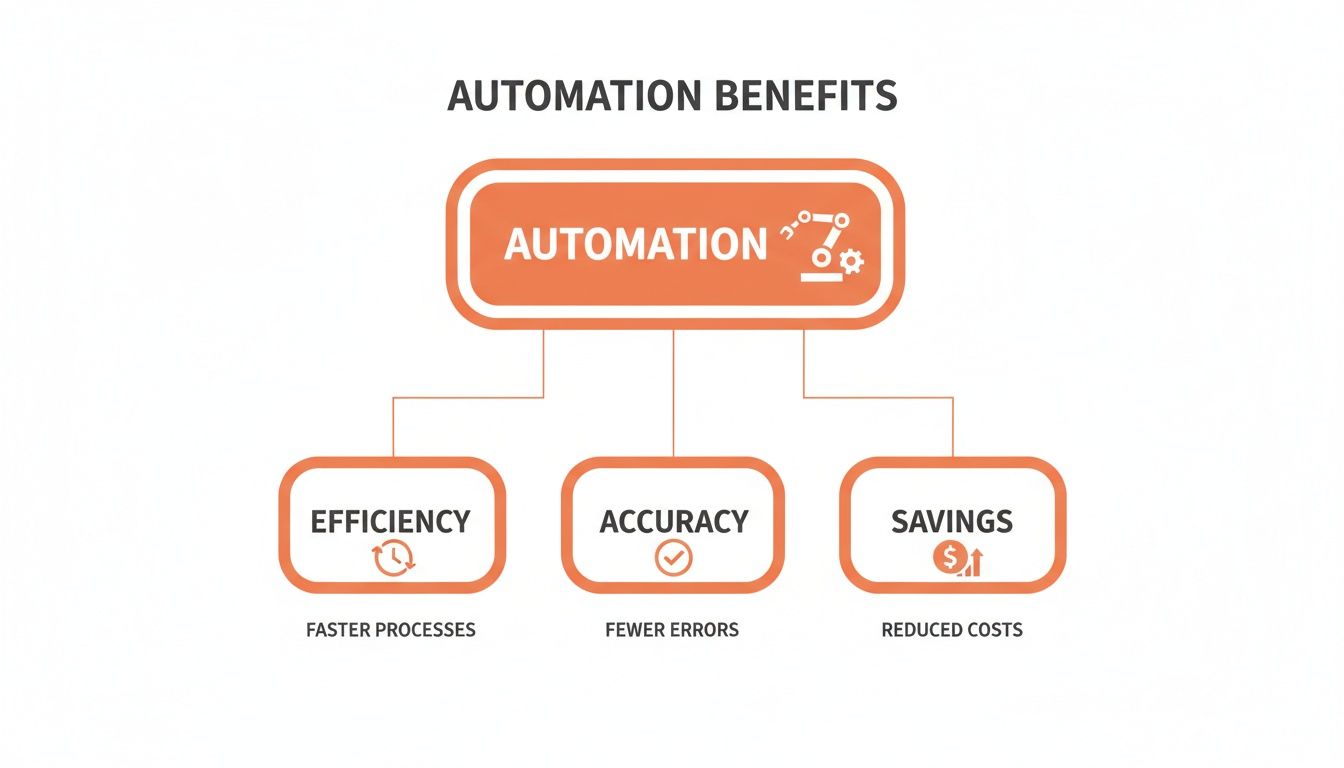
As the graphic shows, it’s a direct line from smarter technology to a more efficient, accurate, and profitable business.
Integrating OCR into Your Existing Workflows
Picking a powerful receipt scanner with ocr is just the first step. The real magic happens when you weave that technology into your day-to-day operations. The goal is a seamless, automated flow—from a physical piece of paper all the way to your accounting software, with almost no human touchpoints.
Thankfully, you don't need a computer science degree to make this happen. Modern OCR solutions are built for flexibility, offering different paths for both non-technical teams and seasoned developers to build slick, efficient workflows.
Simple Workflows for Non-Technical Teams
For many small businesses, the simplest solution is the best one. You don’t need to write a single line of code to dramatically speed up your receipt processing. Most top-tier OCR platforms come with a clean, intuitive web portal that acts as your command center.
It's usually as straightforward as this:
- Drag and Drop: Just take your receipt files—a JPG from your phone or a PDF from an email—and drop them into the portal.
- Automated Processing: The OCR engine kicks in instantly, pulling out all the important data in just a few seconds.
- Export and Use: Once it's done, you can export the clean, structured data as a CSV or Excel file. From there, it's ready to be uploaded directly into QuickBooks, Xero, or whatever ERP system you use.
This approach requires zero coding and immediately kills the soul-crushing task of manual data entry. It’s an incredibly accessible way to get started with automation right now.
Advanced Integration for Developers
When you need deeper, more customized automation, a direct API integration is the way to go. This is where a receipt scanner with ocr goes from being a standalone tool to a core, integrated piece of your software stack. An Application Programming Interface (API) is the bridge that lets your own apps "talk" directly to the OCR engine.
Think of an API like a waiter at a restaurant. Your app (the customer) gives an order (sends a receipt image), and the API (the waiter) takes it to the kitchen (the OCR engine) and brings back the finished dish (the extracted data).
With a well-documented API, developers can build some seriously powerful connections. Imagine integrating OCR directly into your company's mobile expense app. An employee could snap a photo of a receipt, and the data would instantly populate their expense report without them ever leaving the app. If you're building something like this, getting a handle on the basics of an API for data extraction is a great place to start.
Building Real-Time Automation with Webhooks
APIs are great for sending requests, but webhooks are what unlock true, real-time automation. A webhook is basically an automated alert sent from one app to another when something happens. For OCR, this is a game-changer.
Instead of your application constantly bugging the OCR service with "Is it done yet?", a webhook flips that around. The OCR service automatically pings your system the moment the data extraction is complete.
This opens up a world of fully automated, event-driven workflows. Here’s how it might look in the real world:
- Step 1: An employee emails a receipt to a special company inbox.
- Step 2: An automation script sees the new email and fires the attached receipt over to the OCR API.
- Step 3: Once the OCR engine is finished, it uses a webhook to push the extracted JSON data to your expense management system.
- Step 4: Your system catches the data, creates a new expense claim, and pings the right manager for approval.
This whole chain reaction happens in seconds, without a single person lifting a finger. It’s this level of deep integration that turns receipt processing from a tedious chore into a silent, background task. All it takes is a system that can handle standardized JSON and has some smart error-handling built in.
Hardware Scanners vs. Software Solutions
When you’re ready to finally stop processing receipts by hand, the first fork in the road is choosing your tool. Do you need a dedicated piece of hardware humming away on a desk, or can a modern software solution handle the job? This choice between a physical receipt scanner with OCR and a flexible software platform is a big one.
Physical scanners—often called dedicated or desktop scanners—are built for one thing: capturing pristine images of paper documents at high speed. They really shine in centralized operations where one person is responsible for churning through huge stacks of paper receipts every single day.
But they come with some pretty significant downsides. You’ve got the upfront cost of the machine itself, the desk space it eats up, the need for maintenance, and the fact that it’s completely immobile. This makes them a tough sell for remote teams or any business where expenses aren't all processed in one room.
The Rise of Software and API Solutions
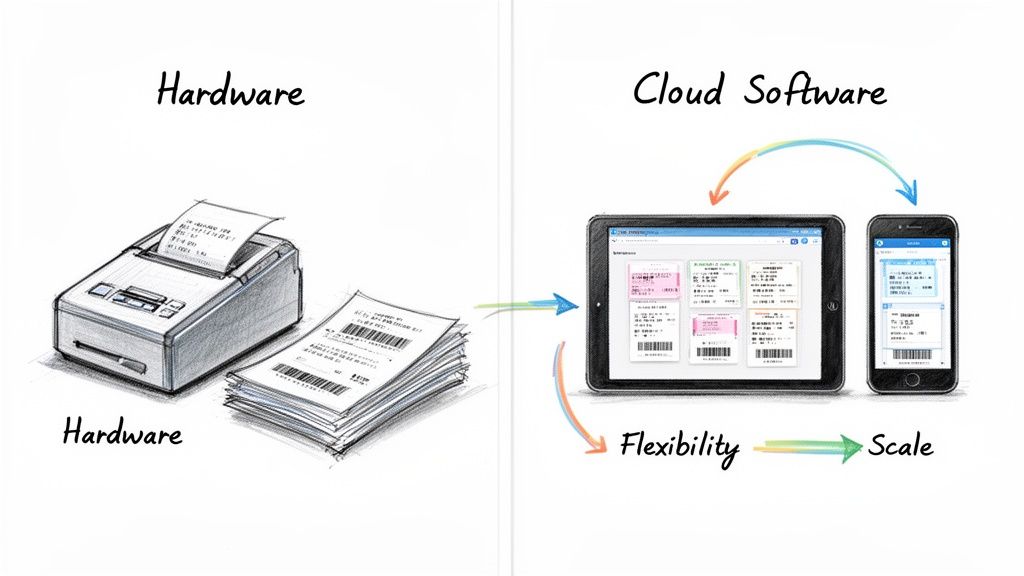
This is where software-based OCR solutions completely change the game. Instead of relying on a specific machine, these platforms use the camera you already have in your pocket—your smartphone. They can also process digital files like PDFs and JPGs that land in your inbox, completely eliminating the need for any hardware.
The real magic of software is its flexibility and scale. An employee out in the field can snap a picture of a receipt the second they get it, kicking off the reimbursement process instantly. No more crumpled-up papers to lose or lug back to the office. It creates a workflow that’s immediate and far more efficient.
Software-based receipt scanners untether your financial workflows from a physical location. They turn any device into a powerful data capture tool, making automation accessible to everyone on your team, wherever they are.
This shift toward software is what’s driving the entire industry forward. The market for receipt scanners is on track to hit USD 2.8 billion by 2033, a surge powered largely by the agility of cloud solutions. It's no surprise that a whopping 60% of SMBs are adopting these platforms to boost their processing power without shelling out for physical gear. You can dig into these market trends and insights to see the full picture.
Comparing the Two Approaches
So, which one is right for you? It really boils down to your specific business needs. While a hardware scanner is a workhorse for high-volume, centralized paper processing, software offers a more dynamic and cost-effective path for most modern businesses.
Let's break down the key differences.
| Factor | Hardware Scanners | Software Solutions (like ExtractBill) |
|---|---|---|
| Upfront Cost | High initial investment in the physical device. | Zero hardware costs; often pay-as-you-go. |
| Scalability | Limited by the speed and capacity of the machine. | Infinitely scalable; process one or thousands of documents on demand. |
| Accessibility | Tied to a specific physical location. | Accessible from anywhere via mobile app or web portal. |
| Flexibility | Primarily handles physical paper documents. | Processes digital files (PDF, JPG) and mobile scans. |
| Maintenance | Requires physical cleaning, driver updates, and potential repairs. | No maintenance required by the user; platform updates are automatic. |
For most small to mid-sized businesses and especially for developers building automated workflows, the choice is pretty clear. Cloud-based software gives you better agility, a lower total cost of ownership, and a much more future-proof way to manage your finances.
Choosing the Right OCR Partner for Your Business
Picking a receipt scanner isn't like buying off-the-shelf software. It's more like hiring a new team member—one responsible for a critical part of your financial workflow. Get it right, and you eliminate manual data entry for good. Get it wrong, and you’ve just created more cleanup work for your team with bad data and integration headaches.
Your decision should boil down to one thing: results. For any business, that means focusing on metrics that directly impact your bottom line and how efficiently your team operates. The goal is to find a partner that can turn receipt processing from a slow, manual chore into an invisible, automated task humming along in the background.
What Business Users Should Demand
When you're evaluating a service, you need to cut straight through the marketing fluff and get to the numbers. A top-tier OCR partner should be able to deliver on a few non-negotiable benchmarks that prove they're a real solution, not just another tool.
Here’s what truly separates a basic tool from a business-ready solution:
- Pinpoint Accuracy: Don't settle for anything less than 99.9% accuracy. Every percentage point below that means your team is stuck playing editor, fixing errors and defeating the entire point of automation.
- Blazing-Fast Speed: Time is your most valuable asset. The platform must process documents in 2–5 seconds. Anything slower creates bottlenecks, especially during high-volume periods like month-end closing.
- No-Nonsense Pricing: Your costs should be completely predictable. A simple pay-as-you-go model is ideal because it ditches subscriptions and hidden fees. You only pay for what you actually use.
A true OCR partner doesn't just sell you an API key. They provide a reliable service that acts as an extension of your own team. Their performance directly translates into your team reclaiming its most valuable resource: time.
What Developers and Integrators Need
For developers, the conversation shifts from business outcomes to technical execution. How cleanly can this engine plug into our existing apps and workflows? A powerful, well-designed API is the absolute backbone of any successful automation project. It’s what turns a standalone service into a deeply embedded part of your tech stack.
When your dev team is vetting a potential OCR partner, these are the mission-critical features to look for:
- A Well-Documented RESTful API: Clean, clear, and comprehensive documentation isn't a "nice-to-have"—it's an absolute must for a quick and painless integration. It’s the difference between a two-day project and a two-week headache.
- Real-Time Webhooks: Webhooks are essential for building modern, event-driven workflows. They allow the OCR service to instantly ping your systems the moment a document is processed, automatically kicking off the next step in your automation chain without any polling.
- Handles Real-World Messiness: The service has to be a workhorse. It needs to handle the huge variety of documents your business actually sees—from crisp PDFs and email invoices to blurry smartphone photos of crumpled receipts.
Ultimately, whether you're a business owner or a developer, the goal is the same: you need a complete solution that automates financial workflows from start to finish. By choosing a partner like ExtractBill that delivers on both raw performance and seamless integration, you're not just buying software. You're investing in a system that frees up your team to focus on growth, not data entry.
Frequently Asked Questions
When you're digging into receipt scanner technology, a few key questions always come up. Here are some straight answers to the most common ones we hear.
How Accurate Is a Receipt Scanner with OCR?
This is the big one, and the answer really depends on the engine under the hood.
Older, template-based OCR systems might get you 70-85% accuracy on a good day. They’re easily tripped up by faded ink, weird layouts, or bad lighting. This leaves your team stuck cleaning up errors, which pretty much defeats the whole point of automation.
Modern, AI-driven solutions are in a completely different league, consistently hitting 99.9% accuracy. They don't just read text; they understand the context of the document, just like a person would. That means the financial data you get is clean and reliable right from the start.
Is It Secure to Upload Financial Documents?
Absolutely, as long as you partner with a provider who takes security seriously. Top-tier services use strong encryption like HTTPS/TLS to shield your data from the moment you upload it to the time it's stored. Think of it as an armored truck for your financial information.
Always look for a provider that's upfront about their security practices. For developers, using API keys is another non-negotiable layer of defense. It ensures only your authorized applications can talk to the service and access your data.
Can OCR Extract Individual Line Items from Receipts?
Only the really good ones can. Basic OCR tools might be able to grab the merchant's name, the date, and the final total, but they often see the actual list of purchases as a meaningless jumble of text. They miss all the rich detail hidden in the receipt's body.
A sophisticated receipt scanner with ocr is built specifically to parse every single line item. It knows how to pull out the product description, quantity, price per item, and the total for each entry. This level of detail is a game-changer for accurate expense reporting, inventory tracking, and deep financial analysis.
Ready to put an end to manual data entry for good? With ExtractBill, you get 99.9% accuracy, full line-item extraction, and processing in just 2-5 seconds. Try it for free and see the difference.
Ready to automate your documents?
Start extracting invoice data in seconds with ExtractBill's AI-powered API.
Get Started for Free